> For the complete documentation index, see [llms.txt](https://kabinet.gitbook.io/ctf-writeup/llms.txt). Markdown versions of documentation pages are available by appending `.md` to page URLs; this page is available as [Markdown](https://kabinet.gitbook.io/ctf-writeup/2025/thuderdome/emerge-through-the-breach.md).

# Emerge through the breach

## Solve

We are given a entry point of `44.208.228.94`

<figure><img src="/files/1opX3zX0HAQDfFNOYOAU" alt=""><figcaption></figcaption></figure>

First, lets perform the standard enumeration on IP Address.

<figure><img src="/files/AwTcAyYpcjpLeJZYJ1pX" alt=""><figcaption><p>nmap -A -T4 44.208.228.94</p></figcaption></figure>

From the output, we can identify that

1. It is running on AWS Ec2
2. Its hosting an apache web server on port 80 and 443

It seems to be a default landing page for a pharmaceutical company.

<figure><img src="/files/f19qSvkx9HtulOhhan0m" alt=""><figcaption></figcaption></figure>

Viewing the page source, everything seems to be a standard landing page, except for a bitbucket url.

<figure><img src="/files/lqqn8tSa3o0oopu89LLm" alt=""><figcaption><p><a href="http://bitbucket.org/massive-pharma/mp-website">http://bitbucket.org/massive-pharma/mp-website</a></p></figcaption></figure>

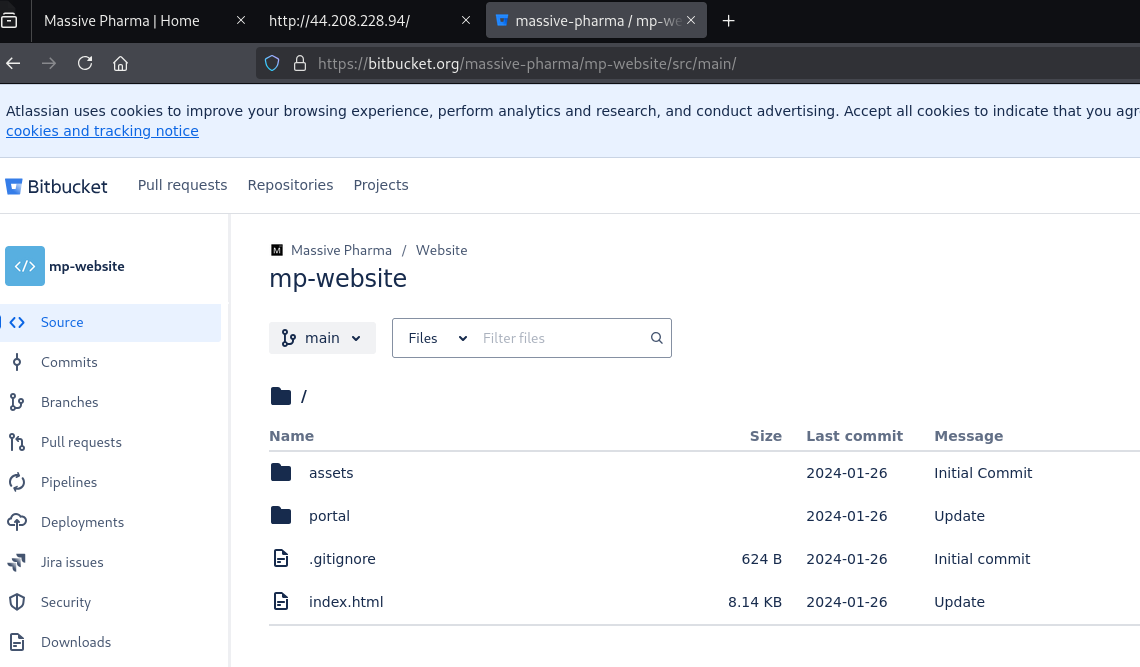
We are able to retrieve the source code of the website via the bitbucket link.

<figure><img src="/files/2Ad3319659vZahA1041O" alt=""><figcaption></figcaption></figure>

Lets git clone the repository and run trufflehog on it to try and find any secrets.

<figure><img src="/files/bzBlIALuAd03FO6F1hob" alt=""><figcaption></figcaption></figure>

Running `git log`we manage to also retrieve 2 username, so lets add that to our loot.

<figure><img src="/files/RE9kWfwVQsOcjBZ0JK2N" alt=""><figcaption><p>Added 2 email to our user.txt</p></figcaption></figure>

As the repository is relatively small, we can manually enumerate the whole repository by doing code review. There is nothing suspicious that will allow us to escalate our privileges. Looking back at the bitbucket, I noticed that there is another repository called trial-data-management-poc within the same workspace.

<figure><img src="/files/bW2zhodK1Hvcwno76ssI" alt=""><figcaption><p><a href="https://bitbucket.org/massive-pharma/workspace/repositories/">https://bitbucket.org/massive-pharma/workspace/repositories/</a></p></figcaption></figure>

Lets rinse and repeat the enumeration we have performed earlier.

<figure><img src="/files/Av0T9bvV0pGGNdFed8Jy" alt=""><figcaption></figcaption></figure>

The trufflehog output does not seem to give any useful infromation, maybe other than a SQLServer is running.

<figure><img src="/files/xDnM1JPAxTwjyaEOAiWD" alt=""><figcaption></figcaption></figure>

Looking at the git log output, there is two commits that seems interesting at first glance.

1. Pushing local changes - `14129237ea34eeefbced772092c9264f60b2cefa`
   1. The author is haru sato local account instead of the domain account
2. Bucket name change - `c167543e30628c5a76f79f519a0adb752b238106`

<figure><img src="/files/qFkmOggubAy8ADW9raBP" alt=""><figcaption></figcaption></figure>

So lets inspect each commits and see what are the changes.

<figure><img src="/files/Xel7W5gu0BnfwBp5b9bX" alt=""><figcaption><p>git show 14129237ea34eeefbced772092c9264f60b2cefa</p></figcaption></figure>

The pushing lcoal commit gives us some juicy information

1. Password - `Treatment!`
2. Email - <devmailer@massive-pharma.com>

So lets add this two new credential to our loot.

Next, inspecting the Bucket name change commit also give us some information

1. AWS Key - AKIATCKANV3QK3BT3CVG
2. Bucket Name
   1. clinical-trial-data
   2. mp-clinical-trial-data

<figure><img src="/files/nYmFUZc04aIMrwHR3rL3" alt=""><figcaption></figcaption></figure>

As we have 2 AWS bucket name, we can try and enumerate the bucket to see if theres any public bucket for low hanging fruits, which sadly there were none.

<figure><img src="/files/8WZkz1Q8MFwqPcrogHeS" alt=""><figcaption></figcaption></figure>

Refering to [Hacktricks](https://cloud.hacktricks.wiki/en/pentesting-cloud/aws-security/aws-services/aws-sts-enum.html#enumeration) and [AWS documentation](https://docs.aws.amazon.com/cli/latest/reference/sts/get-access-key-info.html), we are able to get the Account ID for the access key. I will also add the account id to our loot. I also performed more manual enumeration on the bitbucket repository but there were nothing else interesting. The web app source code is OpenEMR, an open source health record solution.

<figure><img src="/files/fO2cQL8GDY2zDLTgYY7C" alt=""><figcaption><p>aws sts get-access-key-info --access-key-id AKIATCKANV3QK3BT3CVG --profile test</p></figcaption></figure>

Looking at our current loot, we have

<figure><img src="/files/1sAgoZquPCBG604s0dge" alt=""><figcaption></figcaption></figure>

* 1x account id
* 2x username
* 1x password

Let's attempt to spray our credential to see if we can get an AWS Console Access. I will be using the [GoAWSConsoleSpray](https://github.com/WhiteOakSecurity/GoAWSConsoleSpray) tool to spray credentials.

<figure><img src="/files/YUWNpIZ0yw9qDwKbAKj7" alt=""><figcaption><p>GoAWSConsoleSpray -a 211125382880 -u user.txt -p password.txt</p></figcaption></figure>

We have managed to sucesfully sprayed and get a set of valid credentials. Lets add this set of valid credential to our loot.

Upon authentication, we took a look at the `Recently visited`application. This will allow us to identify what are some application that the user might have used recently.

<figure><img src="/files/2qWxg485jtWBkR28d4kM" alt=""><figcaption><p>Rcently visited tab</p></figcaption></figure>

Looking at AWS Secrets Manger, we have found the flag, as well as a secret name called haru.

<figure><img src="/files/v5xS28vcv3Cy0eb0UUaS" alt=""><figcaption><p>AWS Secrets Manager</p></figcaption></figure>

We are able to then retrieve the key/value pair for both secrets.

<figure><img src="/files/OjzuezkYy2crFgzZuFlu" alt=""><figcaption><p>Redacted access key id and secret access key</p></figcaption></figure>

<figure><img src="/files/CXHqa83caFugXa7KxZw4" alt=""><figcaption><p>Redacted flag</p></figcaption></figure>

## TLDR

* Enum IP Address
* Identify bitbucket url, retrieve AWS Access Key and S3 Bucket Name
* Utilize `aws sts get-access-key-info`to get account id
* Spray AWS Console
* Flag from AWS Secrets Manager

## Reference

* <https://github.com/trufflesecurity/trufflehog>
* <https://docs.aws.amazon.com/cli/latest/reference/sts/get-access-key-info.html>
* <https://cloud.hacktricks.wiki/en/pentesting-cloud/aws-security/aws-services/aws-sts-enum.html#enumeration>
* <https://github.com/WhiteOakSecurity/GoAWSConsoleSpray>